M3 · Context Engineering¶
Goal: control what the model sees on every turn — the single biggest lever on real-world agent quality.
You'll use: sessions, a custom
ContextProviderfor memory, and the idea of compaction.
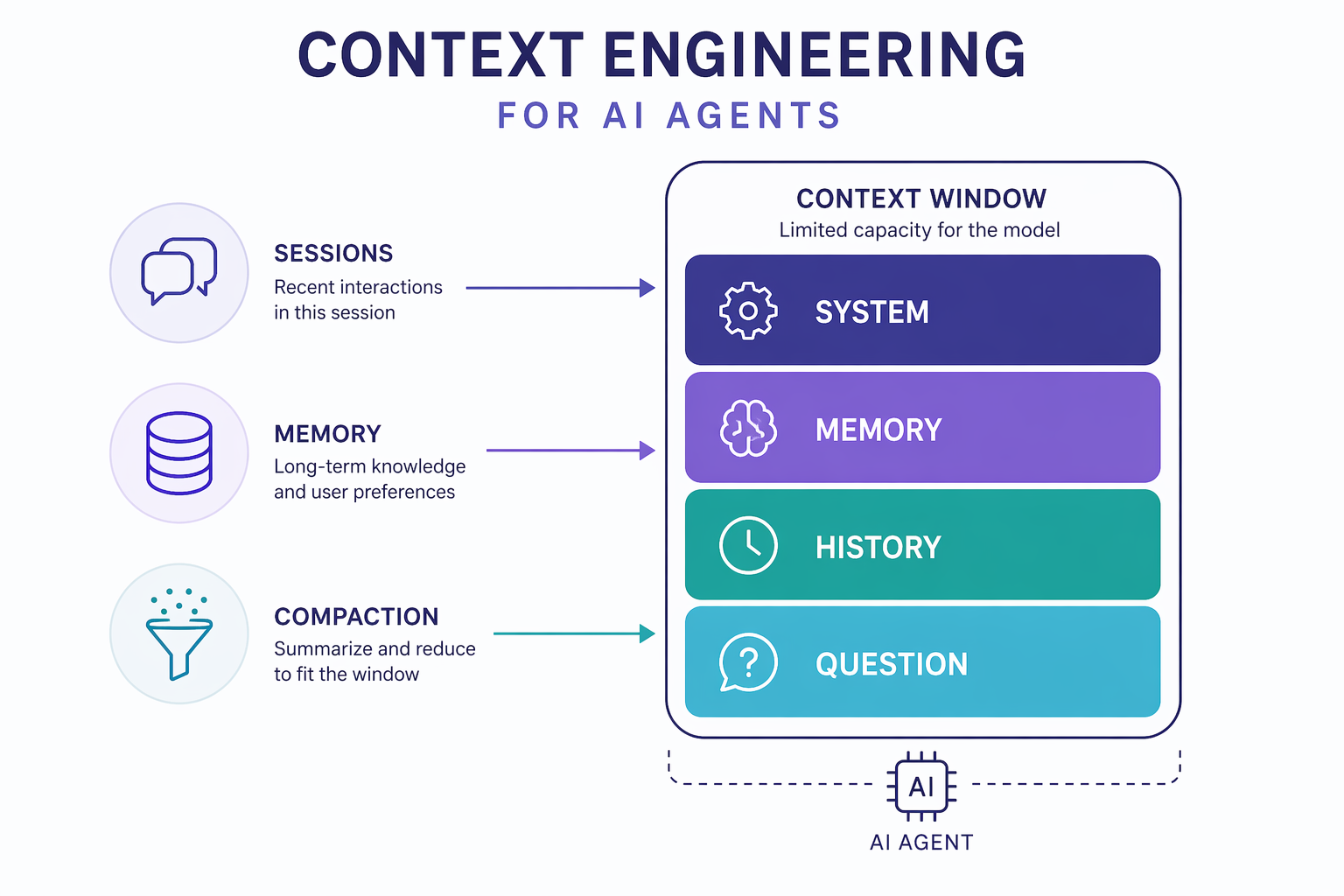
The model only ever sees what fits in its context window. Context engineering is the discipline of deciding what goes in that window each turn:
| Lever | What it does |
|---|---|
| Sessions | Carry conversation history across turns |
| Context providers | Inject dynamic facts / instructions before each run |
| Memory | Persist what matters about the user or task |
| Skills | Keep expertise on disk and load it only when it's relevant |
| Compaction | Summarize or trim history so you never overflow the window |
1. Setup¶
import sys, pathlib
sys.path.insert(0, str(pathlib.Path.cwd().parents[1]))
from workshop_utils import get_chat_client
from agent_framework import Agent
2. The problem: stateless by default¶
Each agent.run(...) is independent. Without a session, the agent has no idea
what you said a moment ago. Watch it forget:
forgetful = Agent(
    client=get_chat_client(),
    name="Forgetful",
    instructions="You are a friendly assistant. Keep answers brief.",
)

print(await forgetful.run("My name is Alice and I love hiking."))
print(await forgetful.run("What's my name and favourite hobby?"))  # ❌ it won't know
3. Sessions: carry history across turns¶
A session holds the running conversation. Pass the same session to each
run() and the agent remembers everything in it.
agent = Agent(
    client=get_chat_client(),
    name="ConversationAgent",
    instructions="You are a friendly assistant. Keep answers brief.",
)

session = agent.create_session()

print(await agent.run("My name is Alice and I love hiking.", session=session))
print(await agent.run("What's my name and favourite hobby?", session=session))  # ✅ remembers
!!! note "Session = short-term memory" The session is the conversation transcript. It's short-term memory: useful within a chat, but it grows with every turn and disappears when the session ends. For durable, selective memory we use a context provider.
4. Memory with a ContextProvider¶
A ContextProvider plugs into the agent loop with two hooks:
before_run— inject instructions/facts into the next model call.after_run— observe the exchange and update what you remember.
This provider extracts the user's name and re-injects it on every future turn — durable, structured memory rather than relying on raw transcript.
from typing import Any
from agent_framework import AgentSession, ContextProvider, SessionContext

class UserMemoryProvider(ContextProvider):
    """Remembers the user's name in session state and personalizes replies."""

    DEFAULT_SOURCE_ID = "user_memory"

    def __init__(self):
        super().__init__(self.DEFAULT_SOURCE_ID)

    async def before_run(self, *, agent: Any, session: "AgentSession | None",
                         context: SessionContext, state: dict[str, Any]) -> None:
        name = state.get("user_name")
        if name:
            context.extend_instructions(self.source_id,
                f"The user's name is {name}. Always address them by name.")
        else:
            context.extend_instructions(self.source_id,
                "You don't know the user's name yet. Ask for it politely.")

    async def after_run(self, *, agent: Any, session: "AgentSession | None",
                        context: SessionContext, state: dict[str, Any]) -> None:
        for msg in context.input_messages:
            text = getattr(msg, "text", "") or ""
            if "my name is" in text.lower():
                state["user_name"] = text.lower().split("my name is")[-1].strip().split()[0].capitalize()

print("provider ready")
mem_agent = Agent(
    client=get_chat_client(),
    name="MemoryAgent",
    instructions="You are a friendly assistant.",
    context_providers=[UserMemoryProvider()],
)

s = mem_agent.create_session()
print(await mem_agent.run("Hello! What's the square root of 9?", session=s))  # asks for name
print(await mem_agent.run("My name is Alice", session=s))                     # stores it
print(await mem_agent.run("What is 2 + 2?", session=s))                       # greets by name

# Inspect what the provider stored:
print("\n[stored state]", s.state.get("user_memory"))
!!! tip "This pattern scales"
The same two hooks power production memory: store user preferences, retrieved
documents (RAG), tool results, or a running summary. Agent Framework ships
richer providers too — mem0, Redis, Azure AI Search, and a file-based
MemoryStore (which the harness uses in M4).
5. Skills: load expertise only when it's needed¶
A skill is a folder (or a Python object) that bundles instructions, reference documents, and executable scripts for one capability.
The context win is progressive disclosure. Everything you know how to do could go in the system prompt — but a 20-page prompt costs tokens on every turn and buries the part that matters. Instead the agent starts with only a one-line catalog of each skill, and pulls the rest in if the conversation calls for it:
| Stage | What's in context |
|---|---|
| Every turn | skill name + description only (a few tokens each) |
| On demand | full SKILL.md instructions, via load_skill |
| On demand | a reference table, via read_skill_resource |
| On demand | the output of a script, via run_skill_script |
SkillsProvider is itself a ContextProvider — the same two hooks you wrote by
hand in §4, doing the injection for you.
5a. A file-based skill¶
There's one on disk already, at skills/unit-converter/ in the repo root. It's
just a folder — nothing is registered or compiled:
skills/unit-converter/
├── SKILL.md                            # frontmatter (name, description) + instructions
├── references/CONVERSION_TABLES.md     # a lookup table, read on demand
└── scripts/convert.py                  # a CLI script, run on demand
The frontmatter description is the only part the model sees up front — so write
it as a trigger: when should the agent reach for this?
REPO = pathlib.Path.cwd().parents[1]
print((REPO / "skills/unit-converter/SKILL.md").read_text())
Scripts don't run themselves. A script runner decides how — subprocess, container, remote sandbox. That boundary is yours to control, which is where sandboxing and resource limits belong in production. Here: a plain subprocess.
import subprocess, sys as _sys
from agent_framework import FileSkill, FileSkillScript

def run_script(skill: FileSkill, script: FileSkillScript, args: list[str] | None = None) -> str:
    """Execute a file skill's script as a local Python subprocess."""
    done = subprocess.run(
        [_sys.executable, str(script.full_path), *(args or [])],
        capture_output=True, text=True, timeout=30,
    )
    return (done.stdout + done.stderr).strip() or "(no output)"
5b. A code-defined skill¶
Skills don't have to live on disk. InlineSkill builds the same shape in Python —
@skill.resource for content to read, @skill.script for a function to call.
These run in-process, so no script runner is involved.
import json
from textwrap import dedent
from agent_framework import InlineSkill, SkillFrontmatter

volume_skill = InlineSkill(
    frontmatter=SkillFrontmatter(
        name="volume-converter",
        description="Convert between gallons and liters using a conversion factor.",
    ),
    instructions=dedent("""\
        Use this skill to convert between gallons and liters.
        1. Read the conversion-table resource to find the factor.
        2. Call the convert script with exactly two arguments: value and factor.
    """),
)

@volume_skill.resource(name="conversion-table", description="Volume conversion factors")
def volume_table() -> str:
    return dedent("""\
        Formula: result = value x factor
        | From    | To      | Factor   |
        |---------|---------|----------|
        | gallons | liters  | 3.78541  |
        | liters  | gallons | 0.264172 |
    """)

@volume_skill.script(name="convert", description="Convert a value. Takes exactly two arguments: value and factor.")
def convert_volume(value: float, factor: float) -> str:
    return json.dumps({"value": value, "factor": factor, "result": round(value * factor, 4)})

print("inline skill ready")
5c. Mix both sources in one agent¶
AggregatingSkillsSource merges any number of sources; SkillsProvider turns the
merged catalog into the three on-demand tools.
Those tools require approval by default — an agent that reads files and runs scripts should. We auto-approve here so the lab runs unattended; the approval gate itself is the one you built in M2.
from agent_framework import (
    AggregatingSkillsSource, FileSkillsSource, InMemorySkillsSource,
    SkillsProvider, SkillsSourceContext, ToolApprovalMiddleware,
)

skills_source = AggregatingSkillsSource([
    FileSkillsSource(str(REPO / "skills"), script_runner=run_script),  # from disk
    InMemorySkillsSource([volume_skill]),                             # from code
])

converter = Agent(
    client=get_chat_client(),
    name="ConverterAgent",
    instructions="You convert units. Always use a skill rather than doing the arithmetic yourself.",
    context_providers=[SkillsProvider(skills_source)],
    middleware=[ToolApprovalMiddleware(auto_approval_rules=[SkillsProvider.all_tools_auto_approval_rule])],
)

# The catalog the model sees up front — one line per skill, nothing more.
for skill in await skills_source.get_skills(SkillsSourceContext(agent=converter)):
    print(f"[skill] {skill.frontmatter.name}: {skill.frontmatter.description}")
print(await converter.run(
    "Two conversions please: how many km is 26.2 miles, "
    "and how many liters is a 5-gallon bucket?",
    session=converter.create_session(),
))
!!! note "One question, two very different paths"
The miles conversion went out to disk: load_skill → read_skill_resource
(the table) → run_skill_script (a subprocess). The gallons conversion ran a
Python function in-process. Your agent code is identical either way — the skill
decides.
Neither skill's instructions were in the prompt until the question arrived. Add
fifty skills and the per-turn cost is still fifty short descriptions.
6. Compaction: never overflow the window¶
Long conversations eventually exceed the context window. Compaction automatically summarizes or trims old history so the agent keeps running.
You won't wire it by hand here — it's one of the batteries the agent harness
includes automatically (max_context_window_tokens triggers it). The mental model:
[ system ][ summary of old turns ][ recent turns ][ new question ]
            ▲ compaction replaces a long tail of turns with a short summary
Key idea: what you keep (recent + summary + pinned facts) is a design choice. That choice is context engineering.
🧪 Your turn¶
- Extend
UserMemoryProviderto also remember a hobby (look for "I love"), and have it greet the user with both name and hobby. - Print
sessionhistory length after several turns to see it grow — that's the pressure compaction relieves. - Add a new file skill: create
skills/<your-skill>/SKILL.mdwith frontmatter and instructions, re-run the cells, and confirm it appears in the catalog. No registration step —FileSkillsSourcerescans the folder. - Make the description in your
SKILL.mddeliberately vague ("does useful things") and ask a question it should handle. Watch the agent skip it. The description is the routing logic. - Skim the upstream
simple_context_provider.py: it uses the model itself to extract structured{name, age}with a Pydantic schema instead of string matching. Why is that more robust?
✅ You can engineer what the agent sees. Now assemble all of it at once. → M4 · The Agent Harness ★