M5 · Multi-Agent Orchestration
Goal: coordinate several specialized agents — and learn when that beats one big agent.
You'll use: the core
WorkflowBuilderwith agents as nodes (sequential and fan-out), low-level executors + edges, and two ready-made builders —SequentialBuilderandHandoffBuilder.
One agent with twenty tools becomes confused and hard to debug. Splitting work across specialists that each do one thing well is often clearer, cheaper, and more reliable.
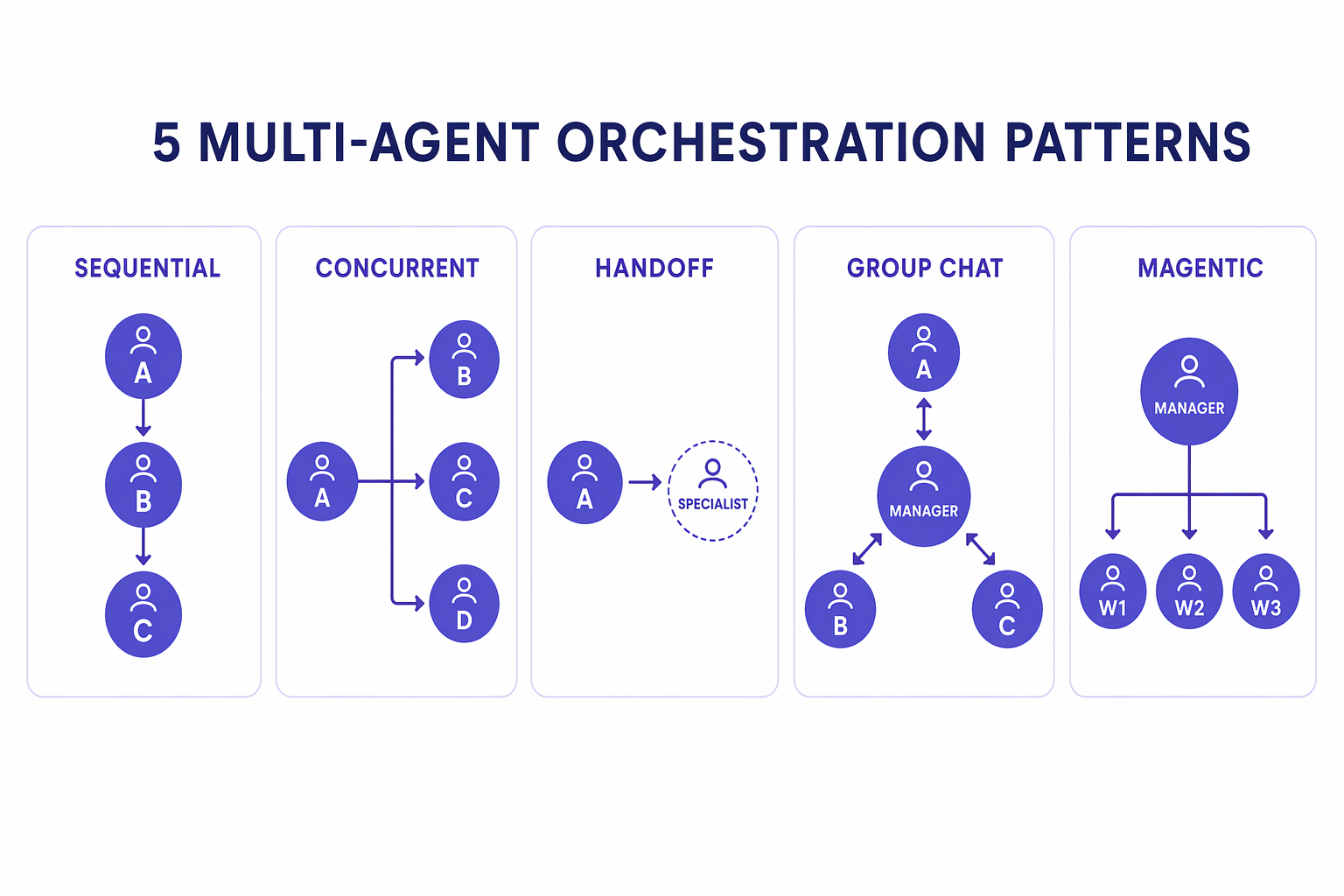
| Pattern | Shape | Good for |
|---|---|---|
| Sequential | A → B → C | pipelines, multi-stage processing |
| Concurrent / fan-out | A, B, C in parallel → merge | independent sub-tasks then aggregate |
| Handoff | control passes to a specialist | triage, escalation |
| Group chat | agents converse under a manager | debate, collaboration |
| Magentic | a manager plans & delegates dynamically | open-ended tasks |
In Agent Framework, an agent is itself an executor — so you compose agents
into a typed workflow graph with the same WorkflowBuilder you'd use for
plain functions. Sections 2–4 build the shapes by hand so you can see the
mechanics; section 5 shows the packaged builders that do it for you.
1. Setup
import sys, pathlib, warnings
sys.path.insert(0, str(pathlib.Path.cwd().parents[1]))
warnings.filterwarnings("ignore", category=DeprecationWarning)
from workshop_utils import get_chat_client
from agent_framework import Agent
2. Sequential: a writer → reviewer pipeline
Wire two agents into a chain: the writer drafts, then the reviewer
critiques. Each agent is a node; add_edge(writer, reviewer) connects them.
output_from="all" returns every node's contribution.
from agent_framework import WorkflowBuilder, AgentResponse
from typing import cast

client = get_chat_client()

writer = Agent(
    client=client,
    name="writer",
    instructions="You are a concise copywriter. Write a single punchy marketing sentence for the prompt.",
)
reviewer = Agent(
    client=client,
    name="reviewer",
    instructions="You are a thoughtful reviewer. Give brief, actionable feedback on the previous message.",
)

# An agent IS an executor, so it can be a node in the graph.
# `output_from="all"` is a WorkflowBuilder constructor argument; build() takes no args.
workflow = (
    WorkflowBuilder(start_executor=writer, output_from="all")  # collect output from every node
    .add_edge(writer, reviewer)
    .build()
)

events = await workflow.run("Write a tagline for a budget-friendly eBike.")
for output in cast(list[AgentResponse], events.get_outputs()):
    print(f"{'-'*60}\n[{output.messages[0].author_name}]\n{output.text}")
print("\nFinal state:", events.get_final_state())
!!! note "The message flows along the edge" The writer's output becomes the reviewer's input automatically — that's what the edge means. No glue code; the graph moves data between agents.
3. Fan-out: one prompt, several specialists
When sub-tasks are independent, connect the start node to several specialists. Here a single idea is sent to three reviewers at once — an optimist, a skeptic, and a risk analyst — and we collect all their takes.
intake = Agent(
    client=client,
    name="intake",
    instructions="Restate the user's idea in one neutral sentence so reviewers can react to it.",
)
optimist = Agent(client=client, name="optimist",
                 instructions="Give two upbeat PROS of the idea. Be brief.")
skeptic = Agent(client=client, name="skeptic",
                instructions="Give two honest CONS of the idea. Be brief.")
risk = Agent(client=client, name="risk_analyst",
             instructions="Name one key RISK to watch. One sentence.")

panel = (
    WorkflowBuilder(start_executor=intake, output_from="all")
    .add_edge(intake, optimist)
    .add_edge(intake, skeptic)
    .add_edge(intake, risk)
    .build()
)

events = await panel.run("Idea: a subscription service for refillable cleaning products.")
for output in cast(list[AgentResponse], events.get_outputs()):
    print(f"{'-'*60}\n[{output.messages[0].author_name}]\n{output.text}")
!!! tip "Fan-out → fan-in"
To merge the specialists' outputs, add a final aggregator node that all
three feed into (e.g. an editor agent that synthesizes a recommendation).
That's the fan-out/fan-in shape — see upstream 03-workflows/parallelism/.
4. Low-level workflows: executors + edges
Agents-as-nodes are a convenience over Agent Framework's typed workflow graph. When you need explicit, recoverable control flow, define your own executors (nodes) and connect them with edges. This tiny graph has no model calls — it just shows the mechanics: uppercase → reverse.
from agent_framework import Executor, WorkflowContext, executor, handler
from typing_extensions import Never

class UpperCase(Executor):
    def __init__(self, id: str):
        super().__init__(id=id)

    @handler
    async def to_upper(self, text: str, ctx: WorkflowContext[str]) -> None:
        await ctx.send_message(text.upper())          # forward to the next node

@executor(id="reverse")
async def reverse_text(text: str, ctx: WorkflowContext[Never, str]) -> None:
    await ctx.yield_output(text[::-1])                # terminal node yields output

upper = UpperCase(id="upper")
graph = WorkflowBuilder(start_executor=upper, output_from="all").add_edge(upper, reverse_text).build()

events = await graph.run("hello world")
print("output:", events.get_outputs())
print("state: ", events.get_final_state())
!!! tip "Why typed graphs matter"
Edges are type-checked: a node emitting str only connects to a node
accepting str. Add conditional edges, loops, fan-in, and checkpointing
(pause/resume) and you get durable, debuggable orchestration — the foundation
for human-in-the-loop and long-running workflows
(03-workflows/checkpoint/, human-in-the-loop/).
5. Ready-made builders: SequentialBuilder and HandoffBuilder
Sections 2–4 wired every edge by hand. The agent-framework-orchestrations
package ships builders for the common shapes, so you describe who
participates instead of how they connect.
5a. SequentialBuilder — the pipeline, without the edges
This is section 2's writer → reviewer chain again. Same result, no add_edge:
hand it an ordered list and it wires the chain for you.
from agent_framework.orchestrations import SequentialBuilder

# Same two agents from section 2 — only the wiring changes.
pipeline = SequentialBuilder(participants=[writer, reviewer], output_from="all").build()

events = await pipeline.run("Write a tagline for a budget-friendly eBike.")
for output in cast(list[AgentResponse], events.get_outputs()):
    print(f"{'-'*60}\n[{output.messages[0].author_name}]\n{output.text}")
print("\nFinal state:", events.get_final_state())
5b. HandoffBuilder — route to the right specialist
A handoff is different from a pipeline: control doesn't march through a fixed order, it transfers. A triage agent inspects the request and hands it to whoever should own it. The specialists can hand back.
Two requirements the builder enforces:
- every participant must set
require_per_service_call_history_persistence=True(the handoff needs the full conversation to travel with the control transfer) —.build()raisesValueErrorotherwise; - you must name a start agent with
.with_start_agent(...).
from agent_framework.orchestrations import HandoffBuilder

def specialist(name: str, instructions: str) -> Agent:
    return Agent(
        client=client,
        name=name,
        instructions=instructions,
        require_per_service_call_history_persistence=True,   # required by HandoffBuilder
    )

triage = specialist("triage", "You route support tickets to the right specialist. Do not answer the question yourself.")
billing = specialist("billing", "You handle billing questions. Answer in two sentences.")
technical = specialist("technical", "You handle technical faults. Answer in two sentences.")

support = (
    HandoffBuilder(participants=[triage, billing, technical], output_from="all")
    .add_handoff(triage, [billing, technical])   # triage routes outward...
    .add_handoff(billing, [triage])              # ...and specialists can hand back
    .add_handoff(technical, [triage])
    .with_start_agent(triage)
    .build()
)

events = await support.run("My payment failed twice and I was charged anyway.")
for output in cast(list[AgentResponse], events.get_outputs()):
    if output.text.strip():                      # triage's turn is a routing call, not text
        print(f"[{output.messages[0].author_name}] {output.text}")
print("\nFinal state:", events.get_final_state())
!!! note "Why the run ends IDLE_WITH_PENDING_REQUESTS"
A handoff workflow is a conversation, not a one-shot pipeline. It answers
the turn, then parks — waiting for the user's next message. That pending state
is the workflow saying "your move", not an error. It's also the hook that
makes handoff a natural fit for human-in-the-loop support flows.
6. Choosing a pattern
Fixed pipeline?                          → SequentialBuilder (or add_edge by hand)
Independent sub-tasks to merge?          → fan-out edges + an aggregator node
Route to the right specialist?           → HandoffBuilder
Need agents to debate/collaborate?       → GroupChatBuilder / MagenticBuilder
Need explicit, recoverable control flow? → custom executors + edges
Start with the simplest shape that fits — reach for a builder once the hand-wired version stops being the clearest way to say what you mean.
Group chat and Magentic round out the set: GroupChatBuilder runs a managed
conversation between agents, and MagenticBuilder lets a manager plan and delegate
dynamically for open-ended tasks. Both ship in the same
agent-framework-orchestrations package you just used, so they're an import away.
Working examples live in the official samples —
03-workflows/orchestrations/.
🧪 Your turn
- Add an
editoragent as a fan-in node: connect optimist, skeptic, and risk into it so it synthesizes one recommendation. - Turn the writer→reviewer pipeline into writer→reviewer→writer (a revision loop) and see the second draft.
- Extend the low-level graph with a middle node that appends
"!!!"between upper and reverse (see upstreamstep1_executors_and_edges.py). - Add a third specialist (e.g.
refunds) to the handoff workflow and givetriagea ticket that should reach it.
✅ You can coordinate many agents. Now measure whether they're any good. → M6 · Evaluating & Optimizing