M7 · Operationalizing
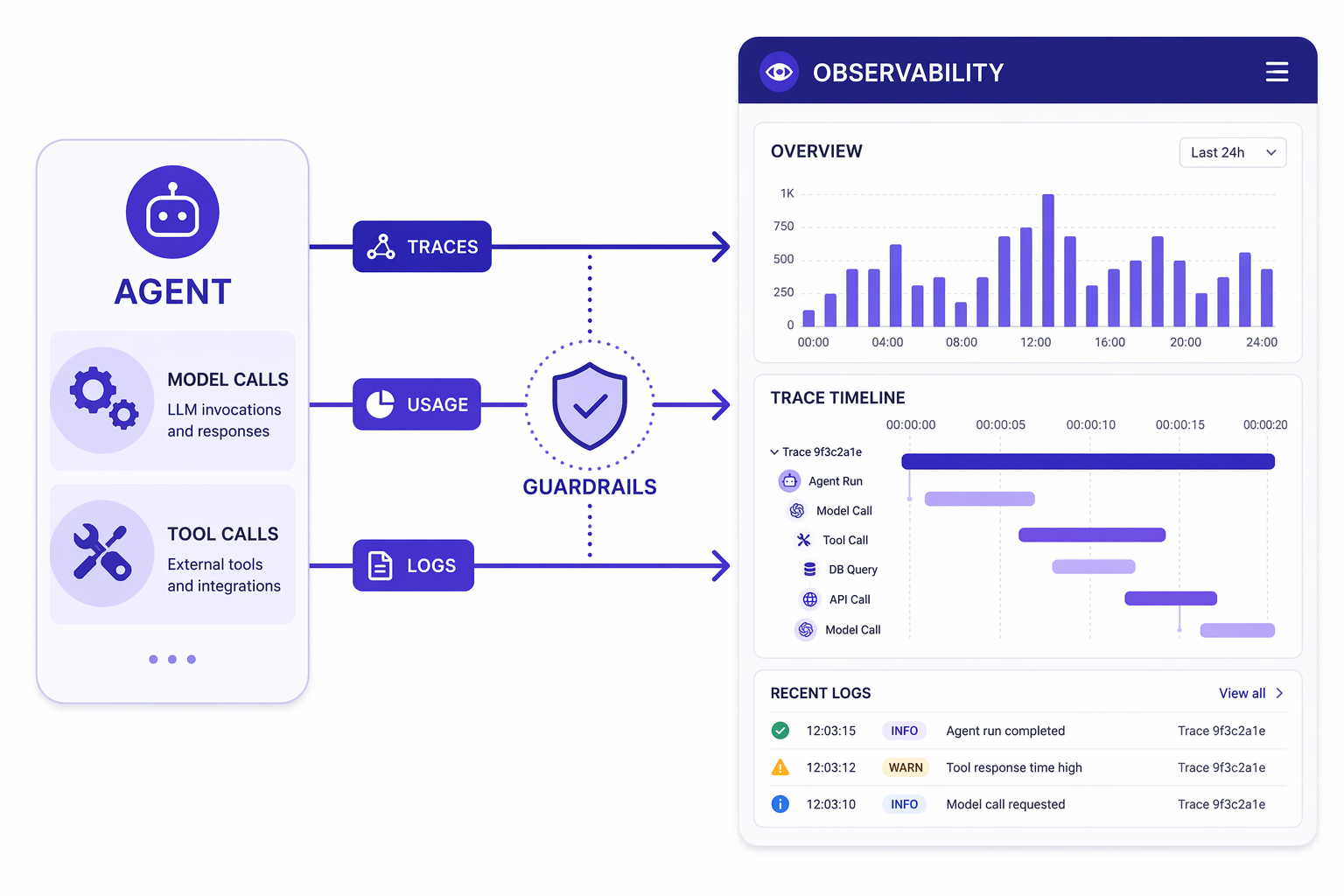
Goal: see inside an agent in production — trace what it does, track token usage, and add guardrails — with OpenTelemetry and middleware.
You'll use:
@chat_middleware,configure_otel_providers,get_tracer.
Agents are non-deterministic and call external tools, so "it worked on my machine" isn't enough. You need observability (what happened?) and control points (intercept/modify behavior). Agent Framework gives you both.
1. Setup
import sys, pathlib
sys.path.insert(0, str(pathlib.Path.cwd().parents[1]))
from workshop_utils import get_chat_client
from agent_framework import Agent, tool
from typing import Annotated
from pydantic import Field
2. Middleware: a control point in the loop
Middleware wraps each model call. You get the context before the call, then
await call_next(), then inspect the result after. It's the hook for logging,
usage tracking, redaction, retries, and guardrails.
This @chat_middleware prints token usage for every inner model call — so you
can see the cost of a single agent.run(), including the extra calls a tool loop
makes.
from collections.abc import Awaitable, Callable
from agent_framework import chat_middleware, ChatContext, ChatResponse

@chat_middleware
async def print_usage(context: ChatContext, call_next: Callable[[], Awaitable[None]]) -> None:
    await call_next()                                   # run the actual model call
    response = context.result
    if isinstance(response, ChatResponse) and response.usage_details:
        print(f"   [usage] {response.usage_details}")   # tokens for THIS model call

print("middleware defined")
from random import randint

@tool(approval_mode="never_require")
def get_weather(location: Annotated[str, Field(description="The location.")]) -> str:
    """Get the weather for a given location."""
    conditions = ["sunny", "cloudy", "rainy", "stormy"]
    return f"The weather in {location} is {conditions[randint(0,3)]} with a high of {randint(10,30)}°C."

agent = Agent(
    client=get_chat_client(),
    name="ObservedAgent",
    instructions="You are a weather assistant. Use the get_weather tool, then summarize in one sentence.",
    tools=[get_weather],
    middleware=[print_usage],          # ← attach the middleware
)

print("Answer:", await agent.run("What's the weather in Seattle, and should I bring an umbrella?"))
!!! note "Notice the multiple [usage] lines"
A single question produced several model calls — one to decide to call the
tool, one to summarize the result. Middleware is how you make that internal
activity (and its cost) visible.
3. Guardrail middleware
Because middleware can read the context and short-circuit, you can enforce policy. Here's a trivially simple input guard that blocks a banned word before it ever reaches the model. Real guards do PII redaction, prompt-injection checks, etc.
@chat_middleware
async def block_secrets(context: ChatContext, call_next: Callable[[], Awaitable[None]]) -> None:
    text = " ".join(getattr(m, "text", "") or "" for m in context.messages).lower()
    if "password" in text:
        # Don't call the model; return a safe canned response instead.
        context.result = ChatResponse(messages=[])
        print("   [guard] blocked: request mentioned a password")
        return
    await call_next()

guarded = Agent(
    client=get_chat_client(),
    name="GuardedAgent",
    instructions="You are a helpful assistant.",
    middleware=[block_secrets],
)

print(await guarded.run("What is the capital of France?"))   # passes through
await guarded.run("My password is hunter2, store it")        # blocked by the guard
4. OpenTelemetry tracing
Middleware gives you hooks; OpenTelemetry gives you end-to-end traces — every model call, tool call, and token count.
Agent Framework emits standard OpenTelemetry GenAI spans, so any OTLP backend
can read them. Pick one with a single variable, TRACE_BACKEND, in your .env:
TRACE_BACKEND |
What it is | Cost / setup |
|---|---|---|
console (default) |
Spans print inline in the notebook | none |
phoenix |
Arize Phoenix — open source, runs on your laptop | uvx phoenix serve |
langfuse |
Langfuse Cloud (or self-hosted) — hosted UI | free tier + keys |
otlp |
Any other OTLP/HTTP collector (Jaeger, Aspire, Tempo, …) | your own |
The notebook code below is identical for all of them — setup_tracing() reads
the variable and wires the right exporter, the same way get_chat_client() reads
MODEL_PROVIDER.
Option A — Phoenix, locally (recommended for this lab)
Phoenix is open source and self-contained. Run it in a separate terminal —
uvx gives it its own environment, so its OpenTelemetry pins can't collide with
the workshop's:
uvx phoenix serve
# or, with Docker:
# docker run -p 6006:6006 -p 4317:4317 arizephoenix/phoenix:latest
Open http://localhost:6006, then set in your .env:
TRACE_BACKEND=phoenix
Nothing leaves your machine.
Option B — Langfuse Cloud
Sign up at https://cloud.langfuse.com (free tier), create a project, and
copy the keys from Settings → API Keys into your .env:
TRACE_BACKEND=langfuse
LANGFUSE_PUBLIC_KEY="pk-lf-..."
LANGFUSE_SECRET_KEY="sk-lf-..."
LANGFUSE_HOST="https://cloud.langfuse.com"   # US: https://us.cloud.langfuse.com
Traces show up under Tracing → Traces. Note that prompts and completions are sent to a hosted service — fine for workshop data, think twice for real user data.
Option C — console
Change nothing. Spans print below the cell.
from workshop_utils import setup_tracing, current_trace_backend

# Reads TRACE_BACKEND from .env — or pass one explicitly: setup_tracing("phoenix")
setup_tracing()
print("backend:", current_trace_backend())
from agent_framework.observability import get_tracer
from opentelemetry.trace import SpanKind

traced_agent = Agent(
    client=get_chat_client(),
    name="TracedAgent",
    instructions="You are concise. Use the get_weather tool when asked about weather.",
    tools=[get_weather],
)

# Your own span wraps the agent's spans, so the whole scenario is one trace.
with get_tracer().start_as_current_span("Scenario: trip planning", kind=SpanKind.CLIENT):
    answer = await traced_agent.run("What's the weather in Kyoto, and name one fact about the city.")
print("Answer:", answer)
!!! success "Now go look at the trace"
- Phoenix → http://localhost:6006 — you'll see Scenario: trip planning
with the model call, the get_weather tool call, and token counts nested
underneath.
- Langfuse → your project's Tracing tab.
- console → scroll up; the spans printed above.
This is the difference between "the agent answered" and "here is exactly what
the agent did, how long each step took, and what it cost."
!!! tip "Zero-code instrumentation"
You can also enable tracing without touching code via environment variables
(ENABLE_INSTRUMENTATION=true, OTEL_EXPORTER_OTLP_ENDPOINT=...). See the
upstream 02-agents/observability/ samples for zero-code and Foundry-backed
setups.
5. Production checklist
| Concern | Lever |
|---|---|
| Tracing | setup_tracing() → Phoenix (local/OSS), Langfuse, or any OTLP backend |
| Cost / tokens | usage-tracking middleware (section 2) |
| Safety | guardrail middleware + tool approval modes (M2) |
| Quality regressions | evaluate_agent in CI (M6) |
| Durability | workflow checkpointing (M5) |
| Secrets | env vars / Key Vault — never hard-code keys |
🧪 Your turn
- Extend
print_usageto accumulate total tokens across a run and print a grand total at the end. - Make
block_secretsredact (replace the banned word with***) and continue instead of blocking. - Run Phoenix locally (
uvx phoenix serve), setTRACE_BACKEND=phoenix, and re-run section 4. Find theget_weathertool span — how long did it take, and how many tokens did the run cost in total? - Swap to
TRACE_BACKEND=langfuseand compare the two UIs. Which one would you put in front of a non-engineer?
✅ You can run agents in production. Now bring it all together. → M8 · Capstone & Hosting