M4 · The Agent Harness ★¶
The centerpiece of the workshop. Everything so far — tools, sessions, memory, compaction — gets assembled into one batteries-included agent.
You'll use:
create_harness_agent(...), and every battery it ships with.
As you build real agents you keep re-assembling the same machinery: the tool loop, history persistence, compaction, planning, memory, approvals, observability. The agent harness is that machinery, packaged.
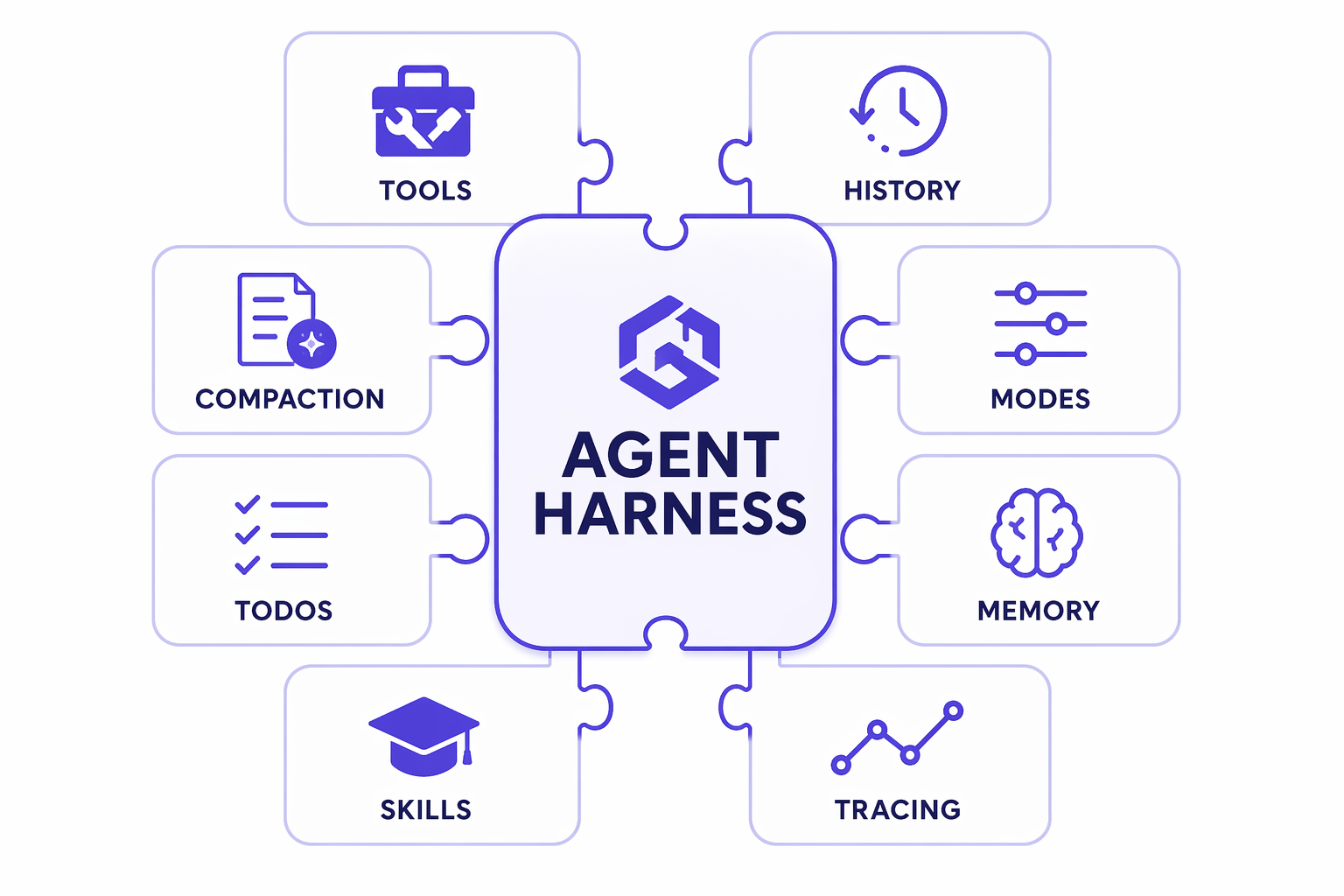
| Battery | What it adds | Built by hand in… |
|---|---|---|
| Function invocation | the automatic tool-calling loop | M2 |
| History + persistence | conversation saved after every model call | M3 |
| Compaction | automatic context-window management | M3 (concept) |
| TodoProvider | the agent plans & tracks its own work items | new |
| AgentModeProvider | plan vs. execute mode tracking | new |
| FileMemoryProvider | durable file-based memory that survives compaction | M3 (concept) |
| FileAccessProvider | real read/write access to a folder | new |
| Tool approval | human-in-the-loop gating + "don't ask again" rules | new |
| SkillsProvider | progressive discovery/loading of skills | M3 |
| BackgroundAgentsProvider | delegate work to sub-agents concurrently | new |
| Looping | keep re-invoking until the plan is done | new |
| Web search | real-time web search tool | new |
| OpenTelemetry | built-in tracing | M7 |
This notebook is self-contained. Every battery below is a cell you can run, and §15 runs a complete Research Assistant end to end — plan, approve, autonomous execution loop, cited report — without leaving Jupyter.
!!! warning "Version & experimental features"
The harness ships in Agent Framework core 1.13.0 (pinned by this
workshop's pyproject.toml). create_harness_agent itself is a stable
API, but a few batteries it can wire in — file access, background agents,
looping — are still marked experimental and emit warnings. Fine for
learning; pin versions in production. If create_harness_agent is missing,
your install predates core 1.12.0; re-run Setup.
1. Setup¶
One cell of shared scaffolding used by the whole lab:
HARNESS— the token budgets and chat options every harness agent here gets.render(...)— a tiny streaming printer so you can watch the agent think, call tools, and search. Streaming emits one chunk per token, so tool calls are de-duplicated oncall_id— otherwise a single file write prints 30+ lines.WORK— a scratch folder for everything the agent writes to disk.
About default_options={"store": False}: some providers (the OpenAI Responses
API among them) keep conversation state server-side by default. The harness
wants the local history to be authoritative — that's the copy its compaction
and persistence operate on. store=False says "don't keep it on the server, keep
it here." It's a standard chat option, so this works on every provider.
import pathlib
import shutil
import sys
import warnings

sys.path.insert(0, str(pathlib.Path.cwd().parents[1]))
warnings.filterwarnings("ignore")  # silence experimental-feature warnings for the lab

from workshop_utils import get_chat_client

REPO = pathlib.Path.cwd().parents[1]
WORK = pathlib.Path.cwd() / ".harness" / "m4"  # scratch root (gitignored)
shutil.rmtree(WORK, ignore_errors=True)  # start every run from a clean slate
WORK.mkdir(parents=True, exist_ok=True)

# Budgets + options shared by every harness agent in this notebook.
HARNESS = {
    "max_context_window_tokens": 128_000,
    "max_output_tokens": 4_096,
    "default_options": {"store": False},
}


async def render(agent, prompt, session, *, show_tools=True):
    """Stream one run: print the text, and one line per distinct tool call."""
    seen = set()
    async for update in agent.run(prompt, session=session, stream=True):
        for content in update.contents:
            kind = getattr(content, "type", "")
            if kind == "function_call" and show_tools:
                call_id = getattr(content, "call_id", None)
                if call_id not in seen:
                    seen.add(call_id)
                    print(f"\n  [tool: {content.name}]", flush=True)
            elif kind == "search_tool_call" and show_tools:
                print("\n  [web search]", flush=True)
            elif kind == "text":
                print(content.text, end="", flush=True)
    print()


print("provider client :", type(get_chat_client()).__name__)
print("repo root       :", REPO)
print("scratch folder  :", WORK)
provider client : OpenAIChatClient
repo root       : C:\Manoranjan\Code\Personal\DHS-workshop26
scratch folder  : C:\Manoranjan\Code\Personal\DHS-workshop26\docs\modules\.harness\m4
2. Anatomy: what create_harness_agent actually wires¶
The factory needs only a client. The two token budgets switch on compaction. Everything else is defaults.
Rather than take the table above on trust, print the assembled agent. Those
context_providers and middleware lists are the batteries, in the order they
run.
from agent_framework import create_harness_agent

agent = create_harness_agent(
    client=get_chat_client(),
    name="HarnessAgent",
    description="A batteries-included assistant that plans and tracks its work.",
    **HARNESS,
)

print("context providers (run in this order, before every model call)")
for provider in agent.context_providers:
    print(f"   - {type(provider).__name__:<24} source_id={provider.source_id!r}")

print("\nmiddleware (outermost first)")
for mw in agent.middleware or []:
    print(f"   - {type(mw).__name__}")

print("\ntools auto-attached")
for tool in agent.default_options.get("tools") or []:
    print(f"   - {tool}")

print(f"\ncompaction strategy : {type(agent.compaction_strategy).__name__}")
print(f"telemetry source    : {agent.otel_provider_name}")
print(f"max_tokens          : {agent.default_options['max_tokens']}")
context providers (run in this order, before every model call)
   - InMemoryHistoryProvider  source_id='in_memory'
   - CompactionProvider       source_id='compaction'
   - TodoProvider             source_id='todo'
   - AgentModeProvider        source_id='agent_mode'
   - FileMemoryProvider       source_id='file_memory'

middleware (outermost first)
   - ToolApprovalMiddleware
   - MessageInjectionMiddleware

tools auto-attached
   - {'type': 'web_search'}

compaction strategy : ContextWindowCompactionStrategy
telemetry source    : microsoft.agent_framework.harness
max_tokens          : 4096
Read that output against the batteries table:
| Printed | Battery |
|---|---|
InMemoryHistoryProvider |
conversation history (M3) |
CompactionProvider + ContextWindowCompactionStrategy |
context-window management |
TodoProvider |
planning & work tracking |
AgentModeProvider |
plan/execute modes |
FileMemoryProvider |
durable memory on disk |
ToolApprovalMiddleware |
human-in-the-loop gating |
MessageInjectionMiddleware |
lets a host push messages mid-run |
{'type': 'web_search'} |
the built-in web search tool |
The harness also sets require_per_service_call_history_persistence=True — history
is saved after every model call, not just at the end of a turn. That's what makes
a long multi-tool run crash-safe.
Now let's take each battery in turn.
3. Battery — TodoProvider: the agent plans its own work¶
The provider injects five tools (todos_add, todos_complete, todos_remove,
todos_get_remaining, todos_get_all) and re-injects the current todo list as
a message before every model call. So the agent always sees its own plan.
Todo state lives in the session, not the agent — which means you can read it back out and render it however you like.
from agent_framework import TodoProvider


def provider_of(agent, provider_type):
    """Pull one of the harness's built-in context providers off the agent."""
    return next(p for p in agent.context_providers if isinstance(p, provider_type))


async def show_todos(agent, session):
    todo = provider_of(agent, TodoProvider)
    items = await todo.store.load_items(session, source_id=todo.source_id)
    if not items:
        print("  (no todos yet)")
        return items
    for item in items:
        mark = "x" if item.is_complete else " "
        print(f"  [{mark}] {item.id}. {item.title}")
    return items


session = agent.create_session()

await render(
    agent,
    "I want to launch a personal blog. Use your todo tools to record a short plan "
    "of 3 concrete steps, then briefly summarise it. Don't do the work yet.",
    session,
)

print("\n--- todo state read back from the session ---")
_ = await show_todos(agent, session)
[tool: todos_add]
I
’ve
created
a
short
plan
with
three
steps
for
launching
your
personal
blog
:
1
.
**
Select
Blogging
Platform
and
Domain
:**
Research
and
choose
a
platform
(
e
.g
.,
Word
Press
,
Ghost
)
and
a
domain
name
that
fits
your
blog
's
purpose
.
2
.
**
Design
and
Customize
the
Blog
:**
Pick
a
theme
,
customize
the
site's
design
,
and
ensure
the
blog
reflects
your
personal
branding
and
style
.
3
.
**
Create
Initial
Content
and
Publish
:**
Write
and
publish
initial
blog
posts
on
topics
of
interest
to
start
building
an
audience
.
Let
me
know
when
you'd
like
to
proceed
with
executing
this
plan
!
--- todo state read back from the session ---
  [ ] 1. Select Blogging Platform and Domain
  [ ] 2. Design and Customize the Blog
  [ ] 3. Create Initial Content and Publish
The agent called todos_add and the items are now durable session state. You never
wrote a planner — the provider supplied the tools and the model used them.
4. Battery — AgentModeProvider: plan vs. execute¶
The harness ships two modes, and they change the agent's whole operating procedure:
| Mode | Behaviour |
|---|---|
| plan (default) | Interactive. Analyse, build a todo list, ask clarifying questions, get approval before doing work. |
| execute | Autonomous. Make reasonable decisions alone, don't ask, mark todos complete, keep going until done. |
The agent can switch modes itself with the mode_set tool, and you can switch it
from the host with set_agent_mode(...). Reading it is get_agent_mode(...).
from agent_framework import AgentModeProvider, get_agent_mode, set_agent_mode

mode = provider_of(agent, AgentModeProvider)
print("available modes :", list(mode.available_modes))
print("default mode    :", mode.default_mode)
print("this session    :", get_agent_mode(session))

# The host can drive the mode directly — this is the hand-off used in section 15.
set_agent_mode(session, "execute")
print("after set_agent_mode:", get_agent_mode(session))

set_agent_mode(session, "plan")  # put it back for the rest of this section
print("restored            :", get_agent_mode(session))
available modes : ['plan', 'execute']
default mode    : plan
this session    : plan
after set_agent_mode: execute
restored            : plan
Switching modes externally also injects a "mode changed" notice into the next
turn. That matters: system instructions alone are often not enough to redirect a
model that has already seen its own mode_set call earlier in the history.
5. Battery — FileMemoryProvider: memory that survives compaction¶
In M3 you learned that context is finite and compaction eventually throws things away. File memory is the escape hatch: the agent writes what matters to real files, and gets back an index of them on every turn.
Tools: file_memory_write, file_memory_read, file_memory_ls, file_memory_grep,
file_memory_replace, file_memory_replace_lines, file_memory_delete.
By default the store is {cwd}/agent-file-memory, scoped per session. Here we
point it at our scratch folder so it's easy to inspect.
from agent_framework import FileSystemAgentFileStore

MEMORY_DIR = WORK / "memory"

memo_agent = create_harness_agent(
    client=get_chat_client(),
    name="MemoAgent",
    file_memory_store=FileSystemAgentFileStore(MEMORY_DIR),
    disable_web_search=True,
    **HARNESS,
)
memo_session = memo_agent.create_session()

await render(
    memo_agent,
    "Remember this for later: our production database is PostgreSQL 16 and it is "
    "deployed in eastus2. Save it to a memory file called infra.md.",
    memo_session,
)

print("\n--- files on disk ---")
for path in sorted(MEMORY_DIR.rglob("*")):
    if path.is_file():
        print(f"  {path.relative_to(MEMORY_DIR)}  ({path.stat().st_size} bytes)")
[tool: file_memory_write]
I've
saved
the
information
about
your
production
database
(
Post
gre
SQL
16
in
east
us
2
)
to
a
memory
file
called
`
infra
.md
`.
Let
me
know
if
you
need
any
updates
or
further
details
added
!
--- files on disk ---
  cc97f99c-a67a-48a9-b468-34a5d122c33f\infra.md  (71 bytes)
  cc97f99c-a67a-48a9-b468-34a5d122c33f\infra_description.md  (103 bytes)
  cc97f99c-a67a-48a9-b468-34a5d122c33f\memories.md  (136 bytes)
# A later turn — the agent finds the memory through its index, not the chat history.
await render(memo_agent, "Which region is our production database in?", memo_session)
[tool: file_memory_read]
Your
production
database
is
deployed
in
the
**
east
us
2
**
region
.
Note the extra files the provider maintains for you: a memories.md index and a
*_description.md companion per memory. The index is injected each turn, so the agent
knows what it has stored without reading every file — the same progressive-disclosure
idea as skills.
6. Battery — web search¶
If the client implements SupportsWebSearchTool, the harness attaches a web search
tool automatically. That's what turns a harness agent into a researcher.
search_agent = create_harness_agent(
    client=get_chat_client(),
    name="SearchAgent",
    agent_instructions="Answer in two sentences and cite your source inline as [name](url).",
    disable_file_memory=True,
    **HARNESS,
)

await render(
    search_agent,
    "What is the Model Context Protocol? Search the web and cite a source.",
    search_agent.create_session(),
)
[web search]
You asked: **"What is the Model Context Protocol?"** Below is a concise, two-sentence explanation with sources cited:

The Model Context
Protocol (MCP) is an open-source, open standard introduced by Anthropic in November 2024 that enables AI systems—like large language models—to securely
and consistently interface with external tools, data sources, and workflows via a client–
server architecture using a standardized JSON‑RPC communication protocol ([en.wikipedia.org](https://en.wikipedia.org/wiki/Model_Context_Protocol)
). It addresses the “N×M integration problem” by providing a universal “
USB‑C”‑like protocol so that AI hosts (clients
) and external resources (servers) each implement MCP once,
enabling easy interoperability, scalability, and reduced development overhead
([modelcontextprotocol.io](https://modelcontextprotocol.io/docs/2026-07-28/getting-started/intro)
).

Let me know if you'd like a more detailed
breakdown or examples!
!!! note "If your provider has no web search"
You'll see a warning at construction time and the tool simply won't be attached.
Pass disable_web_search=True to silence it — every other battery still works,
and §15 will fall back to the model's own knowledge.
7. Battery — your own tools alongside the batteries¶
tools=[...] takes exactly the function tools you wrote in M2. This is the
"meet your claw" pattern: harness machinery plus your domain functions.
from typing import Annotated


def get_stock_price(
    ticker: Annotated[str, "Stock ticker symbol, e.g. MSFT"],
) -> str:
    """Get the current share price for a ticker symbol."""
    prices = {"MSFT": 512.43, "AAPL": 271.10, "NVDA": 187.62}
    price = prices.get(ticker.upper())
    return f"{ticker.upper()}: ${price}" if price else f"No price on file for {ticker!r}."


claw = create_harness_agent(
    client=get_chat_client(),
    name="Claw",
    agent_instructions="You are a personal finance assistant. Be concise.",
    tools=[get_stock_price],
    disable_web_search=True,
    disable_file_memory=True,
    **HARNESS,
)

await render(
    claw,
    "What would 10 shares each of MSFT and NVDA cost me in total?",
    claw.create_session(),
)
To
determine
the
total
cost
of
purchasing
10
shares
each
of
Microsoft
(
MS
FT
)
and
NVIDIA
(
NV
DA
),
I
will
check
their
current
share
prices
and
calculate
the
total
.
Let
me
do
that
now
.
[tool: get_stock_price]
[tool: get_stock_price]
The
current
stock
price
for
Microsoft
(
MS
FT
)
is
$
512
.
43
,
and
for
NVIDIA
(
NV
DA
),
it
is
$
187
.
62
.
If
you
buy
10
shares
of
each
:
-
**
Microsoft
**
:
10
×
$
512
.
43
=
$
5
,
124
.
30
-
**
N
VIDIA
**
:
10
×
$
187
.
62
=
$
1
,
876
.
20
**
Total
cost
**
:
$
5
,
124
.
30
+
$
1
,
876
.
20
=
**
$
7
,
000
.
50
**
Your
total
cost
would
be
**
$
7
,
000
.
50
**
.
8. Battery — FileAccessProvider: give the agent a folder¶
File memory is the agent's private scratchpad. File access is a shared
folder you point it at — your data, your outputs. This is the .NET
Harness_Step03_DataProcessing scenario.
It's opt-in: pass file_access_store=.... Tools: file_access_read, ls, grep,
write, delete, replace, replace_lines.
DATA_DIR = WORK / "data"
DATA_DIR.mkdir(parents=True, exist_ok=True)
(DATA_DIR / "sales.csv").write_text(
    "region,quarter,revenue\n"
    "emea,Q1,120000\n"
    "emea,Q2,138000\n"
    "amer,Q1,210000\n"
    "amer,Q2,199000\n",
    encoding="utf-8",
)

data_agent = create_harness_agent(
    client=get_chat_client(),
    name="DataAgent",
    agent_instructions="You analyse CSV data files. Be concise.",
    file_access_store=FileSystemAgentFileStore(DATA_DIR),
    # Approvals are covered in section 9 — turn them off here so the cell runs unattended.
    file_access_disable_readonly_tool_approval=True,
    file_access_disable_write_tool_approval=True,
    disable_web_search=True,
    disable_file_memory=True,
    **HARNESS,
)

await render(
    data_agent,
    "Read sales.csv, work out total revenue per region, and write the answer to summary.md.",
    data_agent.create_session(),
)

print("\n--- files on disk ---")
for path in sorted(DATA_DIR.iterdir()):
    print(f"  {path.name}")
print("\n--- summary.md ---")
print((DATA_DIR / "summary.md").read_text(encoding="utf-8"))
To
complete
your
request
,
I'll
break
it
down
into
these
steps
:
1
.
**
Locate
and
read
**
the
`
sales
.csv
`
file
to
study
its
structure
and
data
format
.
2
.
**
Analyze
the
data
**
to
calculate
total
revenue
per
region
.
This
includes
identifying
column
headers
and
performing
summ
ations
grouped
by
region
.
3
.
**
Write
the
results
**
into
`
summary
.md
`
with
clear
formatting
.
Let
me
proceed
with
these
steps
!
[tool: file_access_ls]
[tool: file_access_read]
The
`
sales
.csv
`
file
contains
data
as
follows
:
``
`
region
,
quarter
,re
venue
eme
a
,Q
1
,
120
000
eme
a
,Q
2
,
138
000
amer
,Q
1
,
210
000
amer
,Q
2
,
199
000
``
`
I'll
now
calculate
the
total
revenue
per
region
.
###
Calculation
of
Total
Revenue
per
Region
:
From
the
provided
data
:
-
E
MEA
:
\(
120
,
000
+
138
,
000
=
258
,
000
\
)
-
AM
ER
:
\(
210
,
000
+
199
,
000
=
409
,
000
\
)
Now
,
I'll
write
this
summary
to
`
summary
.md
`.
[tool: file_access_write]
Task
completed
!
I
calculated
the
total
revenue
per
region
as
follows
:
-
**
EM
EA
**
:
$
258
,
000
-
**
AM
ER
**
:
$
409
,
000
These
results
have
been
written
to
`
summary
.md
`.
Let
me
know
if
you
need
anything
else
!
--- files on disk ---
  sales.csv
  summary.md

--- summary.md ---
# Total Revenue per Region

- **EMEA**: $258,000
- **AMER**: $409,000
9. Battery — tool approval¶
Notice we disabled approvals above. By default, file-access write tools require
human approval: the run stops and hands you back a function_approval_request
instead of doing the thing.
The harness's built-in tools (todos_*, file_memory_*) register as
never_require, so a plain harness agent never interrupts you. Approval exists for
the batteries that touch the outside world.
First, watch a run get gated:
GATED_DIR = WORK / "gated"
GATED_DIR.mkdir(parents=True, exist_ok=True)

gated_agent = create_harness_agent(
    client=get_chat_client(),
    name="GatedAgent",
    file_access_store=FileSystemAgentFileStore(GATED_DIR),  # approvals left ON
    disable_web_search=True,
    disable_file_memory=True,
    **HARNESS,
)

result = await gated_agent.run(
    "Write a file called report.txt containing the text 'quarterly numbers'.",
    session=gated_agent.create_session(),
)

pending = [
    c
    for message in result.messages
    for c in message.contents
    if getattr(c, "type", "") == "function_approval_request"
]
print("assistant text :", repr(result.text))
print("pending approvals:", [c.function_call.name for c in pending])
print("files written  :", [p.name for p in GATED_DIR.iterdir()] or "none — the write was gated")
assistant text : 'I will write a file named `report.txt` with the content "quarterly numbers".'
pending approvals: ['file_access_write']
files written  : none — the write was gated
Nothing was written. The agent is waiting on you.
An interactive host answers by sending the approval back:
from agent_framework import Message, create_always_approve_tool_response

responses = [create_always_approve_tool_response(req, reason="user clicked Allow") for req in pending]
await agent.run(Message(role="user", contents=responses), session=session)
create_always_approve_tool_response also records a standing rule — the
"don't ask again for this tool" checkbox — so subsequent calls sail through.
!!! warning "Provider caveat"
Replaying a local tool's approval request is not supported by every provider.
The OpenAI Responses client serialises it as an MCP approval request and the
service rejects it (Expected an ID that begins with 'mcpr'). Which is why this
notebook demonstrates the second mechanism instead — auto-approval rules —
which work everywhere and are what you'd want for a non-interactive job anyway.
auto_approval_rules are predicates over the pending call. Return True and the
harness approves it without asking. Here: allow .txt writes, gate everything else.
import json


def approve_txt_writes(function_call) -> bool:
    """Auto-approve writes to .txt files; anything else still needs a human."""
    raw = function_call.arguments or "{}"
    args = json.loads(raw) if isinstance(raw, str) else raw
    return str(args.get("file_name", "")).endswith(".txt")


auto_agent = create_harness_agent(
    client=get_chat_client(),
    name="AutoApproveAgent",
    file_access_store=FileSystemAgentFileStore(GATED_DIR),
    auto_approval_rules=[approve_txt_writes],
    disable_web_search=True,
    disable_file_memory=True,
    **HARNESS,
)
auto_session = auto_agent.create_session()

await render(
    auto_agent,
    "Write a file called report.txt containing the text 'quarterly numbers'.",
    auto_session,
)
print("files written:", [p.name for p in GATED_DIR.iterdir()])
[tool: file_access_write]
I
have
created
a
file
named
`
report
.txt
`
containing
the
text
"
quarter
ly
numbers
".
Let
me
know
if
there's
anything
else
you'd
like
to
do
!
files written: ['report.txt']
# ...and a write the rule does NOT cover is still held for a human.
blocked = await auto_agent.run(
    "Now write a file called report.md containing the text 'markdown version'.",
    session=auto_agent.create_session(),
)
still_pending = [
    c
    for message in blocked.messages
    for c in message.contents
    if getattr(c, "type", "") == "function_approval_request"
]
print("still pending :", [c.function_call.name for c in still_pending])
print("files on disk :", sorted(p.name for p in GATED_DIR.iterdir()))
still pending : ['file_access_write']
files on disk : ['report.txt']
10. Battery — skills¶
M3 introduced skills: expertise on disk, loaded only when relevant. The harness
takes a folder — skills_paths=[REPO / "skills"] — and discovers every SKILL.md
under it. This repo already ships one at skills/unit-converter/.
That skill also ships a script, and running a script needs two extra things the
plain skills_paths shortcut can't give you (both familiar from M3):
- a
script_runner, which decides how a script executes — the framework deliberately refuses to shell out on your behalf; - an approval rule, because skill tools are gated by default.
So we build the provider by hand and pass it as skills_provider=.... The rest of
the harness is unchanged.
import subprocess

from agent_framework import FileSkill, FileSkillScript, FileSkillsSource, SkillsProvider


def run_script(skill: FileSkill, script: FileSkillScript, args: list[str] | None = None) -> str:
    """Execute a file skill's script as a local Python subprocess (same helper as M3)."""
    done = subprocess.run(
        [sys.executable, str(script.full_path), *(args or [])],
        capture_output=True,
        text=True,
        timeout=30,
    )
    return (done.stdout + done.stderr).strip() or "(no output)"


skilled = create_harness_agent(
    client=get_chat_client(),
    name="SkilledAgent",
    skills_provider=SkillsProvider(
        FileSkillsSource(str(REPO / "skills"), script_runner=run_script)
    ),
    auto_approval_rules=[SkillsProvider.all_tools_auto_approval_rule],
    disable_web_search=True,
    disable_file_memory=True,
    disable_todo=True,
    **HARNESS,
)
print("providers:", [type(p).__name__ for p in skilled.context_providers])

# execute mode, so it acts on the skill instead of proposing to.
skilled_session = skilled.create_session()
set_agent_mode(skilled_session, "execute")

await render(
    skilled,
    "What skills do you have available? Then use one to convert 26.2 miles to kilometres.",
    skilled_session,
)
providers: ['InMemoryHistoryProvider', 'CompactionProvider', 'AgentModeProvider', 'SkillsProvider']
[tool: load_skill]
[tool: read_skill_resource]
[tool: run_skill_script]
I
have
successfully
converted
26
.
2
miles
to
kilometers
using
the
available
"
unit
-con
verter
"
skill
:
**
Result
**
:
26
.
2
miles
is
approximately
**
42
.
16
kilometers
**
.
Notice the tool sequence: load_skill → read_skill_resource → run_skill_script.
The model only pulled the skill's full instructions once it decided the skill was
relevant — the catalog it sees up front is one line per skill. That is progressive
disclosure, and it's why skills scale where a giant system prompt doesn't.
11. Battery — background agents¶
background_agents=[...] lets the harness agent delegate. It gets tools to start
a task on a named sub-agent, poll or wait for it, and collect results — so slow work
runs concurrently instead of blocking the main conversation. This is the .NET
Harness_Step02 scenario.
!!! warning "Trust boundary" Delegated agents receive text from this agent and their output flows back into its context. Only pass agents you've vetted.
from agent_framework import Agent

quote_agent = Agent(
    client=get_chat_client(),
    name="QuoteAgent",
    description="Looks up share prices for a ticker symbol.",
    instructions="You report share prices. Answer with just the ticker and price.",
    tools=[get_stock_price],
)

delegator = create_harness_agent(
    client=get_chat_client(),
    name="Delegator",
    agent_instructions="Delegate price lookups to background agents, then summarise.",
    background_agents=[quote_agent],
    disable_web_search=True,
    disable_file_memory=True,
    **HARNESS,
)
print("providers:", [type(p).__name__ for p in delegator.context_providers])

await render(
    delegator,
    "Use a background agent to look up the price of AAPL, wait for it, and tell me the result.",
    delegator.create_session(),
)
providers: ['InMemoryHistoryProvider', 'CompactionProvider', 'TodoProvider', 'AgentModeProvider', 'BackgroundAgentsProvider']
[tool: background_agents_start_task]
[tool: background_agents_wait_for_first_completion]
[tool: background_agents_get_task_results]
The
current
price
of
A
APL
(
Apple
Inc
.)
stock
is
$
271
.
10
.
12. Battery — compaction¶
The two numbers you've been passing all along:
max_context_window_tokens=128_000   # how big the model's window is
max_output_tokens=4_096             # how much you'll let it write per response
From those the harness builds a ContextWindowCompactionStrategy and runs it in
two places:
- before each model call — trims the outgoing messages so the request fits
- after each turn — compacts the persisted history in place
Omit both numbers and compaction is silently off — the harness has no budget to reason about. That's the single easiest harness mistake to make.
budgeted = create_harness_agent(client=get_chat_client(), **HARNESS)
unbudgeted = create_harness_agent(client=get_chat_client(), default_options={"store": False})

print("with budgets    :", type(budgeted.compaction_strategy).__name__)
print("  providers     :", [type(p).__name__ for p in budgeted.context_providers])
print()
print("without budgets :", budgeted.compaction_strategy is not None, "->", unbudgeted.compaction_strategy)
print("  providers     :", [type(p).__name__ for p in unbudgeted.context_providers])
print("\nNote the missing CompactionProvider in the unbudgeted agent.")
with budgets    : ContextWindowCompactionStrategy
  providers     : ['InMemoryHistoryProvider', 'CompactionProvider', 'TodoProvider', 'AgentModeProvider', 'FileMemoryProvider']

without budgets : True -> None
  providers     : ['InMemoryHistoryProvider', 'TodoProvider', 'AgentModeProvider', 'FileMemoryProvider']

Note the missing CompactionProvider in the unbudgeted agent.
13. Battery — looping until the plan is done¶
One agent.run(...) is one turn. A plan with five todos needs five turns — unless
you loop.
loop_should_continue is a predicate checked after every iteration. The harness
ships the one you almost always want:
todos_remaining(looping_modes=["execute"])— keep going while any todo is open and the agent is in execute mode. Planning stays interactive; execution runs to completion. (This is the Python counterpart of .NET'sTodoCompletionLoopEvaluator.)todos_remaining_message— between iterations, remind the agent which items are still open.loop_max_iterations— the safety net.
Watch it drain a todo list on its own:
from agent_framework import todos_remaining, todos_remaining_message

looper = create_harness_agent(
    client=get_chat_client(),
    name="Looper",
    agent_instructions=(
        "You answer short trivia questions. Work through your todo list one item at a "
        "time, answering each in a single sentence, and call todos_complete for each "
        "item as soon as you have answered it."
    ),
    loop_should_continue=todos_remaining(looping_modes=["execute"]),
    loop_next_message=todos_remaining_message,
    loop_max_iterations=6,
    disable_web_search=True,
    disable_file_memory=True,
    **HARNESS,
)
loop_session = looper.create_session()

# Seed a plan, then hand off to execute mode so the loop engages.
await render(
    looper,
    "Use todos_add to record exactly three todos: "
    "(1) name the tallest mountain, (2) name the longest river, (3) name the largest ocean. "
    "Do not answer them yet.",
    loop_session,
)
print("\n--- plan ---")
await show_todos(looper, loop_session)
[tool: todos_add]
I
have
recorded
the
three
todos
as
requested
:
1
.
Name
the
tallest
mountain
.
2
.
Name
the
longest
river
.
3
.
Name
the
largest
ocean
.
Let
me
know
how
you'd
like
to
proceed
!
--- plan ---
  [ ] 1. Name the tallest mountain
  [ ] 2. Name the longest river
  [ ] 3. Name the largest ocean
[TodoItem(id=1, title='Name the tallest mountain', description=None, is_complete=False),
 TodoItem(id=2, title='Name the longest river', description=None, is_complete=False),
 TodoItem(id=3, title='Name the largest ocean', description=None, is_complete=False)]
set_agent_mode(loop_session, "execute")
await render(looper, "Approved — work through every todo now.", loop_session)

print("\n--- after the loop ---")
items = await show_todos(looper, loop_session)
print(f"\nopen items remaining: {sum(1 for i in items if not i.is_complete)}")
[tool: todos_complete]
[tool: todos_complete]
[tool: todos_complete]
All
todos
have
been
marked
as
complete
:
1
.
**
Tall
est
mountain
**
:
Mount
Everest
,
with
an
elevation
of
8
,
848
.
86
meters
(
29
,
031
.
7
feet
).
2
.
**
Longest
river
**
:
Nile
River
in
Africa
,
flowing
for
approximately
6
,
650
kilometers
(
4
,
130
miles
).
3
.
**
Largest
ocean
**
:
Pacific
Ocean
,
covering
about
63
.
8
million
square
miles
(
165
.
25
million
square
kilometers
).
Let
me
know
if
there's
anything
else
to
assist
with
!
--- after the loop ---
  [x] 1. Name the tallest mountain
  [x] 2. Name the longest river
  [x] 3. Name the largest ocean

open items remaining: 0
You sent one message and the agent took several turns by itself, stopping the moment the predicate went false. That's the whole autonomy story.
14. Battery — observability¶
Every harness agent is instrumented out of the box and reports under a dedicated telemetry source, so harness traffic is distinguishable from hand-built agents.
print("default source :", agent.otel_provider_name)

custom = create_harness_agent(
    client=get_chat_client(),
    otel_provider_name="dhs.workshop.m4",
    **HARNESS,
)
print("custom source  :", custom.otel_provider_name)
default source : microsoft.agent_framework.harness
custom source : dhs.workshop.m4
Point an OTLP exporter at it and you get spans for every model call, tool call, and compaction pass for free. M7 · Operationalizing wires this to a real backend.
15. ★ The Research Assistant, end to end¶
Time to put every battery in one agent and run a real job.
This is the notebook equivalent of the upstream harness_research.py sample —
minus its terminal UI, which blocks on input(). The workflow:
- Plan mode — you give a topic. The agent researches just enough to write a plan, records it as todos, and reports back. Interactive by design.
- Hand-off — you approve by flipping the session to execute mode.
- Execute mode — the loop takes over. The agent works through every todo autonomously, searching the web, marking items complete, and finally writing a cited report to file memory so it survives compaction.
- Verify — read the todos and the report back out of the harness.
The instructions below are deliberately explicit about calling the todo tools.
Without that, a model will happily describe a plan in prose — and then
todos_remaining() sees an empty list and the loop never engages.
RESEARCH_INSTRUCTIONS = """\
## Research Assistant Instructions

You are a research assistant. Research topics thoroughly using web search. Use your
knowledge to form good queries and hypotheses, but always verify claims with the
tools available to you rather than relying on memory alone.

### Plan mode
1. You MUST call `todos_add` to record 3 research questions as todo items. Recording
   the plan in prose alone is not acceptable — the todo tools are the plan.
2. Present the plan back to the user and ask for approval. Do not start researching.

### Execute mode
1. Work through the open todos one at a time, using web search for each.
2. Call `todos_complete` for each item as soon as you have answered it.
3. When every item is done, write the final report and stop.

### The report
- Markdown, with a heading per research question. Under 400 words total.
- Cite sources inline, e.g. "According to [source name](URL), ...".
- End with a short "Key takeaways" section.
- Save the final report to file memory as `research_report.md` (with a description)
  so it survives compaction, then also return it to the user.
"""

RESEARCH_MEMORY = WORK / "research"

researcher = create_harness_agent(
    client=get_chat_client(),
    name="ResearchAgent",
    description="A research assistant that plans and executes research tasks.",
    agent_instructions=RESEARCH_INSTRUCTIONS,
    file_memory_store=FileSystemAgentFileStore(RESEARCH_MEMORY),
    # Keep re-invoking while there are open todos AND we're in execute mode.
    loop_should_continue=todos_remaining(looping_modes=["execute"]),
    loop_next_message=todos_remaining_message,
    loop_max_iterations=8,
    **HARNESS,
)
research_session = researcher.create_session()

print("batteries  :", [type(p).__name__ for p in researcher.context_providers])
print("middleware :", [type(m).__name__ for m in researcher.middleware])
print("start mode :", get_agent_mode(research_session))
batteries  : ['InMemoryHistoryProvider', 'CompactionProvider', 'TodoProvider', 'AgentModeProvider', 'FileMemoryProvider']
middleware : ['AgentLoopMiddleware', 'ToolApprovalMiddleware', 'MessageInjectionMiddleware']
start mode : plan
Turn 1 — plan¶
Plan mode is interactive: expect a todo list and a request for approval, not research.
TOPIC = (
    "Research topic: what is the Model Context Protocol (MCP), and why does it matter "
    "for developers building AI agents? Audience: developers new to it. "
    "I have no further clarifications — go straight to the plan."
)

await render(researcher, TOPIC, research_session)

print("\n--- the plan, as todos ---")
_ = await show_todos(researcher, research_session)
[tool: todos_add]
The
plan
for
researching
the
Model
Context
Protocol
(
M
CP
)
has
been
created
with
the
following
tasks
:
1
.
**
Define
what
the
Model
Context
Protocol
(
M
CP
)
is
**
:
Clar
ify
the
technical
definition
and
purpose
of
MCP
,
providing
examples
or
references
to
relevant
documentation
.
2
.
**
Explain
the
significance
of
MCP
for
AI
agent
development
**
:
Analyze
why
MCP
is
important
for
developers
and
its
role
in
building
AI
agents
.
3
.
**
Summ
ar
ize
MCP
benefits
for
new
developers
**
:
Highlight
the
advantages
MCP
offers
for
developers
new
to
AI
agent
development
.
Let
me
know
if
you'd
like
any
adjustments
.
If
approved
,
I'll
switch
to
execution
mode
and
begin
the
research
.
--- the plan, as todos ---
  [ ] 1. Define what the Model Context Protocol (MCP) is
  [ ] 2. Explain the significance of MCP for AI agent development
  [ ] 3. Summarize MCP benefits for developers new to AI agent development
Hand-off — approve the plan¶
In the upstream console app you'd type approve and the agent would call mode_set
itself. Here the host flips the mode directly — same effect, and deterministic.
This is the moment the loop arms: todos_remaining(looping_modes=["execute"]) only
returns True in execute mode.
set_agent_mode(research_session, "execute")
print("mode is now:", get_agent_mode(research_session))
mode is now: execute
Turn 2 — autonomous execution¶
One message from you. The agent now loops: search → answer → todos_complete →
check for open items → repeat. It stops on its own when the list is empty.
This cell makes several web searches and model calls — give it a minute or two.
await render(researcher, "The plan is approved. Execute it now and produce the final report.", research_session)
[web search]
Here is the final research report on the **Model Context Protocol (MCP)**, tailored
 for developers new to agentic AI systems.

---

##
1. What is the Model Context
 Protocol (MCP)?

- **Open, vendor-neutral
standard**: MCP is an open-source protocol introduced by Anthropic in November 2024 to standardize how AI systems
, particularly large language models (LLMs),
connect with external tools, data sources, and services.
([en.wikipedia.org](https://en.wikipedia.org/wiki/Model_Context_Protocol))
- **Standardized integration architecture
**: Built on a client–server architecture with three roles—**hosts**,
**clients**, and **servers**—MCP enables AI systems to discover and invoke
 tools, access resources, and use prompt templates.([en.wikipedia.org](https://en.wikipedia.org/wiki/Model_Context_Protocol))
- **USB‑C metaphor for AI integration**: MCP is
often compared to USB‑C—that is, a universal connector—for AI
systems, offering a single, reusable integration standard instead of many bespoke connections
.
([modelcontextprotocol.io](https://modelcontextprotocol.io/docs/2026-07-28/getting-started/intro))
- **Addresses the N
×M integration problem**: Prior to MCP, developers faced exponential integration
complexity: each of N AI models needed custom integration with M tools.
MCP reduces this to a linear N + M model, enabling scalability and maintain
ability.
([databricks.com](https://www.databricks.com/blog/what-is-model-context-protocol))

---

## 2.
 Why MCP Matters for Developers Building AI Agents

- **Simplifies development**:
MCP abstracts away bespoke integration work. Developers no longer build each connection from scratch;
instead, agents discover capabilities dynamically through MCP servers.
([modelcontextprotocol.io](https://modelcontextprotocol.io/docs/2026-07-28/getting-started/intro)
)
- **Supports real-time, accurate tool access**
: MCP grants AI agents secure, up-to-date access to
external services—far beyond what static model training data provides—improving responsiveness and reliability.
([databricks.com](https://www.databricks.com/blog/what-is-model-context-protocol))
- **Promotes ecosystem interoperability
**: Widely supported across platforms—Claude, ChatGPT, Azure, Databricks, VS Code, Cursor, JetBrains, Spring AI
, and more—MCP enables cross-platform tool reuse and integration.
([modelcontextprotocol.io](https://modelcontextprotocol.io/docs/2026-07-28/getting-started/intro))
- **Enterprise-ready with strong governance**: Recent updates have
made MCP stateless, enhanced security controls, and improved scalability for cloud- and Kubernetes-based
deployments—making it suitable for production
environments.
([venturebeat.com](https://venturebeat.com/orchestration/mcp-just-got-its-biggest-update-ever-heres-what-changes-for-ai-agents))

---

## 3. Benefits of MCP for Developers New to AI Agent Development
- **Faster onboarding and prototyping**: Because tools are exposed via MCP servers, developers can connect agents quickly—without deep familiarity of each tool
's API.([anthropic.com](https://www.anthropic.com/news/model-context-protocol)
)
- **Reduced maintenance burden**: One protocol layer
supports future-proofed integrations; changes in underlying services don’t require agent code updates if
the MCP interface remains stable.
([aimagicx.com](https://www.aimagicx.com/blog/model-context-protocol-mcp-guide-2026))
- **Consistency across environments**: Whether
building in Python, JavaScript, Java, C
#, or TypeScript, MCP SDKs and reference implementations offer consistent patterns across languages.
([docs.spring.io](https://docs.spring.io/spring-ai/reference/api/mcp/mcp-overview.html))
- **Better reliability and fewer hallucinations**: Agents can access authoritative data and execute actual actions—minimizing
hallucination risk and increasing trust in responses.([databricks.com](https://www.databricks.com/blog/what-is-model-context-protocol))
- **Scales as your needs grow**: MCP supports local, remote, public, or private
MCP servers and integrates with tools like Azure Foundry or custom deployment templates—making it
adaptable for evolving use cases.
([learn.microsoft.com](https://learn.microsoft.com/en-us/azure/developer/ai/intro-agents-mcp))

---

### Key Takeaways

- MCP is
a cross-industry open standard (launched November 2024 by Anthropic)
 that streamlines AI‑tool integrations.
- It replaces complex, custom integration logic with
 a single, scalable protocol layer.
- For new developers, MCP means faster starts,
 simplified logic, interoperability, and enterprise-grade scalability.
- Broad ecosystem support and strong documentation
 make MCP a cornerstone of modern AI agent development.

---

The report is now saved as
`research_report.md`. Let me know if you'd like the file contents or more examples and implementation
details!
[tool: file_memory_write]
The
research
report
has
been
completed
and
saved
as
`
research
_report
.md
`.
The
report
covers
what
the
Model
Context
Protocol
(
M
CP
)
is
,
its
significance
for
AI
agent
development
,
and
the
benefits
it
provides
for
new
developers
.
Let
me
know
if
you'd
like
the
file
contents
emailed
,
reviewed
,
or
formatted
differently
!
Progress so far:
- Here is the final research report on the **Model Context Protocol (MCP)**, tailored for developers new to agentic AI systems.

---

## 1. What is the Model Context Protocol (MCP)?

- **Open, vendor-neutral standard**: MCP is an open-source protocol introduced by Anthropic in November 2024 to standardize how AI systems, particularly large language models (LLMs), connect with external tools, data sources, and services.([en.wikipedia.org](https://en.wikipedia.org/wiki/Model_Context_Protocol))
- **Standardized integration architecture**: Built on a client–server architecture with three roles—**hosts**, **clients**, and **servers**—MCP enables AI systems to discover and invoke tools, access resources, and use prompt templates.([en.wikipedia.org](https://en.wikipedia.org/wiki/Model_Context_Protocol))
- **USB‑C metaphor for AI integration**: MCP is often compared to USB‑C—that is, a universal connector—for AI systems, offering a single, reusable integration standard instead of many bespoke connections.([modelcontextprotocol.io](https://modelcontextprotocol.io/docs/2026-07-28/getting-started/intro))
- **Addresses the N×M integration problem**: Prior to MCP, developers faced exponential integration complexity: each of N AI models needed custom integration with M tools. MCP reduces this to a linear N + M model, enabling scalability and maintainability.([databricks.com](https://www.databricks.com/blog/what-is-model-context-protocol))

---

## 2. Why MCP Matters for Developers Building AI Agents

- **Simplifies development**: MCP abstracts away bespoke integration work. Developers no longer build each connection from scratch; instead, agents discover capabilities dynamically through MCP servers.([modelcontextprotocol.io](https://modelcontextprotocol.io/docs/2026-07-28/getting-started/intro))
- **Supports real-time, accurate tool access**: MCP grants AI agents secure, up-to-date access to external services—far beyond what static model training data provides—improving responsiveness and reliability.([databricks.com](https://www.databricks.com/blog/what-is-model-context-protocol))
- **Promotes ecosystem interoperability**: Widely supported across platforms—Claude, ChatGPT, Azure, Databricks, VS Code, Cursor, JetBrains, Spring AI, and more—MCP enables cross-platform tool reuse and integration.([modelcontextprotocol.io](https://modelcontextprotocol.io/docs/2026-07-28/getting-started/intro))
- **Enterprise-ready with strong governance**: Recent updates have made MCP stateless, enhanced security controls, and improved scalability for cloud- and Kubernetes-based deployments—making it suitable for production environments.([venturebeat.com](https://venturebeat.com/orchestration/mcp-just-got-its-biggest-update-ever-heres-what-changes-for-ai-agents))

---

## 3. Benefits of MCP for Developers New to AI Agent Development

- **Faster onboarding and prototyping**: Because tools are exposed via MCP servers, developers can connect agents quickly—without deep familiarity of each tool's API.([anthropic.com](https://www.anthropic.com/news/model-context-protocol))
- **Reduced maintenance burden**: One protocol layer supports future-proofed integrations; changes in underlying services don’t require agent code updates if the MCP interface remains stable.([aimagicx.com](https://www.aimagicx.com/blog/model-context-protocol-mcp-guide-2026))
- **Consistency across environments**: Whether building in Python, JavaScript, Java, C#, or TypeScript, MCP SDKs and reference implementations offer consistent patterns across languages.([docs.spring.io](https://docs.spring.io/spring-ai/reference/api/mcp/mcp-overview.html))
- **Better reliability and fewer hallucinations**: Agents can access authoritative data and execute actual actions—minimizing hallucination risk and increasing trust in responses.([databricks.com](https://www.databricks.com/blog/what-is-model-context-protocol))
- **Scales as your needs grow**: MCP supports local, remote, public, or private MCP servers and integrates with tools like Azure Foundry or custom deployment templates—making it adaptable for evolving use cases.([learn.microsoft.com](https://learn.microsoft.com/en-us/azure/developer/ai/intro-agents-mcp))

---

### Key Takeaways

- MCP is a cross-industry open standard (launched November 2024 by Anthropic) that streamlines AI‑tool integrations.
- It replaces complex, custom integration logic with a single, scalable protocol layer.
- For new developers, MCP means faster starts, simplified logic, interoperability, and enterprise-grade scalability.
- Broad ecosystem support and strong documentation make MCP a cornerstone of modern AI agent development.

---

The report is now saved as `research_report.md`. Let me know if you'd like the file contents or more examples and implementation details! The research report has been completed and saved as `research_report.md`. The report covers what the Model Context Protocol (MCP) is, its significance for AI agent development, and the benefits it provides for new developers. Let me know if you'd like the file contents emailed, reviewed, or formatted differently!
You still have 3 open todo item(s) that must be addressed before you can finish:
- Define what the Model Context Protocol (MCP) is
- Explain the significance of MCP for AI agent development
- Summarize MCP benefits for developers new to AI agent development

Continue working through them now. Mark each todo complete as you finish it, and only stop once every todo item is complete.
[tool: todos_complete]
[tool: todos_complete]
[tool: todos_complete]
All
tasks
related
to
researching
the
Model
Context
Protocol
(
M
CP
)
have
been
marked
as
complete
.
The
report
thoroughly
defines
MCP
and
its
significance
for
AI
agent
development
,
alongside
benefits
tailored
for
new
developers
.
Let
me
know
if
there
are
any
further
needs
or
refin
ements
!
Verify what the harness did¶
Three independent proofs that the machinery ran — no trust required:
items = await show_todos(researcher, research_session)
open_items = [i for i in items if not i.is_complete]
print(f"\n1. todos: {len(items)} total, {len(open_items)} still open")

print("\n2. durable memory written to disk:")
for path in sorted(RESEARCH_MEMORY.rglob("*")):
    if path.is_file():
        print(f"   {path.relative_to(RESEARCH_MEMORY)}  ({path.stat().st_size} bytes)")

print(f"\n3. final mode: {get_agent_mode(research_session)}")
  [x] 1. Define what the Model Context Protocol (MCP) is
  [x] 2. Explain the significance of MCP for AI agent development
  [x] 3. Summarize MCP benefits for developers new to AI agent development

1. todos: 3 total, 0 still open

2. durable memory written to disk:
   ac178442-8d22-4600-b38c-ee5112dddc8a\memories.md  (175 bytes)
   ac178442-8d22-4600-b38c-ee5112dddc8a\research_report.md  (4596 bytes)
   ac178442-8d22-4600-b38c-ee5112dddc8a\research_report_description.md  (132 bytes)

3. final mode: execute
from IPython.display import Markdown, display

reports = sorted(RESEARCH_MEMORY.rglob("*.md"))
report = next(
    (p for p in reports if "research_report" in p.name and not p.name.endswith("_description.md")),
    None,
)

if report is not None:
    print(f"--- {report.name} ---\n")
    display(Markdown(report.read_text(encoding="utf-8")))
else:
    print("No research_report.md found. Files present:", [p.name for p in reports])
--- research_report.md ---
1. What is the Model Context Protocol (MCP)?¶
- Open, vendor-neutral standard: MCP is an open-source protocol introduced by Anthropic in November 2024 to standardize how AI systems, particularly large language models (LLMs), connect with external tools, data sources, and services.(en.wikipedia.org)
- Standardized integration architecture: Built on a client–server architecture with three roles—hosts, clients, and servers—MCP enables AI systems to discover and invoke tools, access resources, and use prompt templates.(en.wikipedia.org)
- USB‑C metaphor for AI integration: MCP is often compared to USB‑C—that is, a universal connector—for AI systems, offering a single, reusable integration standard instead of many bespoke connections.(modelcontextprotocol.io)
- Addresses the N×M integration problem: Prior to MCP, developers faced exponential integration complexity: each of N AI models needed custom integration with M tools. MCP reduces this to a linear N + M model, enabling scalability and maintainability.(databricks.com)
2. Why MCP Matters for Developers Building AI Agents¶
- Simplifies development: MCP abstracts away bespoke integration work. Developers no longer build each connection from scratch; instead, agents discover capabilities dynamically through MCP servers.(modelcontextprotocol.io)
- Supports real-time, accurate tool access: MCP grants AI agents secure, up-to-date access to external services—far beyond what static model training data provides—improving responsiveness and reliability.(databricks.com)
- Promotes ecosystem interoperability: Widely supported across platforms—Claude, ChatGPT, Azure, Databricks, VS Code, Cursor, JetBrains, Spring AI, and more—MCP enables cross-platform tool reuse and integration.(modelcontextprotocol.io)
- Enterprise-ready with strong governance: Recent updates have made MCP stateless, enhanced security controls, and improved scalability for cloud- and Kubernetes-based deployments—making it suitable for production environments.(venturebeat.com)
3. Benefits of MCP for Developers New to AI Agent Development¶
- Faster onboarding and prototyping: Because tools are exposed via MCP servers, developers can connect agents quickly—without deep familiarity of each tool's API.(anthropic.com)
- Reduced maintenance burden: One protocol layer supports future-proofed integrations; changes in underlying services don’t require agent code updates if the MCP interface remains stable.(aimagicx.com)
- Consistency across environments: Whether building in Python, JavaScript, Java, C#, or TypeScript, MCP SDKs and reference implementations offer consistent patterns across languages.(docs.spring.io)
- Better reliability and fewer hallucinations: Agents can access authoritative data and execute actual actions—minimizing hallucination risk and increasing trust in responses.(databricks.com)
- Scales as your needs grow: MCP supports local, remote, public, or private MCP servers and integrates with tools like Azure Foundry or custom deployment templates—making it adaptable for evolving use cases.(learn.microsoft.com)
Key Takeaways¶
- MCP is a cross-industry open standard (launched November 2024 by Anthropic) that streamlines AI‑tool integrations.
- It replaces complex, custom integration logic with a single, scalable protocol layer.
- For new developers, MCP means faster starts, simplified logic, interoperability, and enterprise-grade scalability.
- Broad ecosystem support and strong documentation make MCP a cornerstone of modern AI agent development.
!!! success "What you just watched"
A single create_harness_agent(...) call produced an agent that planned its own
work, asked for approval, then autonomously searched the web across multiple
turns, tracked its progress, and persisted a cited report to disk — while
compacting its own context and emitting traces the whole time.
Every one of those behaviours is something you built by hand, one piece at a
time, in M2 and M3. The harness is that knowledge, assembled.
🧪 Your turn¶
- Turn a battery off. Re-run §15 with
disable_todo=True. The agent no longer externalises a plan — andtodos_remaining()has nothing to loop on, so execution collapses into a single turn. That contrast is the value of theTodoProvider. - Change the loop condition. Write your own
loop_should_continuepredicate — e.g. keep going until a memory file calleddone.mdexists — and pass it instead oftodos_remaining(...). - Give the researcher a tool. Add
tools=[get_stock_price]and ask it to research a company and quote its share price. Watch it interleave your tool with web search. - Add a skill. Point the researcher at
skills_paths=[REPO / "skills"]and write aSKILL.mddescribing your preferred report format. Skills beat long instructions. (skills_pathsis the shortcut; reach for the explicitskills_providerfrom §10 only when your skill runs scripts.) - Map the table. Read the batteries table at the top once more and name where you built each row by hand in M2–M3.
✅ You assembled a complete agent. Now make several of them collaborate. → M5 · Multi-Agent Orchestration