M1 · First Inference
Goal: make your first model calls on Foundry — chat, embeddings, streaming, and the Responses API — all from one client. You'll use:
AIProjectClient,get_openai_client(),chat.completions,embeddings,responses.
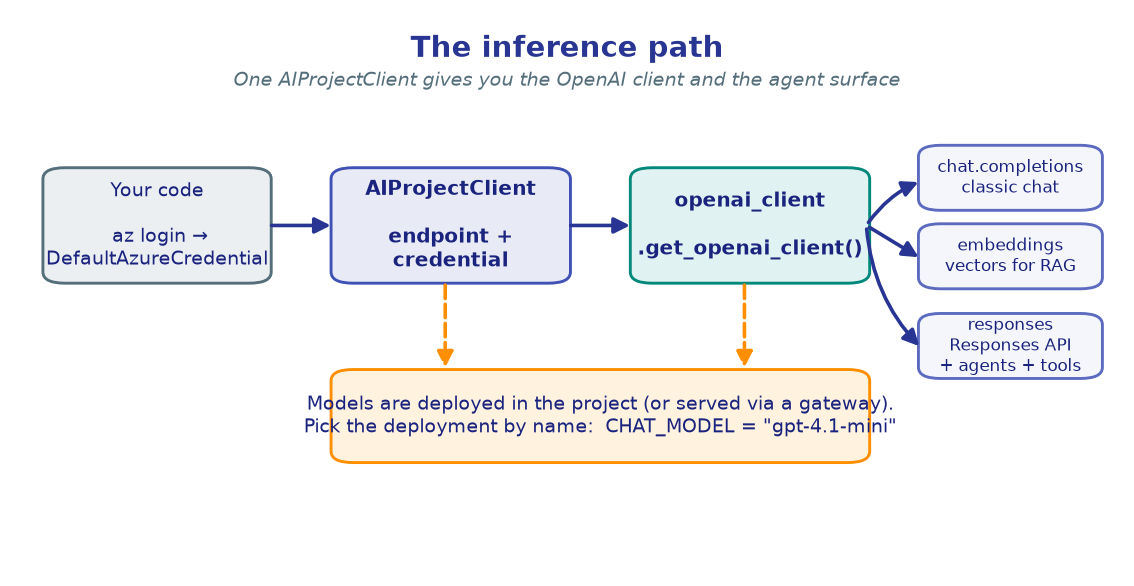
Every lab in this workshop starts the same way: authenticate with
DefaultAzureCredential, build an AIProjectClient from your project endpoint,
and ask it for an OpenAI-compatible client. That one client gives you chat,
embeddings, and the Responses API that later powers agents and tools.
If you haven't set up your project and .env yet, do the
Setup first.
import os
from dotenv import load_dotenv

load_dotenv()  # reads .env from the repo root

PROJECT_ENDPOINT = os.environ["PROJECT_ENDPOINT"]
CHAT_MODEL       = os.environ.get("CHAT_MODEL", "gpt-4.1-mini")
EMBEDDING_MODEL  = os.environ.get("EMBEDDING_MODEL", "text-embedding-3-large")

print("Project :", PROJECT_ENDPOINT)
print("Chat    :", CHAT_MODEL)
print("Embed   :", EMBEDDING_MODEL)
!!! note "Expected output"
Project : https://<account>.services.ai.azure.com/api/projects/<project> Chat : gpt-4.1-mini Embed : text-embedding-3-large
The values come straight from your .env — no secrets in the notebook.
2. Build the client
DefaultAzureCredential uses your az login identity (or a managed identity in
production). AIProjectClient is constructed from the project endpoint + that
credential; get_openai_client() returns the OpenAI-compatible client wired to your
project.
from azure.identity import DefaultAzureCredential
from azure.ai.projects import AIProjectClient

credential     = DefaultAzureCredential()
project_client = AIProjectClient(endpoint=PROJECT_ENDPOINT, credential=credential)
openai_client  = project_client.get_openai_client()

print("project_client : ready")
print("openai_client  : ready")
!!! note "Expected output"
project_client : ready openai_client : ready
A DefaultAzureCredential error here almost always means you need to run
az login; a 403 means your identity lacks the Azure AI Developer role on
the project.
3. Chat completions
The classic chat surface. You pass the deployment name (not a raw model id) and a list of messages.
response = openai_client.chat.completions.create(
    model=CHAT_MODEL,
    messages=[
        {"role": "system", "content": "You are a concise technical assistant."},
        {"role": "user",   "content": "What is catastrophic forgetting in neural networks?"},
    ],
)

print("Model  :", response.model)
print("Tokens :", response.usage.total_tokens)
print()
print(response.choices[0].message.content)
!!! note "Expected output"
Model : gpt-4.1-mini Tokens : 142 Catastrophic forgetting is the tendency of a neural network to abruptly lose knowledge of previously learned tasks when it is trained on a new task...
Token counts and wording will vary; the shape is what matters.
4. Embeddings
Turn text into vectors — the foundation for retrieval. You'll lean on this in M4 · Grounding/RAG. One call embeds a batch of strings.
texts = [
    "Microsoft Foundry centralises model governance behind one platform.",
    "Embeddings turn text into vectors for semantic search.",
    "Each project authenticates with DefaultAzureCredential.",
]

result = openai_client.embeddings.create(model=EMBEDDING_MODEL, input=texts)

print("Model      :", EMBEDDING_MODEL)
print("Dimensions :", len(result.data[0].embedding))
for i, item in enumerate(result.data):
    v = item.embedding
    print(f"[{i}] [{v[0]:.4f}, {v[1]:.4f}, {v[2]:.4f}, ...]  ({len(v)} dims)")
!!! note "Expected output"
Model : text-embedding-3-large Dimensions : 3072 [0] [-0.0123, 0.0456, -0.0789, ...] (3072 dims) [1] [0.0234, -0.0567, 0.0891, ...] (3072 dims) [2] [-0.0345, 0.0678, -0.0912, ...] (3072 dims)
5. Streaming
For responsive UIs, stream tokens as they're generated instead of waiting for the full response.
stream = openai_client.chat.completions.create(
    model=CHAT_MODEL,
    messages=[{"role": "user", "content": "In one sentence, what is Microsoft Foundry?"}],
    stream=True,
)

for chunk in stream:
    if chunk.choices and chunk.choices[0].delta.content:
        print(chunk.choices[0].delta.content, end="", flush=True)
print()
!!! note "Expected output"
The sentence prints incrementally, a few tokens at a time:
Microsoft Foundry is Azure's unified platform-as-a-service for building, governing, and operating enterprise AI models, agents, and apps.
6. The Responses API
The Responses API is the modern, stateful surface that powers agents and
tools in every later lab. The minimal call takes a model and an input; the reply
is in output_text.
response = openai_client.responses.create(
    model=CHAT_MODEL,
    input="Name a planet with rings, in one short sentence.",
)

print(response.output_text)
!!! note "Expected output"
Saturn is a planet famous for its prominent ring system.
!!! tip "Why this matters"
Hold onto this call. In the next lab you'll wrap a model in an agent definition
and invoke it through this exact responses.create(...) surface — just with an
agent_reference attached.
🧪 Your turn
- Swap the model. If you deployed a reasoning model, set
REASONING_MODELin your.env, read it in cell 1, and re-run the Responses API call with it. Note how the answer style changes. - Compare token usage. Ask the chat model a long question vs. a short one and print
response.usage.total_tokensfor each. - Embed and compare. Embed two similar sentences and two different ones, then
compute cosine similarity (
numpy.doton normalized vectors) — similar sentences should score higher.
✅ You made chat, embedding, streaming, and Responses API calls from one client. Next: wrap a model in a versioned agent and invoke it. → M2 · Your First Agent