Architecture & projects
How Foundry is organized — the nouns you'll touch in every lab: account, project, connection, model deployment.
You don't need to deploy any of the enterprise infrastructure to do this workshop — a single project with a couple of model deployments is enough. But understanding the shape helps you read the SDK and scale up later.
1. Accounts and projects
- A Foundry account (the Azure resource) is the top-level container. It holds your model deployments, connections, and one or more projects.
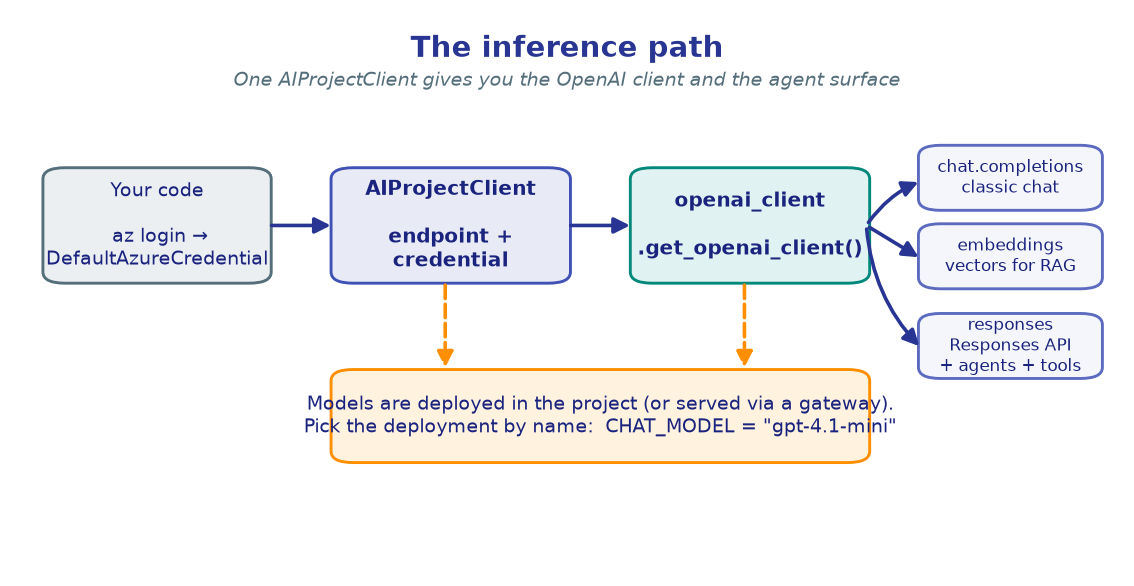
- A project is your working scope — agents, knowledge bases, evaluations, and traces all live in a project. Your code targets a project endpoint:
Everything in the labs is created inside one project. The
AIProjectClient is constructed from
that endpoint and a credential:
from azure.identity import DefaultAzureCredential
from azure.ai.projects import AIProjectClient

project_client = AIProjectClient(
    endpoint=PROJECT_ENDPOINT,
    credential=DefaultAzureCredential(),
)
2. Model deployments
Models from the Discover catalog are deployed into your account, then referenced by deployment name — not by raw model id. In the labs you'll set:
CHAT_MODEL=gpt-4.1-mini          # a fast, capable chat model
EMBEDDING_MODEL=text-embedding-3-large
REASONING_MODEL=o4-mini          # optional, for reasoning labs
RESEARCH_MODEL=o3-deep-research  # optional, for deep research
You call a deployment by passing its name to the client:
openai_client = project_client.get_openai_client()
resp = openai_client.responses.create(model=CHAT_MODEL, input="Hello!")
One client, many surfaces
project_client.get_openai_client() returns an OpenAI-compatible client wired to
your project. From it you reach chat.completions, embeddings, and the
Responses API (responses.create) — the surface that powers agents and tools.
You'll use exactly this pattern in M1.
3. Connections
A connection links your project to another Azure resource — an Azure AI Search service for knowledge bases (M4), Application Insights for tracing (M10), or an AI gateway. Connections are created once (portal or Bicep) and then referenced by name from code, so secrets never live in your notebooks.
4. Single-project vs. multi-project patterns
The upstream enterprise reference deploys a hub-and-spoke topology — a core gateway plus many project "spokes" behind Azure API Management (APIM) — to give each team isolated rate limits and a single governed egress. Two common shapes:
| Pattern | Looks like | When |
|---|---|---|
| 1:1 spoke | one account → one project per team | strong isolation, per-team quotas |
| 1:N multi-project | one account → many projects | shared models, lighter footprint |
This workshop uses neither — just one project, direct, with
DefaultAzureCredential — so you can focus on the SDK and code. The
control plane & governance page explains the
enterprise topology if you need to scale to it.
   Workshop:                         Enterprise (reference):

   your code                          team code ─┐
       │                                          ├─ APIM gateway ─ core account
   AIProjectClient                    team code ─┘        │
       │                                            project spokes (1:1 / 1:N)
   one project ── model deployments         governed by RBAC + Azure Policy
→ Next: Control plane & governance or jump into Setup and start the labs.