M5 · MCP Tools
Goal: connect your agent to an external system through a Model Context Protocol (MCP) server — and watch it call real tools. You'll use: an
MCPToolon aPromptAgentDefinition, the Responses API, and the Foundry tool catalog.
In M4 you grounded an agent in documents. But agents often need to reach live systems — a ticketing backend, a CRM, a project tracker. MCP (Model Context Protocol) is the open standard for exactly that: write your tools once as an MCP server, and any MCP-speaking agent can discover and call them. The agent expresses intent ("what's overdue?"); the server owns the endpoint details.
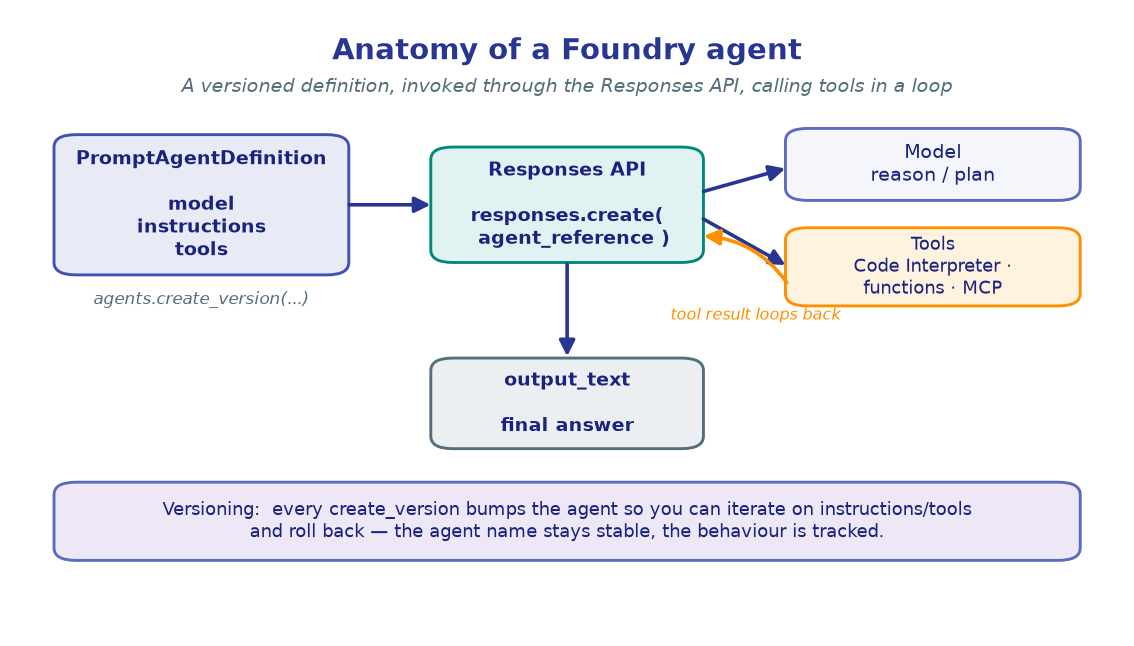
!!! note "The MCP server is assumed to exist"
The reference lab deploys a multi-tool Azure Functions MCP server. Provisioning it is covered step-by-step in the Platform docs — here we just read its URL and label
from .env (MCP_SERVER_URL, MCP_SERVER_LABEL) and wire it to an agent. Foundry's
versioned-agent API is preview; pin azure-ai-projects in pyproject.toml if a
symbol drifts.
1. Configure
Beyond the usual project variables, we read the MCP server endpoint and a short server label. The label namespaces the server's tools inside the agent, so multiple MCP servers can coexist without collisions.
import os
from dotenv import load_dotenv

load_dotenv()  # reads .env from the repo root

PROJECT_ENDPOINT = os.environ["PROJECT_ENDPOINT"]
CHAT_MODEL       = os.environ.get("CHAT_MODEL", "gpt-4.1-mini")

# A remote MCP server, already deployed (see Platform → MCP tool servers). The URL
# typically ends in an SSE endpoint, e.g. https://<host>/runtime/webhooks/mcp/sse?code=<key>
MCP_SERVER_URL   = os.environ["MCP_SERVER_URL"]
MCP_SERVER_LABEL = os.environ.get("MCP_SERVER_LABEL", "project_tracker")

print("Project :", PROJECT_ENDPOINT)
print("Model   :", CHAT_MODEL)
print("MCP url :", MCP_SERVER_URL.split("?")[0], "(+ key)")
print("Label   :", MCP_SERVER_LABEL)
!!! note "Expected output"
Project : https://<account>.services.ai.azure.com/api/projects/<project> Model : gpt-4.1-mini MCP url : https://<host>/runtime/webhooks/mcp/sse (+ key) Label : project_tracker
We print the URL without its secret query string — keep keys out of notebook
output.
2. Build the client
The same bootstrap as every lab: one credential, one project client, one
OpenAI-compatible client. The Responses API on openai_client is how we'll invoke the
agent once its MCP tool is attached.
from azure.identity import DefaultAzureCredential
from azure.ai.projects import AIProjectClient

credential     = DefaultAzureCredential()
project_client = AIProjectClient(endpoint=PROJECT_ENDPOINT, credential=credential)
openai_client  = project_client.get_openai_client()

print("project_client :", "ready")
print("openai_client  :", "ready")
!!! note "Expected output"
project_client : ready openai_client : ready
3. Attach the MCP server to an agent
You give an agent an MCP server by adding one tool definition to its
PromptAgentDefinition. The minimal shape is a dict with type: "mcp", the
server_label, and the server_url. Setting require_approval="never" lets the agent
call tools without pausing for a human OK — fine for trusted, read-mostly servers.
from azure.ai.projects.models import PromptAgentDefinition

instructions = (
    "You are a project-management assistant. Use the project_tracker MCP tools to "
    "read live project data — never guess IDs, owners, or dates. If the tools return "
    "nothing relevant, say so plainly rather than inventing an answer."
)

agent = project_client.agents.create_version(
    agent_name="pm-assistant",
    definition=PromptAgentDefinition(
        model=CHAT_MODEL,
        instructions=instructions,
        tools=[{
            "type": "mcp",
            "server_label": MCP_SERVER_LABEL,
            "server_url": MCP_SERVER_URL,
            "require_approval": "never",
        }],
    ),
    description="PM assistant backed by a remote MCP server.",
)
print(f"Agent '{agent.name}' ready (version {agent.version}).")
!!! note "Expected output"
Agent 'pm-assistant' ready (version 1).
The agent definition now contains the MCP server. On every run, Foundry connects
to the server, fetches its tool list (names, descriptions, parameter schemas), and
hands those to the model — this is tool discovery, and it happens automatically.
4. Ask the agent — and watch it call a tool
Invoke the agent through the Responses API with an agent_reference. Behind the scenes
the model reads the available tools, decides which to call, sends the call to the MCP
server, and folds the result into its answer. The tools it invoked show up as mcp_call
items in response.output.
def ask(question: str) -> tuple[str, list[str]]:
    """Send a question to the agent; return (answer_text, mcp_tools_called)."""
    response = openai_client.responses.create(
        input=[{"role": "user", "content": question}],
        extra_body={"agent_reference": {"name": agent.name, "version": agent.version,
                                        "type": "agent_reference"}},
    )
    if response.status != "completed" or response.error:
        raise RuntimeError(f"Run did not complete: {response.status} {response.error}")
    tools_called = [getattr(i, "name", i.server_label) for i in response.output
                    if getattr(i, "type", None) == "mcp_call"]
    return response.output_text, tools_called

answer, tools = ask("Which tasks are overdue, and who owns each one?")
print("Tools called:", tools)
print(answer)
!!! note "Expected output"
Tools called: ['list_overdue_tasks'] Three tasks are overdue: • Finalize launch copy — owner: Priya Nair (due 2026-06-05) • Vendor security review — owner: Tom Alvarez (due 2026-06-08) • Pricing sign-off — owner: Dana Lee (due 2026-06-10)
The model translated plain English into a list_overdue_tasks call — intent over
endpoint. You never wrote an HTTP request; the MCP server owns that detail.
5. Inspect tool discovery
Curious which tools the server actually offers? They surface as mcp_list_tools
items in the response output the first time the agent connects. Printing them shows the
exact catalog the model chose from — useful when an agent isn't calling the tool you
expected.
response = openai_client.responses.create(
    input="What can you help me with?",
    extra_body={"agent_reference": {"name": agent.name, "version": agent.version,
                                    "type": "agent_reference"}},
)

for item in response.output:
    if getattr(item, "type", None) == "mcp_list_tools":
        print(f"Server '{item.server_label}' exposes {len(item.tools)} tools:")
        for tool in item.tools[:5]:
            print(f"  - {tool['name']}")
        break
!!! note "Expected output"
Server 'project_tracker' exposes 12 tools: - list_projects - get_project - list_overdue_tasks - search_documents - flag_risk
!!! tip "Design tools around intent, not endpoints"
Good MCP tools mirror what a user wants — list_overdue_tasks, search_documents
— not raw CRUD over a database. The model picks tools from their names and
descriptions, so intent-shaped names dramatically improve routing accuracy.
6. Reference the server from the tool catalog
Embedding server_url (with its key) in every agent doesn't scale — rotate the key and
you must edit each agent. The Foundry tool catalog fixes this: register the MCP
server once as a project connection, then agents reference it by connection id.
The credential lives in the connection, not the agent definition.
# A connection named e.g. 'project-tracker-mcp' was registered once (see Platform →
# MCP tool servers). MCP_CONNECTION holds that connection's name.
MCP_CONNECTION = os.environ.get("MCP_CONNECTION", "project-tracker-mcp")
catalog_tool   = project_client.connections.get(MCP_CONNECTION)

agent_v2 = project_client.agents.create_version(
    agent_name="pm-assistant",
    definition=PromptAgentDefinition(
        model=CHAT_MODEL,
        instructions=instructions,
        tools=[{
            "type": "mcp",
            "server_label": MCP_SERVER_LABEL,
            "server_url": catalog_tool.target,          # endpoint from the catalog
            "project_connection_id": catalog_tool.id,   # reference, not a baked-in key
            "require_approval": "never",
        }],
    ),
    description="PM assistant — MCP server referenced via the tool catalog.",
)
print(f"Agent '{agent_v2.name}' now at version {agent_v2.version}.")
print(f"Tool source: catalog connection '{MCP_CONNECTION}' (no key in the definition).")
!!! note "Expected output"
Agent 'pm-assistant' now at version 2. Tool source: catalog connection 'project-tracker-mcp' (no key in the definition).
create_version is idempotent on content: because we changed the tool wiring, a
new version (2) is minted. Rotate the server's key in the connection and every
agent that references it picks up the change — zero agent edits.
!!! warning "When to require approval"
require_approval="never" suits read-mostly, trusted servers. For tools that write
or spend money, set require_approval="always" so each call surfaces for a human to
approve before it runs.
🧪 Your turn
- Ask a multi-step question. Prompt the agent with something that needs two tools
(e.g. "Find overdue tasks on the Aurora project and flag a risk for the latest one")
and print
tools— you should see more than onemcp_call. - Tighten the instructions. Edit the system prompt to require the agent to cite the task id for every item, re-version, and re-run. Notice the format change.
- Flip approval on. Re-create the agent with
require_approval="always"and observe themcp_approval_requestitem that appears inresponse.outputinstead of an immediate tool call.
✅ You connected an agent to a remote MCP server, watched it discover and call tools, and moved the credential into the tool catalog. Next: give your agent memory so it remembers across turns. → M6 · Agent Memory