M13 · Human-in-the-Loop & REST¶
Goal: pause an agent for human approval before a risky tool call — then learn to invoke that same agent over raw REST (single-shot, multi-turn, streaming). You'll use:
FunctionTool, the Responses API approval pattern, andrequestsagainst/openai/v1/responses.
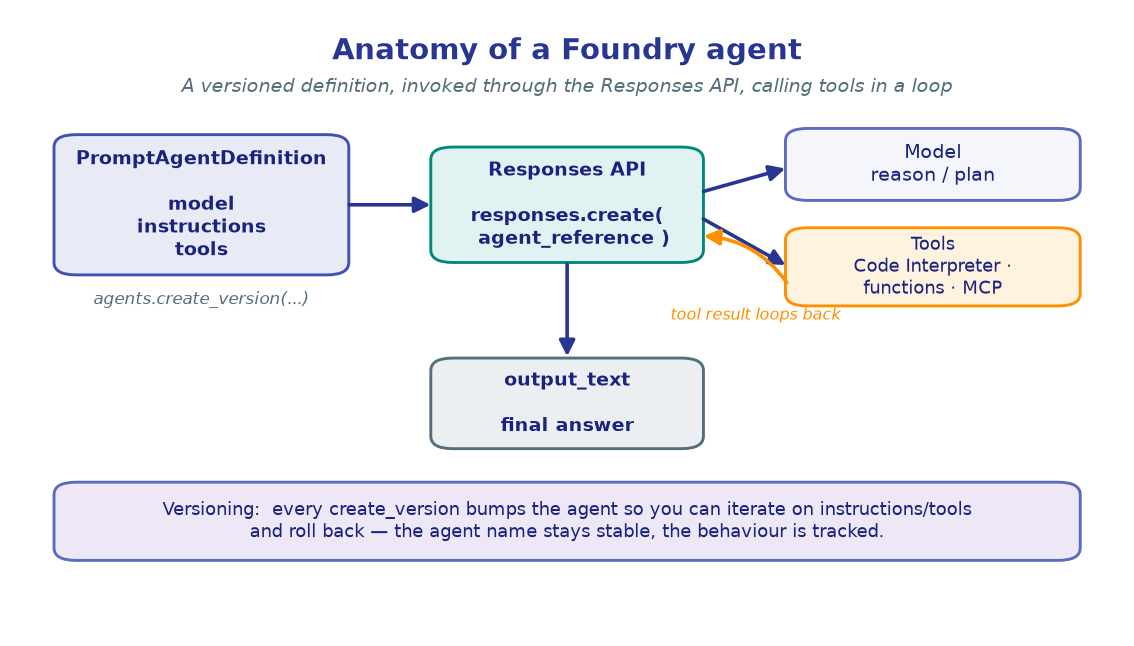
This lab has two themes. First, human-in-the-loop (HITL): when an agent wants to call a tool that's irreversible — moving money, deleting data — you don't want it firing unattended. Foundry's Responses API makes this natural: it returns the tool call as an output item without executing it, so your code can route it to a human first.
Then we drop below the SDK to the raw REST surface. Every responses.create(...) call
you've made is just an HTTPS POST with a bearer token — we'll reproduce it with requests,
chain turns with previous_response_id, and stream tokens over Server-Sent Events.
!!! note "Sections 1–3 are HITL · sections 4–6 are REST"
The two halves share one agent: you build a payments agent with an approval-gated tool
in §1–3, then invoke that exact agent over HTTP in §4–6. The versioned-agent API is
preview — pin azure-ai-projects in pyproject.toml if a symbol drifts.
1. Configure & build the client¶
The canonical bootstrap. We also name the agent up front — we'll reference it by name both through the SDK (here) and over REST (later).
import os, json
from dotenv import load_dotenv
from azure.identity import DefaultAzureCredential
from azure.ai.projects import AIProjectClient

load_dotenv()  # reads .env from the repo root

PROJECT_ENDPOINT = os.environ["PROJECT_ENDPOINT"]
CHAT_MODEL       = os.environ.get("CHAT_MODEL", "gpt-4.1-mini")
AGENT_NAME       = "payments-approval-agent"

credential     = DefaultAzureCredential()
project_client = AIProjectClient(endpoint=PROJECT_ENDPOINT, credential=credential)
openai_client  = project_client.get_openai_client()

print("Project    :", PROJECT_ENDPOINT)
print("Model      :", CHAT_MODEL)
print("Agent name :", AGENT_NAME)
!!! note "Expected output"
Project : https://<account>.services.ai.azure.com/api/projects/<project> Model : gpt-4.1-mini Agent name : payments-approval-agent
2. Define tools — and create the agent¶
Two FunctionTool schemas. get_account_balance is read-only and safe to auto-run;
transfer_funds is irreversible. The APPROVAL_REQUIRED_TOOLS set is the convention
that decides which calls get intercepted — it's our policy, not something the model
enforces. We also keep mock implementations so the demo runs end-to-end.
from azure.ai.projects.models import FunctionTool, PromptAgentDefinition

APPROVAL_REQUIRED_TOOLS = {"transfer_funds"}   # routing convention — intercept these

get_balance_tool = FunctionTool(
    name="get_account_balance",
    description="Get the current balance for an account. Safe to execute automatically.",
    parameters={"type": "object",
                "properties": {"account_id": {"type": "string"}},
                "required": ["account_id"]},
)
transfer_tool = FunctionTool(
    name="transfer_funds",
    description="Transfer funds between accounts. REQUIRES human approval before execution.",
    parameters={"type": "object",
                "properties": {"from_account": {"type": "string"},
                               "to_account":   {"type": "string"},
                               "amount":       {"type": "number"}},
                "required": ["from_account", "to_account", "amount"]},
)

# Mock implementations (no real money moves).
def get_account_balance(account_id):
    return f"Account {account_id} balance: ${ {'ACC-001': 5000.0}.get(account_id, 0.0):,.2f}"
def transfer_funds(from_account, to_account, amount):
    return f"Transferred ${amount:,.2f} from {from_account} to {to_account}."
TOOL_IMPL = {"get_account_balance": lambda a: get_account_balance(**a),
             "transfer_funds":      lambda a: transfer_funds(**a)}

agent = project_client.agents.create_version(
    agent_name=AGENT_NAME,
    definition=PromptAgentDefinition(
        model=CHAT_MODEL,
        instructions=("You are a banking assistant with two tools: get_account_balance and "
                      "transfer_funds. Call the tool directly — do not describe what you will "
                      "do. The system handles human approval for transfer_funds."),
        tools=[get_balance_tool, transfer_tool],
    ),
    description="HITL demo — financial transactions with human approval for transfers.",
)
agent_ref = {"agent_reference": {"name": agent.name, "type": "agent_reference"}}
print(f"Agent '{agent.name}' ready (version {agent.version}).")
print("Approval-required:", APPROVAL_REQUIRED_TOOLS)
!!! note "Expected output"
Agent 'payments-approval-agent' ready (version 1). Approval-required: {'transfer_funds'}
The agent advertises both tools to the model. Whether a call actually executes is a
decision your loop makes next — that's the whole point of HITL.
3. The approval loop — approve & reject¶
Here's the pattern. Call responses.create(), then scan response.output for
function_call items. Auto-execute safe tools; for approval-required tools, ask a human.
Submit every result back as a function_call_output via previous_response_id and loop
until no tool calls remain. We pass the human decision as an approve callback so the
cell stays runnable — in production that callback is a UI prompt, webhook, or queue.
def run_with_hitl(user_message: str, approve) -> str:
    """Run the agent, routing approval-required tool calls through `approve(name, args)`."""
    response = openai_client.responses.create(
        input=[{"role": "user", "content": user_message}], extra_body=agent_ref)

    while True:
        calls = [i for i in response.output if i.type == "function_call"]
        if not calls:
            break                                   # no tool calls → final answer ready

        outputs = []
        for call in calls:
            args = json.loads(call.arguments)
            if call.name in APPROVAL_REQUIRED_TOOLS:
                if approve(call.name, args):         # ← human decision point
                    result = TOOL_IMPL[call.name](args)
                    print(f"[APPROVED] {call.name}({args}) -> {result}")
                else:
                    result = f"Action '{call.name}' was rejected by the operator."
                    print(f"[REJECTED] {call.name} will not execute")
            else:
                result = TOOL_IMPL[call.name](args)  # auto-execute safe tools
                print(f"[AUTO] {call.name}({args}) -> {result}")
            outputs.append({"type": "function_call_output",
                            "call_id": call.call_id, "output": result})

        response = openai_client.responses.create(    # submit results, continue
            input=outputs, previous_response_id=response.id, extra_body=agent_ref)
    return response.output_text

print(">>> APPROVE path")
print(run_with_hitl("Transfer $500 from ACC-001 to ACC-002.", approve=lambda n, a: True))
print("\n>>> REJECT path")
print(run_with_hitl("Transfer $9000 from ACC-001 to ACC-002.", approve=lambda n, a: False))
!!! note "Expected output" ``` >>> APPROVE path [APPROVED] transfer_funds({'from_account': 'ACC-001', 'to_account': 'ACC-002', 'amount': 500}) -> Transferred $500.00 from ACC-001 to ACC-002. The transfer of $500.00 from ACC-001 to ACC-002 is complete.
>>> REJECT path
[REJECTED] transfer_funds will not execute
I wasn't able to complete that transfer — it was rejected by the operator.
```
On approve, the tool runs and the agent confirms; on reject, the rejection string is
fed back as the tool result, so the agent gracefully reports the decline.
!!! tip "Where the human really lives"
Swap the approve callback for whatever fits your app — a blocking
input("Approve? (y/n): ") in a CLI, a Teams Adaptive Card, or an async approval queue.
The Responses API holds the run open via previous_response_id; nothing executes until
you submit the function_call_output.
4. Drop to raw REST — single-shot¶
Same agent, no SDK. Every responses.create(...) is an HTTPS POST to
{endpoint}/openai/v1/responses with a bearer token for the https://ai.azure.com/.default
audience — the exact scope the SDK uses internally. The body is just the input plus the
agent_reference (as a top-level key over the wire, where the SDK put it in extra_body).
import requests

responses_url = f"{PROJECT_ENDPOINT.rstrip('/')}/openai/v1/responses"
access_token  = credential.get_token("https://ai.azure.com/.default").token
headers = {"Authorization": f"Bearer {access_token}", "Content-Type": "application/json"}

body = {
    "input": [{"role": "user", "content": "What is my balance for account ACC-001?"}],
    "agent_reference": {"name": AGENT_NAME, "type": "agent_reference"},
}

def output_text(result: dict) -> str:
    """Aggregate visible text from a raw Responses payload.

    The wire JSON has NO top-level `output_text` key — that's a convenience the SDK's typed
    Response synthesises. Over REST we concatenate the output_text parts ourselves.
    """
    return "".join(part["text"]
                   for item in result.get("output", []) if item.get("type") == "message"
                   for part in item.get("content", []) if part.get("type") == "output_text")

resp = requests.post(responses_url, headers=headers, json=body, timeout=60)
resp.raise_for_status()
result = resp.json()
print("HTTP   :", resp.status_code)
print("Resp id:", result["id"])
print("Status :", result["status"])
print("Output :", output_text(result))
!!! note "Expected output"
HTTP : 200 Resp id: resp_01J8X... Status : completed Output : Account ACC-001 has a balance of $5,000.00.
agent_reference.name resolves to the agent's latest version; add
"version": "1" to pin one. The agent auto-ran the read-only get_account_balance
tool server-side — REST callers see only the final text.
5. Multi-turn over REST — previous_response_id¶
To continue a conversation you don't resend history. Capture the first response's id
and pass it as previous_response_id on the next POST — the service rehydrates the prior
state server-side. Same field, same semantics as the SDK; here it's just another JSON key.
turn1 = requests.post(responses_url, headers=headers, json={
    "input": [{"role": "user", "content": "Invent a one-line story about an astronaut named Mira."}],
    "agent_reference": {"name": AGENT_NAME, "type": "agent_reference"},
}, timeout=60).json()
print("Turn 1:", output_text(turn1))

turn2 = requests.post(responses_url, headers=headers, json={
    "input": [{"role": "user", "content": "Now tell me what happens next, in one line."}],
    "previous_response_id": turn1["id"],          # ← the whole continuation primitive
    "agent_reference": {"name": AGENT_NAME, "type": "agent_reference"},
}, timeout=60).json()
print("Turn 2:", output_text(turn2))
!!! note "Expected output"
Turn 1: Mira drifted past Saturn's rings, humming a lullaby to the dark. Turn 2: A reply hummed back — and Mira realised the dark had been listening.
Turn 2 carried no copy of turn 1's text, yet the agent continued the thread — the server
held the history, keyed by previous_response_id. This is the same primitive the HITL
loop in §3 used to submit function_call_output back into an open run.
6. Streaming over REST — Server-Sent Events¶
For token-by-token UIs, add "stream": true. The response content type flips from
application/json to text/event-stream: a sequence of data: {json} lines. You dispatch
on each event's type and accumulate response.output_text.delta chunks as they land.
import sys

stream_headers = {**headers, "Accept": "text/event-stream"}
stream_body = {
    "input": [{"role": "user", "content": "Tell me a three-sentence story about a lighthouse keeper."}],
    "agent_reference": {"name": AGENT_NAME, "type": "agent_reference"},
    "stream": True,
}

chunks, event_counts = [], {}
with requests.post(responses_url, headers=stream_headers, json=stream_body,
                   stream=True, timeout=120) as r:
    r.raise_for_status()
    print("content-type:", r.headers.get("content-type"), "\n")
    for line in r.iter_lines(decode_unicode=True):
        if not line or not line.startswith("data: "):
            continue
        payload = line[len("data: "):]
        if payload == "[DONE]":
            break
        event = json.loads(payload)
        etype = event.get("type", "<none>")
        event_counts[etype] = event_counts.get(etype, 0) + 1
        if etype == "response.output_text.delta":
            chunks.append(event.get("delta", ""))
            sys.stdout.write(event["delta"]); sys.stdout.flush()

print("\n\nChars   :", sum(len(c) for c in chunks))
print("Events  :", event_counts)
!!! note "Expected output" The story prints incrementally as deltas arrive, then the tallies: ``` content-type: text/event-stream
Every night the keeper lit the lamp against the fog. One storm, a small boat
followed it home. By dawn, the keeper had a new friend and a story worth telling.

Chars   : 218
Events  : {'response.created': 1, 'response.output_item.added': 1,
           'response.output_text.delta': 47, 'response.output_text.done': 1,
           'response.completed': 1}
```
The concatenated `delta` chunks equal the `output_text` you aggregated in §4 — streaming
just hands it to you a few tokens at a time.
!!! warning "Tokens are short-lived"
credential.get_token(...) returns a token that expires (~60–90 min). For a
long-running service, fetch a fresh token per request (or cache until near expiry)
rather than reusing the one captured in §4.
🧪 Your turn¶
- Add a second gated tool. Give the agent a
close_accounttool, add it toAPPROVAL_REQUIRED_TOOLS, and confirmrun_with_hitlintercepts it too. Ask the agent to "close ACC-003" and reject it. - Pin a version over REST. Re-version the agent (edit its instructions, call
create_versionagain), then add"version": "1"to the RESTagent_referenceand prove the older behaviour still answers. - Count streaming events. Re-run §6 with a longer prompt and compare the
response.output_text.deltacount — more text means more deltas, but still oneresponse.completed.
✅ You gated a risky tool behind human approval, then invoked the same agent over raw REST — single-shot, multi-turn, and streaming. Next: shrink a big model into a smaller, cheaper one that mimics it. → M14 · Fine-Tuning & Distillation