M7 · Multi-Agent Orchestration¶
Goal: coordinate a team of specialist agents behind a router — one classifies intent, three answer in their domain. You'll use: the Microsoft Agent Framework —
AzureAIAgentClient,Agent, andWorkflowBuilderswitch-case routing.
A single do-everything agent gets brittle fast: its instructions bloat, its tools collide, and its answers blur across domains. The fix is the router + specialists pattern — a small orchestrator classifies each question and dispatches it to exactly one domain expert (HR, Marketing, or Products). Each specialist stays sharp because it owns one job.
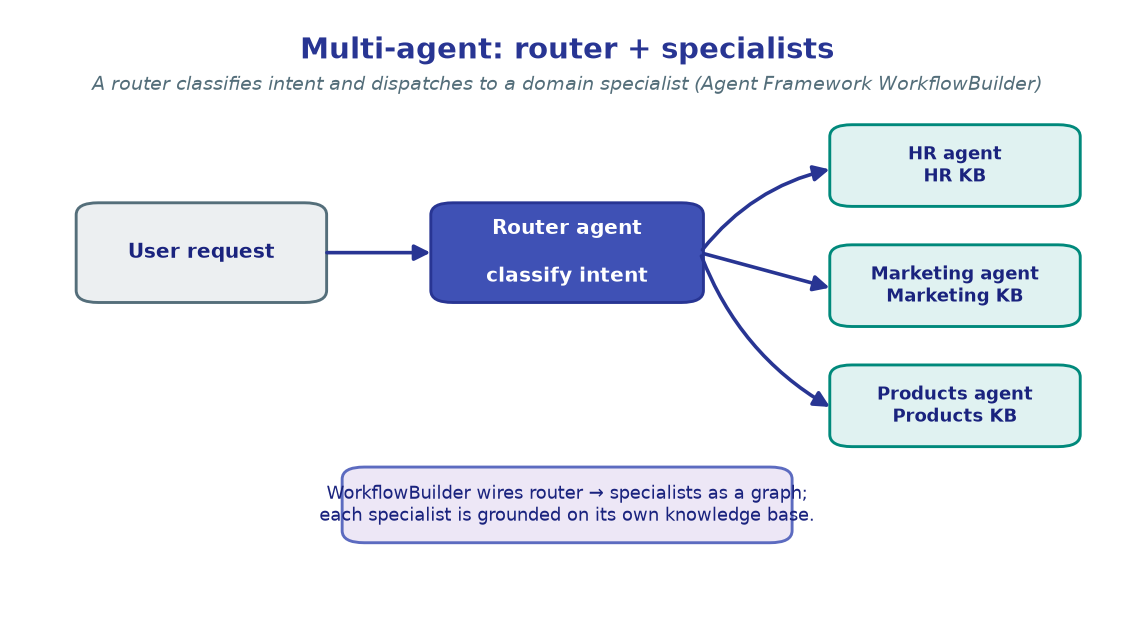
You'll build this with the Microsoft Agent Framework's WorkflowBuilder: a typed graph
where the orchestrator is the start node and a switch-case edge group routes its
classification to one of three specialist nodes.
!!! note "The Agent Framework is pre-1.0"
This lab uses agent-framework-core + agent-framework-azure-ai (pinned to
1.0.0rc6 in pyproject.toml). The reference routes inference through an APIM
connection with FoundryChatClient; our single-project lab uses AzureAIAgentClient
over the project endpoint with plain deployment names. Symbols move between release
candidates — if an import drifts, pin the version and check what the package actually
exports.
1. Configure¶
The usual project variables, plus SEARCH_ENDPOINT — read here only so you can later
ground each specialist on a Foundry IQ knowledge base (see the upgrade note in §3).
The routing pattern itself needs nothing beyond the chat model.
import os
from dotenv import load_dotenv

load_dotenv()  # reads .env from the repo root

PROJECT_ENDPOINT = os.environ["PROJECT_ENDPOINT"]
CHAT_MODEL       = os.environ.get("CHAT_MODEL", "gpt-4.1-mini")
SEARCH_ENDPOINT  = os.environ.get("SEARCH_ENDPOINT", "")   # optional — for §3 grounding

print("Project :", PROJECT_ENDPOINT)
print("Model   :", CHAT_MODEL)
print("Search  :", SEARCH_ENDPOINT or "(not set — specialists run ungrounded)")
!!! note "Expected output"
Project : https://<account>.services.ai.azure.com/api/projects/<project> Model : gpt-4.1-mini Search : (not set — specialists run ungrounded)
Every agent in this lab shares one chat model — the specialisation comes from
instructions and routing, not from different models.
2. Build the Agent Framework client¶
The Agent Framework wraps your Foundry project in an AzureAIAgentClient. We build it
from the same AIProjectClient you've used all workshop — one credential, one project, one
client — then hand that client to every agent we create. Agent is the framework's
unit: a model client + instructions + a name.
from azure.identity import DefaultAzureCredential
from azure.ai.projects import AIProjectClient
from agent_framework import Agent
from agent_framework.azure import AzureAIAgentClient

credential     = DefaultAzureCredential()
project_client = AIProjectClient(endpoint=PROJECT_ENDPOINT, credential=credential)

# One Agent Framework client, wired to the project; reused by every agent below.
chat_client = AzureAIAgentClient(
    project_client=project_client,
    model_deployment_name=CHAT_MODEL,
)

print("project_client :", "ready")
print("chat_client    :", "ready (AzureAIAgentClient)")
!!! note "Expected output"
project_client : ready chat_client : ready (AzureAIAgentClient)
AzureAIAgentClient is the single-project stand-in for the reference's
APIM-routed FoundryChatClient — same role, no gateway prefix on the model name.
3. Define the specialists¶
Three domain experts, each a plain Agent with a focused system prompt. Tight instructions
are what keep a specialist on-topic — the HR agent won't wander into product specs. We give
each a clear name (the router's targets) and description.
def specialist(name: str, domain: str, expertise: str) -> Agent:
    """Build a domain specialist agent with focused instructions."""
    return Agent(
        client=chat_client,
        name=name,
        description=f"Contoso {domain} specialist.",
        instructions=(
            f"You are the Contoso {domain} Specialist, an expert on {expertise}. "
            "Answer accurately and concisely. If a question falls outside your domain, "
            "say so plainly rather than guessing. Respond in plain text."
        ),
    )

hr_agent = specialist(
    "contoso-hr-agent", "HR",
    "policies, benefits, PTO, onboarding, performance reviews, and compensation",
)
marketing_agent = specialist(
    "contoso-marketing-agent", "Marketing",
    "campaigns, brand guidelines, social media, email marketing, SEO, and competitors",
)
products_agent = specialist(
    "contoso-products-agent", "Products",
    "Contoso product specs, features, pricing, and availability",
)

for a in (hr_agent, marketing_agent, products_agent):
    print(f"  {a.name}")
!!! note "Expected output"
contoso-hr-agent contoso-marketing-agent contoso-products-agent
!!! tip "Grounding a specialist (production upgrade)"
In the reference, each specialist is grounded on a Foundry IQ knowledge base so its
answers cite real documents. Attach a context provider (needs the
agent-framework-azure-ai-search extra and a KB provisioned per
M4):
python from agent_framework.azure import AzureAISearchContextProvider kb = AzureAISearchContextProvider( endpoint=SEARCH_ENDPOINT, credential=credential, mode="agentic", knowledge_base_name="contoso-kb-hr", knowledge_base_output_mode="answer_synthesis", ) Agent(client=chat_client, name="contoso-hr-agent", instructions=..., context_providers=[kb])
The routing pattern below is identical whether specialists are grounded or not.
4. Define the orchestrator (router)¶
The orchestrator is itself an Agent — but a tiny one. Its only job is classification:
read the question, emit exactly one label (HR, MARKETING, or PRODUCTS). No prose, no
answer. Constraining the output to a single word makes routing reliable.
orchestrator = Agent(
    client=chat_client,
    name="contoso-orchestrator",
    description="Routes Contoso queries to the HR, Marketing, or Products specialist.",
    instructions=(
        "You are a query routing assistant for Contoso. Classify the user's question into "
        "exactly one domain and respond with ONLY that label:\n"
        "- HR        : policies, benefits, PTO, onboarding, performance, compensation\n"
        "- MARKETING : campaigns, brand, social media, email, SEO, competitors\n"
        "- PRODUCTS  : product specs, features, pricing, availability\n"
        "Respond with exactly one word: HR, MARKETING, or PRODUCTS. No punctuation."
    ),
)

# Sanity-check the classifier on its own before wiring the graph.
probe = await orchestrator.run("How many PTO days do I accrue after 5 years?")
print("Classification:", probe.text.strip())
!!! note "Expected output"
Classification: HR
A focused classifier is cheap and fast — it emits one token of signal, not a full
answer. That single word is what the workflow switches on next.
5. Wire the workflow graph¶
Now the orchestration. WorkflowBuilder builds a typed graph: the orchestrator is the
start node, and an add_switch_case_edge_group routes its output to the first matching
Case — or the Default. The case conditions inspect the classifier's text (which arrives
wrapped as an AgentExecutorResponse, so we read .agent_response.text).
from agent_framework import WorkflowBuilder, WorkflowAgent, Case, Default

def _is_hr(r) -> bool:
    text = str(r.agent_response.text).upper()
    return "HR" in text and "MARKETING" not in text

def _is_marketing(r) -> bool:
    return "MARKETING" in str(r.agent_response.text).upper()

workflow = (
    WorkflowBuilder(
        start_executor=orchestrator,
        output_executors=[hr_agent, marketing_agent, products_agent],
    )
    .add_switch_case_edge_group(
        source=orchestrator,
        cases=[
            Case(condition=_is_hr,        target=hr_agent),
            Case(condition=_is_marketing, target=marketing_agent),
            Default(target=products_agent),       # Products is the catch-all
        ],
    )
    .build()
)

# Wrap the graph so it can be invoked like a single agent.
team = WorkflowAgent(workflow, name="contoso-team")
print("Workflow built — orchestrator → {hr | marketing | products}")
!!! note "Expected output"
Workflow built — orchestrator → {hr | marketing | products}
Default is the safety net: anything the classifier doesn't tag HR or MARKETING falls
through to Products. Order matters — the first matching Case wins.
6. Route real queries through the team¶
Invoke the wrapped workflow exactly like a single agent — await team.run(question) — and
the graph does the rest: classify, dispatch, answer. Send one question per domain and watch
each land on the right specialist.
QUERIES = [
    "What is Contoso's remote work policy?",
    "What are the key elements of the Contoso brand guidelines?",
    "What are the specifications of the ContosoBook Pro laptop?",
]

for q in QUERIES:
    result = await team.run(q)
    print(f"Q: {q}")
    print(f"A: {result.text.strip()[:160]}...")
    print()
!!! note "Expected output" ``` Q: What is Contoso's remote work policy? A: Contoso supports a hybrid model: employees may work remotely up to three days per week with manager approval, with core collaboration hours from 10am–2pm...
Q: What are the key elements of the Contoso brand guidelines?
A: The Contoso brand centres on the primary blue palette, the Segoe typeface, generous
   whitespace, and a confident-but-approachable voice across all channels...

Q: What are the specifications of the ContosoBook Pro laptop?
A: The ContosoBook Pro ships with a 14" Retina display, the Contoso M3 chip, 18 hours
   of battery, 16–32GB RAM, and up to 2TB SSD...
```
Each answer came from a **different** specialist — the orchestrator routed HR →
`contoso-hr-agent`, brand → `contoso-marketing-agent`, specs → `contoso-products-agent`,
with no manual dispatch in your code.
!!! tip "Why a graph beats an if/else"
You could hand-write the routing with an if label == 'HR'. The WorkflowBuilder
graph pays off as the team grows: add a node, add a Case, and you get typed edges,
a visualisable topology, and a single team.run(...) surface — the same primitive
that scales to fan-out, loops, and sub-workflows.
🧪 Your turn¶
- Add a fourth specialist. Create a
contoso-it-agent(helpdesk / device support), add anITlabel to the orchestrator's instructions, and add aCase(condition=_is_it, target=it_agent)— then ask "My laptop won't connect to VPN, who do I contact?" - Probe the Default branch. Ask something genuinely ambiguous ("Tell me about Contoso") and confirm it falls through to the Products catch-all. Then tighten the orchestrator prompt to handle it better.
- Ground a specialist. If you have a Foundry IQ KB from M4, attach an
AzureAISearchContextProviderto the HR agent (see §3) and confirm its answers now cite document titles.
✅ You built a router that classifies intent and a WorkflowBuilder graph that dispatches
to three domain specialists — multi-agent orchestration in ~40 lines. Next: a single agent
that plans and iterates like a research analyst.
→ M8 · Deep Research