M5b · Work IQ (Workplace Intelligence)
Goal: ground an agent in live, permission-aware work context — mail, calendar, Teams, SharePoint, OneDrive — by attaching Microsoft Work IQ as an MCP tool. You'll use: the same
MCPToolwiring from M5, pointed at the Work IQ MCP server.
In M4 you grounded an agent in documents you bring, and in M5 you reached a live system through MCP. Work IQ is where those two ideas meet: it's a workplace intelligence layer that turns the signals already flowing through Microsoft 365 and connected business systems into agent-ready intelligence — and exposes them over the same MCP protocol you already know.
The crucial difference from a generic MCP server is permission awareness: Work IQ returns only what the calling user is allowed to see, so an agent grounded in it can't leak a document or a calendar the user couldn't open themselves. Security and governance are by design.
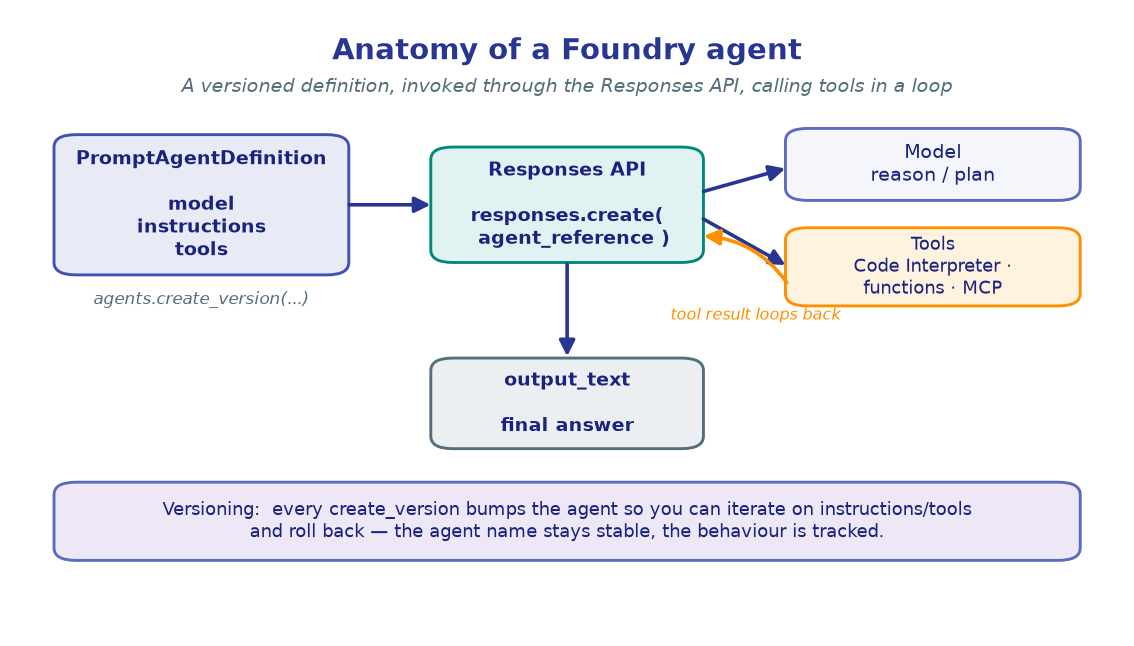
!!! note "Where Work IQ sits relative to Foundry IQ" Foundry IQ (M4) grounds an agent in a knowledge base you build (Azure AI Search). Work IQ grounds it in the user's live work — no corpus to ingest, and results are scoped to that user's permissions at query time. They compose: a grounded specialist can cite both your indexed docs and the requester's real mail/calendar/Teams context.
The four pillars
Work IQ organizes workplace intelligence into four components. You'll mostly touch the last two from an agent, but it helps to see the whole shape:
| Pillar | What it is |
|---|---|
| Chat | A grounded conversational surface over your work context. |
| Context | The semantic layer that continuously turns M365 + business-system signals into agent-ready knowledge. |
| Tools | Permission-aware actions and retrievals an agent can call — surfaced over REST, A2A, and MCP. |
| Workspaces | Scoped collections that bound what an agent can reason over. |
This lab connects a Foundry agent to the Tools pillar over MCP. We note A2A and REST at the end — Work IQ speaks all three, which is how agents discover it and invoke its tools.
1. Configure
Beyond the usual project variables, we read the Work IQ MCP endpoint and a short server label (it namespaces Work IQ's tools inside the agent, exactly like M5). The Work IQ server is provided by the Work IQ CLI / your tenant — see the Setup page for tenant admin consent and the EULA step.
import os
from dotenv import load_dotenv

load_dotenv()  # reads .env from the repo root

PROJECT_ENDPOINT = os.environ["PROJECT_ENDPOINT"]
CHAT_MODEL       = os.environ.get("CHAT_MODEL", "gpt-4.1-mini")

# The Work IQ MCP endpoint. The Work IQ CLI runs the server
# (`npx -y @microsoft/workiq mcp`); a cloud-hosted Foundry agent reaches it at a
# tenant endpoint (see the Work IQ admin guide). We keep the URL + key in .env.
WORKIQ_MCP_URL   = os.environ["WORKIQ_MCP_URL"]
WORKIQ_MCP_LABEL = os.environ.get("WORKIQ_MCP_LABEL", "work_iq")

print("Project :", PROJECT_ENDPOINT)
print("Model   :", CHAT_MODEL)
print("WorkIQ  :", WORKIQ_MCP_URL.split("?")[0], "(+ key)")
print("Label   :", WORKIQ_MCP_LABEL)
!!! note "Expected output"
Project : https://<account>.services.ai.azure.com/api/projects/<project> Model : gpt-4.1-mini WorkIQ : https://<host>/workiq/mcp (+ key) Label : work_iq
As in M5, we print the URL without its secret query string — keep keys out of
notebook output.
2. Build the client
Identical bootstrap to every lab: one credential, one project client, one
OpenAI-compatible client. The Responses API on openai_client is how we'll invoke the
agent once its Work IQ tool is attached.
from azure.identity import DefaultAzureCredential
from azure.ai.projects import AIProjectClient

credential     = DefaultAzureCredential()
project_client = AIProjectClient(endpoint=PROJECT_ENDPOINT, credential=credential)
openai_client  = project_client.get_openai_client()

print("project_client :", "ready")
print("openai_client  :", "ready")
!!! note "Expected output"
project_client : ready openai_client : ready
3. Attach Work IQ to an agent
This is the M5 move, re-used: give the agent one MCP tool definition pointing at the
Work IQ server. The one change that matters for work data is approval policy. Work IQ
tools are permission-aware retrievals but can also act (e.g. send mail, create events),
so we set require_approval="always" — every tool call surfaces for a human OK before it
runs. (Flip read-only tools to "never" once you trust them.)
from azure.ai.projects.models import PromptAgentDefinition

instructions = (
    "You are a work assistant grounded in Work IQ. Use the work_iq MCP tools to read the "
    "user's real mail, calendar, Teams, and files — never guess names, dates, or contents. "
    "Work IQ already scopes results to the caller's permissions, so treat whatever it "
    "returns as the only context you may use, and cite the source item when you can."
)

agent = project_client.agents.create_version(
    agent_name="work-assistant",
    definition=PromptAgentDefinition(
        model=CHAT_MODEL,
        instructions=instructions,
        tools=[{
            "type": "mcp",
            "server_label": WORKIQ_MCP_LABEL,
            "server_url": WORKIQ_MCP_URL,
            "require_approval": "always",
        }],
    ),
    description="Work-grounded assistant backed by the Work IQ MCP server.",
)
print(f"Agent '{agent.name}' ready (version {agent.version}).")
!!! note "Expected output"
Agent 'work-assistant' ready (version 1).
On every run, Foundry connects to Work IQ, fetches its tool list (names, descriptions,
parameter schemas), and hands those to the model — the same tool discovery you saw
in M5, now over your workplace.
4. Ground the agent in real work context
Ask a question that only the user's live work can answer. The model reads the available
Work IQ tools, picks one, Work IQ resolves it against the caller's permissions, and the
answer is folded back in. Because we required approval, an mcp_approval_request surfaces
first; approve it, then the mcp_call runs.
def ask(question: str) -> tuple[str, list[str]]:
    """Send a question to the agent; return (answer_text, work_iq_tools_called)."""
    response = openai_client.responses.create(
        input=[{"role": "user", "content": question}],
        extra_body={"agent_reference": {"name": agent.name, "version": agent.version,
                                        "type": "agent_reference"}},
    )
    if response.status != "completed" or response.error:
        raise RuntimeError(f"Run did not complete: {response.status} {response.error}")
    tools_called = [getattr(i, "name", i.server_label) for i in response.output
                    if getattr(i, "type", None) == "mcp_call"]
    return response.output_text, tools_called

answer, tools = ask("What meetings do I have tomorrow, and which have unread email threads?")
print("Tools called:", tools)
print(answer)
!!! note "Expected output"
Tools called: ['search_calendar', 'search_mail'] You have two meetings tomorrow: • 09:30 Launch sync (3 attendees) — 2 unread threads from Priya about the demo script • 14:00 Vendor review — no unread threads
The model translated plain English into Work IQ calls — intent over endpoint, just
like M5 — but the data is the user's actual calendar and mailbox, returned only because
this user is allowed to see it.
5. Inspect Work IQ's tools
Curious which tools Work IQ offers? As in M5 they surface as mcp_list_tools items the
first time the agent connects. Printing them shows the exact catalog the model chose
from — handy when an agent isn't reaching for the work signal you expected.
response = openai_client.responses.create(
    input="What kinds of work context can you look up for me?",
    extra_body={"agent_reference": {"name": agent.name, "version": agent.version,
                                    "type": "agent_reference"}},
)

for item in response.output:
    if getattr(item, "type", None) == "mcp_list_tools":
        print(f"Server '{item.server_label}' exposes {len(item.tools)} tools:")
        for tool in item.tools[:5]:
            print(f"  - {tool['name']}")
        break
!!! note "Expected output"
Server 'work_iq' exposes 9 tools: - search_mail - search_calendar - search_teams_messages - search_files - get_person
!!! tip "Permission awareness is the feature" Every one of these tools resolves as the calling user. You don't filter results for security — Work IQ does, at the source. That's what makes grounding an agent in live work data safe enough for the enterprise.
6. (Optional) A2A and REST
MCP is one of three protocols Work IQ speaks. The other two matter as your system grows:
- A2A (Agent-to-Agent) — Work IQ publishes an agent card so other agents can discover it and delegate work-grounded tasks to it. This is the natural bridge to M7 · Multi-Agent Orchestration: a router can hand "what's on my plate this week?" to a Work IQ specialist.
- REST — a plain HTTP surface for apps and scripts that aren't agents at all.
You don't need to wire these to finish the lab — just know that the same permission-aware intelligence is reachable three ways, which is how Work IQ slots into existing systems.
🧪 Your turn
- Cross-signal question. Ask something that needs two work signals at once (e.g.
"Summarize the SharePoint doc Dana shared in Teams yesterday" combines files + Teams)
and print
tools— you should see more than onemcp_call. - Tighten governance. Re-version the agent with
require_approval="always"kept for write-style tools but"never"for pure reads (if your server distinguishes them), and note how approvals only appear for actions. - Capstone tie-in. Sketch how a work-grounded specialist would join the multi-agent system in M15 · Capstone: which questions should the router send to Work IQ versus your Foundry IQ knowledge base?
✅ You grounded an agent in live, permission-aware Microsoft 365 work context by attaching Work IQ as an MCP tool — re-using the exact wiring from M5. Next: give your agent memory so it remembers across turns. → M6 · Agent Memory