M3 · Tools & Function Calling
Goal: give an agent tools — first Foundry's hosted Code Interpreter, then a custom function of your own — and watch the model decide when to call them. You'll use:
CodeInterpreterTool,FunctionTool, thetools=[...]field onPromptAgentDefinition, and thefunction_call→function_call_outputloop.
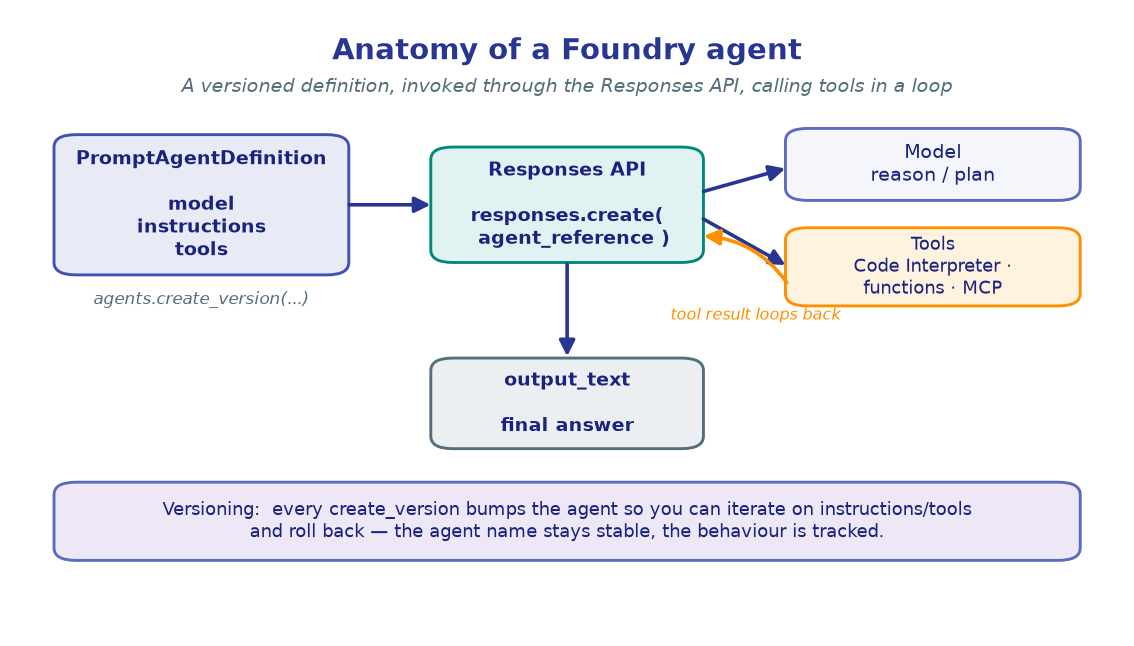
The agent you built in M2 could only talk. Tools let it act — run code, look things up, hit your APIs. Foundry supports two flavours:
- Hosted tools (e.g. Code Interpreter) run inside Foundry. You attach them and the service executes them for you.
- Custom function tools run in your code. The model emits a structured call; you execute it and feed the result back. This is function calling.
!!! note "Tool APIs are evolving"
The agent/tool surface on Foundry is moving fast. The class names below mirror the
current azure-ai-projects SDK; if an import differs in your version, check the
package's models module — the shapes (a tool object in tools=[...], a
function_call item in the response) are stable.
import os, json
from dotenv import load_dotenv
from azure.identity import DefaultAzureCredential
from azure.ai.projects import AIProjectClient

load_dotenv()  # reads .env from the repo root

PROJECT_ENDPOINT = os.environ["PROJECT_ENDPOINT"]
CHAT_MODEL       = os.environ.get("CHAT_MODEL", "gpt-4.1-mini")

credential     = DefaultAzureCredential()
project_client = AIProjectClient(endpoint=PROJECT_ENDPOINT, credential=credential)
openai_client  = project_client.get_openai_client()

print("Chat model :", CHAT_MODEL)
print("clients    : ready")
!!! note "Expected output"
Chat model : gpt-4.1-mini clients : ready
2. Upload data for Code Interpreter
Code Interpreter runs Python in a sandboxed container. To analyse a file, upload it
first with purpose="assistants"; the returned file.id is what you attach to the
agent. Here we synthesize a tiny CSV and upload it.
import io

csv_bytes = io.BytesIO(
    b"sector,quarter,operating_profit\n"
    b"TRANSPORTATION,Q1,120\n"
    b"TRANSPORTATION,Q2,135\n"
    b"TRANSPORTATION,Q3,128\n"
    b"TRANSPORTATION,Q4,150\n"
)
csv_bytes.name = "quarterly_results.csv"   # the API uses this as the filename

uploaded_file = openai_client.files.create(purpose="assistants", file=csv_bytes)
print("Uploaded file id:", uploaded_file.id)
!!! note "Expected output"
Uploaded file id: assistant-7xKQ...e2
The file now lives in your project's Files store, ready for any agent you grant
access to.
3. Create an agent with the Code Interpreter tool
Attach the hosted tool through the tools=[...] field on the agent definition.
AutoCodeInterpreterToolParam provisions a managed container and pre-loads the file
ids you pass — so the agent can read the CSV the moment it runs.
from azure.ai.projects.models import (
    PromptAgentDefinition,
    CodeInterpreterTool,
    AutoCodeInterpreterToolParam,
)

analyst = project_client.agents.create_version(
    agent_name="data-analyst-agent",
    definition=PromptAgentDefinition(
        model=CHAT_MODEL,
        instructions="You are a helpful data analyst. Use Python to answer questions about uploaded files.",
        tools=[
            CodeInterpreterTool(
                container=AutoCodeInterpreterToolParam(file_ids=[uploaded_file.id])
            )
        ],
    ),
    description="Analyses uploaded CSVs with sandboxed Python.",
)

print("Agent   :", analyst.name)
print("Version :", analyst.version)
!!! note "Expected output"
Agent : data-analyst-agent Version : 1
Same create_version pattern as M2 —
tools are just another field on the definition, so they're versioned with it.
4. Let the agent run code
Ask a question that requires computation. The agent writes Python against the CSV,
runs it in the container, and returns the answer — you never see the code unless you
ask for it. Invocation is the same agent_reference call from M2.
response = openai_client.responses.create(
    input=(
        "From the uploaded CSV, which quarter had the highest operating profit "
        "for the TRANSPORTATION sector, and what was the full-year total?"
    ),
    extra_body={"agent_reference": {"name": analyst.name, "type": "agent_reference"}},
)

print(response.output_text)
!!! note "Expected output"
Q4 had the highest operating profit for TRANSPORTATION at 150. The full-year total across Q1–Q4 was 533.
!!! tip "Hosted = you don't run it"
Code Interpreter executed entirely inside Foundry. Each conversation gets its own
sandbox session (idle-timeout ~30 min). Charts and files it produces come back as
container_file_citation annotations you can download — a great next experiment.
5. Define a custom function tool
For your logic, declare a FunctionTool: a name, a description, and a JSON-Schema for
its parameters. This is only a declaration — the model uses it to decide when and
with what arguments to call. The actual implementation stays in your code.
from azure.ai.projects.models import FunctionTool

get_weather_tool = FunctionTool(
    name="get_weather",
    description="Get the current weather for a city. Call this whenever a user asks about weather.",
    parameters={
        "type": "object",
        "properties": {
            "city": {"type": "string", "description": "City name, e.g. 'Zurich'"},
            "unit": {"type": "string", "enum": ["celsius", "fahrenheit"], "description": "Temperature unit"},
        },
        "required": ["city"],
    },
)

# The real implementation — a mock here; in production this calls a weather API.
def get_weather(city: str, unit: str = "celsius") -> str:
    fake = {"Zurich": 18, "Cairo": 34, "Oslo": 7}
    temp = fake.get(city, 21)
    if unit == "fahrenheit":
        temp = round(temp * 9 / 5 + 32)
    return f"{city}: {temp}°{'F' if unit == 'fahrenheit' else 'C'}, partly cloudy."

print("Declared tool:", get_weather_tool.name)
!!! note "Expected output"
Declared tool: get_weather
The schema is the contract the model reads. A crisp description (per tool and
per parameter) is the single biggest lever on whether the model calls it correctly.
6. Wire the function-calling loop
Function tools need a round-trip: the model returns a function_call instead of
text, you execute it, then send the result back as a function_call_output keyed by
call_id. Linking calls with previous_response_id lets the agent continue where it
left off. Loop until no more tool calls remain.
weather_agent = project_client.agents.create_version(
    agent_name="weather-agent",
    definition=PromptAgentDefinition(
        model=CHAT_MODEL,
        instructions="You are a travel assistant. Use the get_weather tool to answer weather questions; don't guess.",
        tools=[get_weather_tool],
    ),
)
agent_ref = {"agent_reference": {"name": weather_agent.name, "type": "agent_reference"}}

response = openai_client.responses.create(
    input=[{"role": "user", "content": "Should I pack a coat for Oslo? What's it like there now?"}],
    extra_body=agent_ref,
)

while True:
    calls = [item for item in response.output if item.type == "function_call"]
    if not calls:
        break  # no pending tool calls → response holds the final text

    tool_outputs = []
    for call in calls:
        args   = json.loads(call.arguments)
        result = get_weather(**args)               # ← run YOUR function
        print(f"[tool] {call.name}({args}) -> {result}")
        tool_outputs.append({
            "type": "function_call_output",
            "call_id": call.call_id,
            "output": result,
        })

    # Feed results back; previous_response_id continues the same exchange.
    response = openai_client.responses.create(
        input=tool_outputs,
        previous_response_id=response.id,
        extra_body=agent_ref,
    )

print()
print(response.output_text)
!!! note "Expected output" ``` [tool] get_weather({'city': 'Oslo'}) -> Oslo: 7°C, partly cloudy.
Yes — pack a coat. It's about 7°C and partly cloudy in Oslo right now, so a warm
layer will be welcome.
```
The model chose to call `get_weather`, you executed it locally, and the agent wove
the real result into a natural answer.
!!! warning "Validate tool arguments" The model proposes the arguments — treat them like any untrusted input. Validate and authorize before doing anything irreversible. The same loop shape extends to a human-in-the-loop gate: intercept sensitive calls, get approval, then run them.
🧪 Your turn
- Add a second function tool. Declare
convert_currency(amount, from, to), attach it alongsideget_weather, and ask a question that forces both calls in one turn. The loop already handles multiplefunction_callitems per response. - Make Code Interpreter draw. Re-run section 4 asking for a bar chart PNG, then
pull the
container_file_citationannotation offresponse.output[-1]and download the bytes withopenai_client.containers.files.content.retrieve(...). - Starve the model. Remove
get_weatherfrom thetoolslist but keep the weather question — watch it either refuse or hedge, proving the tool (not the model) supplied the facts.
✅ Your agent can now run hosted code and call your own functions. Next: ground it in your knowledge so its answers are backed by real sources. → M4 · Grounding / RAG (Foundry IQ)