What is Microsoft Foundry?
Read this first. It frames why the platform exists before you start writing code in the labs.
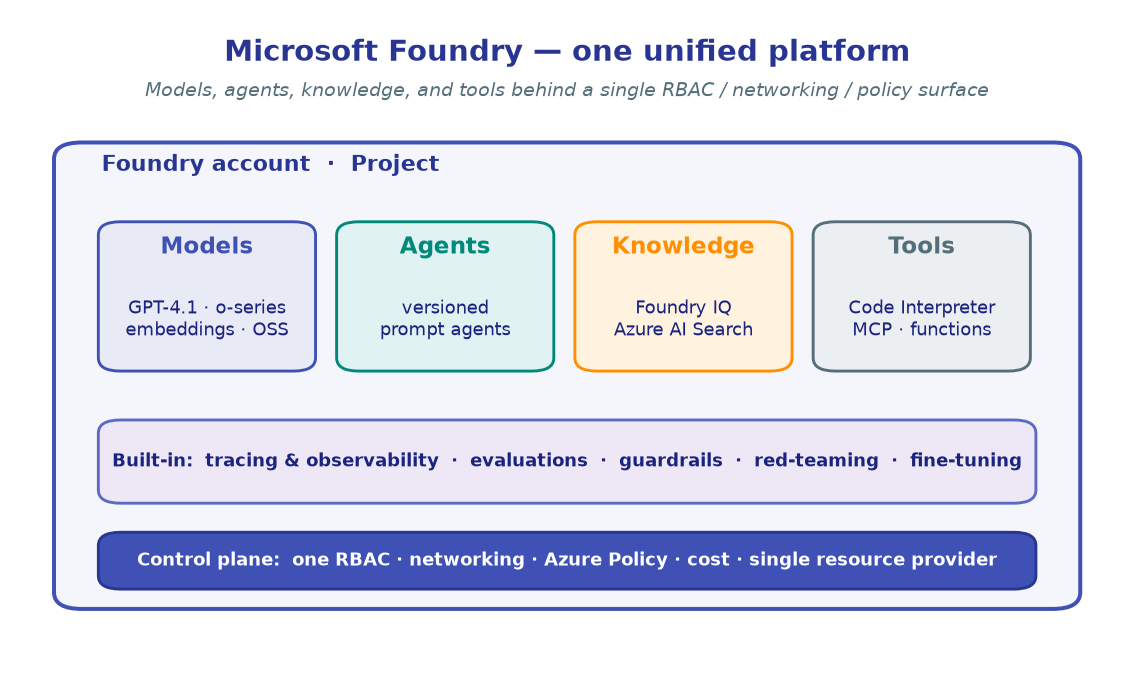
Microsoft Foundry (Azure AI Foundry) is a unified Azure platform-as-a-service for enterprise AI — it brings models, agents, knowledge, and tools under a single management surface, with tracing, evaluation, guardrails, and fine-tuning built in.
Instead of stitching together separate services for inference, retrieval, agent orchestration, and monitoring, Foundry unifies them under one Azure resource provider namespace with a single RBAC / networking / policy surface.
Why a unified platform
Building production AI used to mean assembling a zoo of services — one for model hosting, another for vector search, a third for tracing, plus bespoke glue for agents and guardrails. Each had its own auth, its own SKUs, its own portal.
Foundry collapses that into one platform:
| Capability | What you get | Workshop module |
|---|---|---|
| Models | GPT-4.1, o-series reasoning, embeddings, OSS models, deployed in your project | M1 · First inference |
| Agents | Versioned prompt agents invoked via the Responses API | M2 · Your first agent |
| Tools | Code Interpreter, custom functions, an MCP tool catalog (1,400+ tools) | M3 · Tools, M5 · MCP |
| Knowledge | Foundry IQ knowledge bases over Azure AI Search, with citations | M4 · Grounding/RAG |
| Memory | Cross-turn context that adapts to the user | M6 · Agent memory |
| Evaluation | Quality, agent-specific, and custom evaluators | M9 · Evaluation |
| Observability | OpenTelemetry tracing → Application Insights | M10 · Observability |
| Safety | Prompt Shields, PII detection, blocklists, red-teaming | M11 · Guardrails, M12 · Red teaming |
Everything below those capabilities — RBAC, networking, Azure Policy, cost management — is shared, so governance is set once and applies everywhere.
The two portals
Foundry ships two web portals; know which one you're in:
- Microsoft Foundry (new) — the streamlined experience for building and operating multi-agent applications. Only Foundry projects are visible here. This is where most of this workshop's portal references point.
- Microsoft Foundry (classic) — use when you work across multiple resource types: Azure OpenAI resources, hub-based projects, and older project shapes.
Three areas of the new portal
- Home — project switcher and your resource boundaries at a glance.
- Discover — a "Netflix-style" catalog of models and agents across providers (Azure OpenAI, OSS, partner models). Browse, compare, and deploy.
- Build — the developer control plane: create projects, deploy and test models in playgrounds, define agents and workflows, and launch fine-tunes.
You'll mostly live in code
This is a coding workshop. The portal is where you create a project and deploy a model (a few clicks, covered in Setup); everything after that happens through the SDK in the lab notebooks.
What makes it "enterprise-ready"
- One RBAC surface — grant access to a project, not to a dozen scattered resources.
- Networking & Azure Policy — private endpoints and policy guardrails apply across models and agents uniformly.
- Built-in observability & evaluation — measure quality before you ship and trace behavior after, without bolting on extra infrastructure.
- Open protocols — first-class MCP and A2A support with full auth, plus an AI gateway integration.
- Fleet management — register agents (even from other clouds), get health alerts, and manage 100% of your AI assets in one Operate view.
Where this fits
The rest of the Platform section explains how projects and the control plane are organized:
- Architecture & projects — accounts, projects, connections, and model deployments.
- Control plane & governance — provisioning, regions, cost, RBAC, gateways, and policy.
Then the Labs put the platform through its paces, end to end.
→ Next: Architecture & projects
Acknowledgement
Distilled from the awesome-foundry-nextgen enterprise lab series (areas 00–03), simplified for a single-project coding workshop.