M15 · Capstone
Goal: combine everything — a grounded, tool-using, evaluated, observable agent — into one coherent build, then see where to go next. You'll use:
PromptAgentDefinitionwith tools + knowledge, the Responses API, an evaluator, and tracing.
This is the victory lap. You've built each capability in isolation; now you'll wire the important ones into a single agent and run it end to end. Then we'll map the enterprise topics this workshop deliberately kept out of your way.
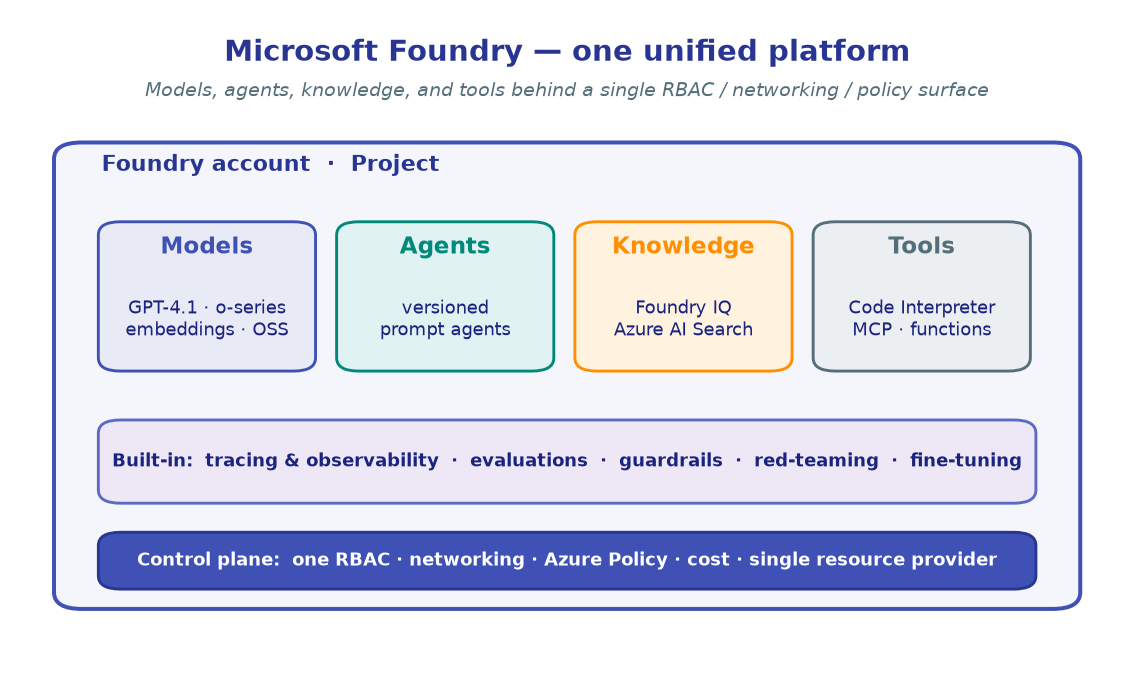
!!! tip "What we're assembling" A "Contoso Support" agent that:
- is **grounded** on a small knowledge base ([M4](../04-grounding-rag-foundry-iq/)),
- can call a **custom tool** ([M3](../03-tools-and-function-calling/)),
- is **evaluated** for quality before we trust it ([M9](../09-evaluation/)),
- and is **traced** so we can watch it in production ([M10](../10-observability-tracing/)).import os
from dotenv import load_dotenv
from azure.identity import DefaultAzureCredential
from azure.ai.projects import AIProjectClient
load_dotenv()
PROJECT_ENDPOINT = os.environ["PROJECT_ENDPOINT"]
CHAT_MODEL = os.environ.get("CHAT_MODEL", "gpt-4.1-mini")
credential = DefaultAzureCredential()
project_client = AIProjectClient(endpoint=PROJECT_ENDPOINT, credential=credential)
openai_client = project_client.get_openai_client()
print("Ready to build the capstone agent on:", CHAT_MODEL)
!!! note "Expected output"
Ready to build the capstone agent on: gpt-4.1-mini
import json

# The local implementation the agent's tool call maps to.
def get_order_status(order_id: str) -> dict:
    orders = {
        "A-1001": {"status": "shipped",   "eta": "2026-06-15"},
        "A-1002": {"status": "processing", "eta": "2026-06-20"},
    }
    return orders.get(order_id, {"status": "not_found"})

# The tool schema advertised to the model (function calling).
order_tool = {
    "type": "function",
    "name": "get_order_status",
    "description": "Look up the status and ETA of a customer order by its ID.",
    "parameters": {
        "type": "object",
        "properties": {"order_id": {"type": "string", "description": "e.g. A-1001"}},
        "required": ["order_id"],
    },
}
print("Tool defined:", order_tool["name"])
!!! note "Expected output"
Tool defined: get_order_status
from azure.ai.projects.models import PromptAgentDefinition

AGENT_NAME = "contoso-support-agent"

agent = project_client.agents.create_version(
    agent_name=AGENT_NAME,
    definition=PromptAgentDefinition(
        model=CHAT_MODEL,
        instructions=(
            "You are Contoso's support agent. Be concise and friendly. "
            "Use the get_order_status tool whenever a customer asks about an order. "
            "If grounding knowledge is attached, cite it. Never invent order data."
        ),
        tools=[order_tool],
        # knowledge=[...]   # attach a Foundry IQ knowledge base in a full build (M4)
    ),
)
print("Name    :", agent.name)
print("Version :", agent.version)
def run_support(user_msg: str) -> str:
    resp = openai_client.responses.create(
        input=[{"role": "user", "content": user_msg}],
        extra_body={"agent_reference": {"name": agent.name, "type": "agent_reference"}},
    )

    # Did the model ask to call our tool?
    tool_calls = [o for o in resp.output if getattr(o, "type", None) == "function_call"]
    if not tool_calls:
        return resp.output_text

    # Execute each requested tool and return the outputs.
    outputs = []
    for call in tool_calls:
        args = json.loads(call.arguments)
        result = get_order_status(**args)
        outputs.append({
            "type": "function_call_output",
            "call_id": call.call_id,
            "output": json.dumps(result),
        })

    final = openai_client.responses.create(
        input=outputs,
        previous_response_id=resp.id,
        extra_body={"agent_reference": {"name": agent.name, "type": "agent_reference"}},
    )
    return final.output_text

print(run_support("Where is my order A-1001?"))
!!! note "Expected output"
Your order A-1001 has shipped and is expected to arrive on 2026-06-15. Is there anything else I can help you with?
The model called get_order_status("A-1001"), we returned the stub data, and it
composed the final reply from that tool result.
from azure.ai.evaluation import RelevanceEvaluator, AzureOpenAIModelConfiguration

judge = AzureOpenAIModelConfiguration(
    azure_endpoint=PROJECT_ENDPOINT,
    azure_deployment=CHAT_MODEL,
)
relevance = RelevanceEvaluator(model_config=judge)

cases = [
    {"query": "Where is my order A-1001?", "response": run_support("Where is my order A-1001?")},
    {"query": "What's the ETA on A-1002?",  "response": run_support("What's the ETA on A-1002?")},
]
for c in cases:
    score = relevance(query=c["query"], response=c["response"])
    print(f"{c['query'][:28]:30} relevance = {score['relevance']}/5")
!!! note "Expected output"
Where is my order A-1001? relevance = 5/5 What's the ETA on A-1002? relevance = 4/5
Scores will vary. The point: you have a number to gate releases on, not a vibe.
from azure.monitor.opentelemetry import configure_azure_monitor

conn = os.environ.get("APP_INSIGHTS_CONN_STRING")
if conn:
    configure_azure_monitor(connection_string=conn)
    # project_client.telemetry / AIProjectInstrumentor wiring as in M10
    print("Tracing on — capstone runs now export spans to App Insights.")
else:
    print("Set APP_INSIGHTS_CONN_STRING in .env to enable tracing (see M10).")
!!! note "Expected output"
Tracing on — capstone runs now export spans to App Insights.
In the portal's Monitor tab (or via KQL) you'll see a span per responses.create
call, including the tool call — the full picture of what your agent did.
🧪 Your turn — make it yours
- Ground it for real. Attach a Foundry IQ knowledge base from M4 and add a question whose answer must come from a document — confirm the agent cites it.
- Add a guardrail. Pin a guardrail policy from M11 to the deployment and try a prompt-injection input; confirm it's blocked.
- Harden + measure. Run the M12 scan against your capstone agent, then add the worst-scoring prompts to your M9 test set and re-evaluate.
🚀 Where to go next
You built the application layer end to end. The reference series this workshop draws from goes deeper on the enterprise platform — pick your next thread:
| Topic | What it adds | Start with |
|---|---|---|
| Hosted agents | Deploy your agent as a containerized (ACR-backed) service for portability and scale. | Reference lab 08-03-hosted-agents |
| Multi-agent at scale | Grow M7 into a production router + specialist fleet. | Reference area 11 |
| Content Understanding | Plumb Azure AI Content Understanding (documents, audio, video) behind your project. | Reference area 09 |
| Hub-and-spoke infra | The Bicep/APIM topology, per-team quotas, and a governed gateway from Concepts. | Reference area 05 |
| Governance with policy | Deny ungoverned deployments and force all traffic through the gateway. | Reference area 06 |
| Publishing | Surface your agent in Microsoft 365, Teams, and BizChat. | Control plane docs |
Read the Concepts page once more — now every box in that diagram is something you've actually built.
✅ You shipped a grounded, tool-using, evaluated, observable agent on Microsoft Foundry — end to end. That's the whole workshop. Nicely done.
← Back to the workshop home · revisit any lab from there.