M4 · Grounding / RAG (Foundry IQ)
Goal: stop your agent hallucinating — ground its answers in your documents, with citations. You'll use:
azure-search-documents(vector + semantic index), a Foundry IQ knowledge base, and an agent wired to it via the Responses API.
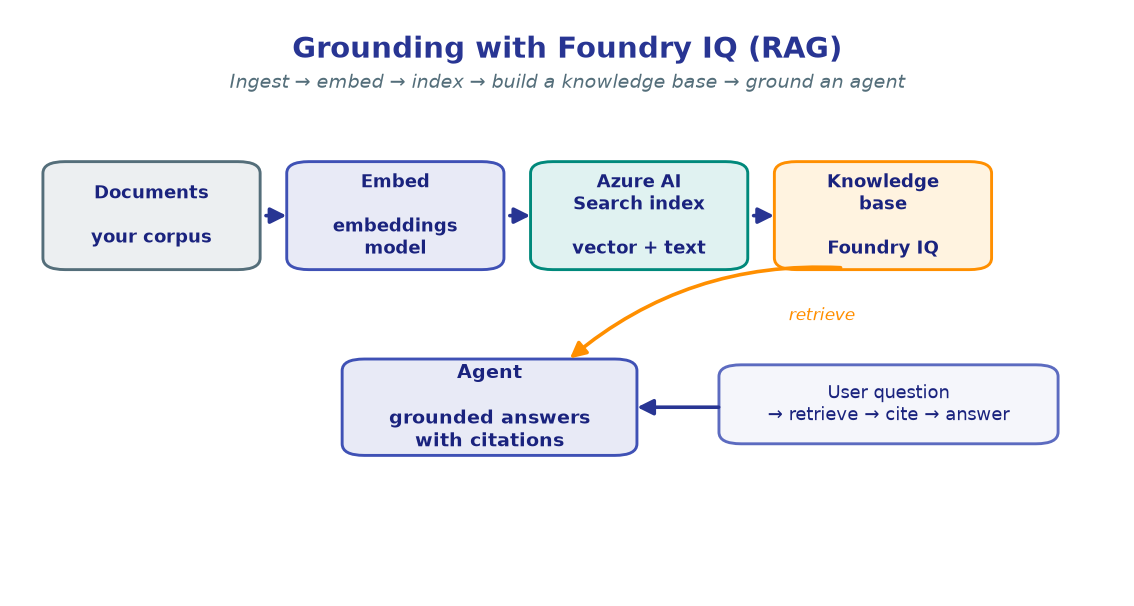
Models are confident even when they're wrong. Grounding fixes that: you embed your documents, index them in Azure AI Search, wrap that index in a Foundry IQ knowledge base (KB), and attach the KB to an agent. Now every answer is drawn from — and cites — your corpus.
The arc of this lab is three steps: embed + index → build a KB → ground an agent.
!!! note "Provisioning is conceptual here"
This lab assumes an Azure AI Search service already exists (its endpoint is in
your .env as SEARCH_ENDPOINT). Standing up Search and wiring its identity to
your Foundry account is covered in the Platform docs — here we stay focused on the
SDK calls. The Foundry IQ KB classes are preview and evolving; pin
azure-search-documents in pyproject.toml if a method name drifts.
1. Configure
We read the same project variables as every lab, plus the Search endpoint and a project connection name that lets your project reach the KB's tool endpoint.
import os
from dotenv import load_dotenv

load_dotenv()  # reads .env from the repo root

PROJECT_ENDPOINT  = os.environ["PROJECT_ENDPOINT"]
CHAT_MODEL        = os.environ.get("CHAT_MODEL", "gpt-4.1-mini")
EMBEDDING_MODEL   = os.environ.get("EMBEDDING_MODEL", "text-embedding-3-large")
SEARCH_ENDPOINT   = os.environ["SEARCH_ENDPOINT"]

# Names we'll create / reference in this lab.
INDEX_NAME        = "foundry-facts"
KS_NAME           = "foundry-facts-ks"      # knowledge source (registers the index)
KB_NAME           = "foundry-facts-kb"      # knowledge base (what the agent queries)
SEARCH_CONNECTION = os.environ.get("SEARCH_CONNECTION", "foundry-iq-search")

# The KB's model-grounded query endpoint needs the account (not project) URL.
ACCOUNT_ENDPOINT  = PROJECT_ENDPOINT.split("/api/projects/")[0]

print("Project :", PROJECT_ENDPOINT)
print("Search  :", SEARCH_ENDPOINT)
print("Index   :", INDEX_NAME)
print("Embed   :", EMBEDDING_MODEL)
!!! note "Expected output"
Project : https://<account>.services.ai.azure.com/api/projects/<project> Search : https://<search>.search.windows.net Index : foundry-facts Embed : text-embedding-3-large
SEARCH_CONNECTION is the name of a RemoteTool project connection that points
at the KB — created once, per the Platform docs.
2. Build the clients
One DefaultAzureCredential authenticates everything — the Foundry project, the
OpenAI-compatible client (for embeddings), and the two Azure AI Search clients.
from azure.identity import DefaultAzureCredential
from azure.ai.projects import AIProjectClient
from azure.search.documents import SearchClient
from azure.search.documents.indexes import SearchIndexClient

credential     = DefaultAzureCredential()
project_client = AIProjectClient(endpoint=PROJECT_ENDPOINT, credential=credential)
openai_client  = project_client.get_openai_client()

index_client   = SearchIndexClient(endpoint=SEARCH_ENDPOINT, credential=credential)
search_client  = SearchClient(endpoint=SEARCH_ENDPOINT, index_name=INDEX_NAME,
                              credential=credential)

print("project_client :", "ready")
print("openai_client  :", "ready")
print("index_client   :", "ready")
print("search_client  :", "ready")
!!! note "Expected output"
project_client : ready openai_client : ready index_client : ready search_client : ready
A 403 from the Search clients means your identity is missing the Search Index
Data Contributor role on the Search service.
3. Create the vector + semantic index
The index is the backbone of retrieval. We define a small schema: a key, two text fields, and a vector field for semantic similarity. The HNSW algorithm powers fast approximate-nearest-neighbour search; a semantic configuration adds Microsoft's re-ranker on top. An integrated vectorizer lets the index embed queries at search time using your project's embedding deployment.
from azure.search.documents.indexes.models import (
    SearchField, SearchFieldDataType, SearchableField, SimpleField,
    SearchIndex, VectorSearch, VectorSearchProfile,
    HnswAlgorithmConfiguration, HnswParameters,
    AzureOpenAIVectorizer, AzureOpenAIVectorizerParameters,
    SemanticConfiguration, SemanticSearch, SemanticField, SemanticPrioritizedFields,
)

VECTOR_DIMS = 3072  # text-embedding-3-large

fields = [
    SimpleField(name="id", type=SearchFieldDataType.String, key=True),
    SearchableField(name="title", type=SearchFieldDataType.String),
    SearchableField(name="content", type=SearchFieldDataType.String,
                    analyzer_name="en.microsoft"),
    SearchField(
        name="contentVector",
        type=SearchFieldDataType.Collection(SearchFieldDataType.Single),
        searchable=True, stored=False,
        vector_search_dimensions=VECTOR_DIMS,
        vector_search_profile_name="facts-hnsw-profile",
    ),
]

vector_search = VectorSearch(
    algorithms=[HnswAlgorithmConfiguration(name="facts-hnsw",
                parameters=HnswParameters(metric="cosine"))],
    profiles=[VectorSearchProfile(name="facts-hnsw-profile",
              algorithm_configuration_name="facts-hnsw",
              vectorizer_name="facts-vectorizer")],
    vectorizers=[AzureOpenAIVectorizer(
        vectorizer_name="facts-vectorizer",
        parameters=AzureOpenAIVectorizerParameters(
            resource_url=ACCOUNT_ENDPOINT,        # single project — no gateway
            deployment_name=EMBEDDING_MODEL,
            model_name=EMBEDDING_MODEL,           # managed identity (no api_key)
        ),
    )],
)

semantic_search = SemanticSearch(configurations=[SemanticConfiguration(
    name="facts-semantic",
    prioritized_fields=SemanticPrioritizedFields(
        title_field=SemanticField(field_name="title"),
        content_fields=[SemanticField(field_name="content")],
    ),
)])

index = SearchIndex(name=INDEX_NAME, fields=fields,
                    vector_search=vector_search, semantic_search=semantic_search)
result = index_client.create_or_update_index(index)
print(f"Index '{result.name}' ready ({len(result.fields)} fields)")
!!! note "Expected output"
Index 'foundry-facts' ready (4 fields)
!!! tip "Why stored=False on the vector?"
Vectors are only used for the ANN search — you never need them back in results.
stored=False skips persisting them in retrievable form and cuts index storage
substantially. The integrated vectorizer uses your managed identity to call the
embedding deployment, so no API key lives in the index.
corpus = [
    {"id": "1", "title": "Foundry projects",
     "content": "A Microsoft Foundry project is your working scope. Agents, knowledge "
                "bases, evaluations, and traces all live inside one project, addressed "
                "by a project endpoint."},
    {"id": "2", "title": "DefaultAzureCredential",
     "content": "Every Foundry lab authenticates with DefaultAzureCredential, which uses "
                "your az login identity locally and a managed identity in production — "
                "no model API keys are stored in code."},
    {"id": "3", "title": "Knowledge bases",
     "content": "Foundry IQ grounds an agent by attaching a knowledge base built over an "
                "Azure AI Search index. The agent retrieves chunks and cites them, so "
                "answers are backed by your own documents."},
    {"id": "4", "title": "The Responses API",
     "content": "The Responses API is the modern stateful surface that powers agents and "
                "tools. You invoke an agent by passing an agent_reference to "
                "responses.create."},
    {"id": "5", "title": "Embeddings",
     "content": "text-embedding-3-large turns text into 3072-dimensional vectors. "
                "Cosine similarity over those vectors is the basis for semantic "
                "retrieval in a search index."},
]

vectors = openai_client.embeddings.create(
    model=EMBEDDING_MODEL,
    input=[doc["content"] for doc in corpus],
)
for doc, item in zip(corpus, vectors.data):
    doc["contentVector"] = item.embedding

search_client.upload_documents(corpus)
print(f"Uploaded {len(corpus)} documents to '{INDEX_NAME}'.")
print(f"Vector dims: {len(corpus[0]['contentVector'])}")
!!! note "Expected output"
Uploaded 5 documents to 'foundry-facts'. Vector dims: 3072
One embeddings.create call batches all five docs. In production you'd batch ~100
at a time with retry/back-off.
5. Build the Foundry IQ knowledge base
A knowledge source registers the index as a named retrieval target; a knowledge
base sits on top and is what an agent actually queries. We use minimal reasoning
effort — pure semantic retrieval with no extra LLM planning pass — which is the
simplest, fastest, lowest-cost option and needs no model config of its own. The agent's
own model does the reasoning and citing.
from azure.search.documents.indexes.models import (
    SearchIndexKnowledgeSource, SearchIndexKnowledgeSourceParameters,
    SearchIndexFieldReference, KnowledgeBase, KnowledgeSourceReference,
    KnowledgeRetrievalOutputMode, KnowledgeRetrievalMinimalReasoningEffort,
)

# Knowledge source — register the index + which fields become citation metadata.
ks = SearchIndexKnowledgeSource(
    name=KS_NAME,
    description="Five short facts about Microsoft Foundry.",
    search_index_parameters=SearchIndexKnowledgeSourceParameters(
        search_index_name=INDEX_NAME,
        semantic_configuration_name="facts-semantic",
        source_data_fields=[
            SearchIndexFieldReference(name="id"),
            SearchIndexFieldReference(name="title"),
        ],
    ),
)
index_client.create_or_update_knowledge_source(ks)

# Knowledge base — minimal effort: no LLM, returns raw cited chunks (EXTRACTIVE_DATA).
kb = KnowledgeBase(
    name=KB_NAME,
    description="Foundry facts KB — minimal effort, direct semantic retrieval.",
    output_mode=KnowledgeRetrievalOutputMode.EXTRACTIVE_DATA,
    knowledge_sources=[KnowledgeSourceReference(name=KS_NAME)],
    retrieval_reasoning_effort=KnowledgeRetrievalMinimalReasoningEffort(),
)
index_client.create_or_update_knowledge_base(kb)
print(f"Knowledge source '{KS_NAME}' and knowledge base '{KB_NAME}' ready.")
!!! note "Expected output"
Knowledge source 'foundry-facts-ks' and knowledge base 'foundry-facts-kb' ready.
!!! tip "minimal vs low effort"
minimal does a direct semantic search — great for single-topic lookups. low
(and higher) add an LLM query-planning pass that decomposes complex questions
into sub-queries before searching. Start minimal; raise the effort only when answer
relevance demands it (it costs a model call per query).
6. Retrieve with citations
Before wiring the KB to an agent, query it directly with
KnowledgeBaseRetrievalClient. This isolates retrieval from agent config and shows
the cited chunks the agent will reason over. A minimal-effort KB takes an intent
(a pre-parsed search directive) rather than a chat message, because it has no LLM to
interpret a conversation.
from azure.search.documents.knowledgebases import KnowledgeBaseRetrievalClient
from azure.search.documents.knowledgebases.models import (
    KnowledgeBaseRetrievalRequest, KnowledgeRetrievalSemanticIntent,
    SearchIndexKnowledgeSourceParams,
)

kb_client = KnowledgeBaseRetrievalClient(
    endpoint=SEARCH_ENDPOINT, knowledge_base_name=KB_NAME, credential=credential)

request = KnowledgeBaseRetrievalRequest(
    intents=[KnowledgeRetrievalSemanticIntent(search="How does Foundry ground an agent?")],
    knowledge_source_params=[SearchIndexKnowledgeSourceParams(
        knowledge_source_name=KS_NAME,
        include_references=True,
        include_reference_source_data=True,
    )],
)

result = kb_client.retrieve(request)
print("Retrieved text:\n", result.response[0].content[0].text[:200], "...\n")
print("Citations:")
for ref in result.references:
    print(f"  - [{ref.id}] {(ref.source_data or {}).get('title', ref.id)}")
!!! note "Expected output" ``` Retrieved text: Foundry IQ grounds an agent by attaching a knowledge base built over an Azure AI Search index. The agent retrieves chunks and cites them, so answers are backed ...
Citations:
  - [3] Knowledge bases
  - [1] Foundry projects
```
The KB returned the most relevant chunk **plus** the document ids/titles to cite.
`EXTRACTIVE_DATA` means the text is your indexed content, verbatim — no rewriting.
7. Ground an agent on the KB
Each KB automatically exposes an MCP endpoint. We attach it to a versioned agent as
an MCPTool, pointed at that endpoint through the project's RemoteTool connection
(SEARCH_CONNECTION). The agent's instructions force it to retrieve before answering and
to cite — so the final answer is grounded and attributable. We then ask it via the
same responses.create surface from M1.
from azure.ai.projects.models import PromptAgentDefinition, MCPTool

MCP_ENDPOINT = (f"{SEARCH_ENDPOINT}/knowledgebases/{KB_NAME}"
                f"/mcp?api-version=2025-11-01-preview")

kb_tool = MCPTool(
    server_label="knowledge_base",
    server_url=MCP_ENDPOINT,
    require_approval="never",
    allowed_tools=["knowledge_base_retrieve"],
    project_connection_id=SEARCH_CONNECTION,
)

agent = project_client.agents.create_version(
    agent_name="foundry-facts-agent",
    definition=PromptAgentDefinition(
        model=CHAT_MODEL,
        instructions=(
            "You answer questions about Microsoft Foundry. Always call the "
            "knowledge_base tool first and answer only from what it returns. "
            "Cite the source title in parentheses after each claim. If the answer "
            "is not in the knowledge base, reply exactly: 'I don't know.'"
        ),
        tools=[kb_tool],
    ),
    description="Grounded Foundry facts agent (Foundry IQ knowledge base).",
)
print(f"Agent 'foundry-facts-agent' ready (version {agent.version}).")

response = openai_client.responses.create(
    input="What grounds an agent's answers, and how is auth handled?",
    extra_body={"agent_reference": {"name": agent.name, "version": agent.version,
                                    "type": "agent_reference"}},
)
tools_used = [i.server_label for i in response.output
              if getattr(i, "type", None) == "mcp_call"]
print("Tools called:", tools_used)
print(response.output_text)
!!! note "Expected output"
Agent 'foundry-facts-agent' ready (version 1). Tools called: ['knowledge_base'] A Foundry IQ knowledge base grounds an agent's answers: it retrieves chunks from an Azure AI Search index and the agent cites them (Knowledge bases). Authentication uses DefaultAzureCredential — your az login identity locally, a managed identity in production, with no API keys in code (DefaultAzureCredential).
Note the (parenthetical citations) — they map straight back to the corpus titles.
Ask something off-corpus (e.g. "who won the 1998 World Cup?") and the agent returns
I don't know. instead of guessing.
🧪 Your turn
- Add a document. Append a sixth fact to
corpus, re-embed and re-upload, then ask the agent a question only that doc can answer. Confirm the new title appears as a citation. - Raise the reasoning effort. Swap
KnowledgeRetrievalMinimalReasoningEffort()forKnowledgeRetrievalLowReasoningEffort()(this KB variant needs a model config — see the note) and ask a compound question. Compare which citations come back. - Tighten grounding. Change the instructions to require two citations per claim, re-version the agent, and re-run. Watch the answer style change.
✅ You embedded a corpus, indexed it, built a Foundry IQ knowledge base, and grounded an agent that cites your data. Next: reach external systems through MCP tools. → M5 · MCP Tools