M2 · Your First Agent
Goal: turn a raw model into a named, versioned agent — give it instructions, create it on Foundry, invoke it, then iterate safely. You'll use:
PromptAgentDefinition,project_client.agents.create_version, the Responses API with anagent_reference.
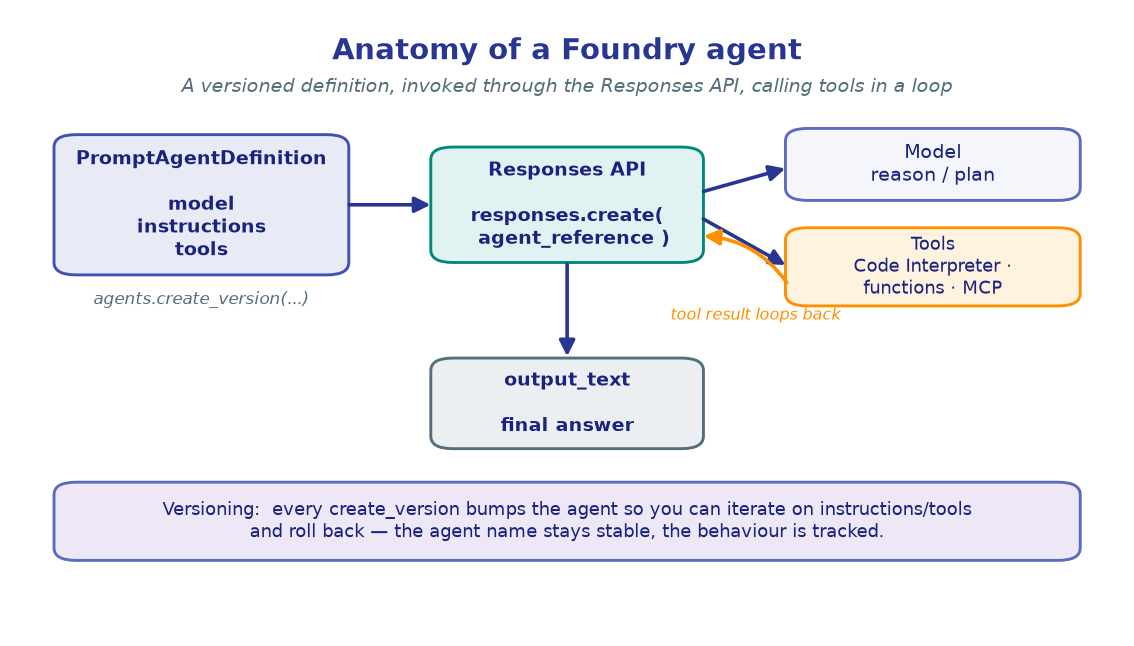
In M1 you called a model directly. An agent wraps that model in a reusable, server-side definition:
agent = model + instructions + tools
The definition lives in your Foundry project under a stable name. Each time you change it, Foundry stores a new version — so you can iterate on a prompt without ever breaking the callers that reference the agent by name.
If your project and .env aren't ready yet, do the Setup first.
import os
from dotenv import load_dotenv

load_dotenv()  # reads .env from the repo root

PROJECT_ENDPOINT = os.environ["PROJECT_ENDPOINT"]
CHAT_MODEL       = os.environ.get("CHAT_MODEL", "gpt-4.1-mini")

# A stable, human-readable name. Re-running these cells versions THIS agent.
AGENT_NAME = "storytelling-agent"

print("Project :", PROJECT_ENDPOINT)
print("Chat    :", CHAT_MODEL)
print("Agent   :", AGENT_NAME)
!!! note "Expected output"
Project : https://<account>.services.ai.azure.com/api/projects/<project> Chat : gpt-4.1-mini Agent : storytelling-agent
The agent name is yours to choose — keep it stable, since versioning keys off it.
2. Build the client
Identical bootstrap to M1: DefaultAzureCredential → AIProjectClient → an
OpenAI-compatible client. We also reach project_client.agents, the surface for
creating and versioning agents.
from azure.identity import DefaultAzureCredential
from azure.ai.projects import AIProjectClient

credential     = DefaultAzureCredential()
project_client = AIProjectClient(endpoint=PROJECT_ENDPOINT, credential=credential)
openai_client  = project_client.get_openai_client()

print("project_client : ready")
print("openai_client  : ready")
!!! note "Expected output"
project_client : ready openai_client : ready
A credential error here usually means you need az login; a 403 means your
identity lacks the Azure AI Developer role on the project.
from azure.ai.projects.models import PromptAgentDefinition

agent = project_client.agents.create_version(
    agent_name=AGENT_NAME,
    definition=PromptAgentDefinition(
        model=CHAT_MODEL,
        instructions=(
            "You are a storytelling agent. "
            "You craft engaging one-line stories based on user prompts and context."
        ),
    ),
)

print("Name    :", agent.name)
print("Version :", agent.version)
!!! note "Expected output"
Name : storytelling-agent Version : 1
!!! tip "create_version is idempotent"
Re-running this exact cell does not spawn version 2 — Foundry compares the
definition to the latest stored version and only bumps the number when something
actually changed. That makes it safe to re-run while you iterate.
4. Invoke the agent
You call the agent through the same responses.create(...) surface from M1 — but
instead of passing model=, you attach an agent_reference in extra_body.
Foundry resolves the name, applies the stored model + instructions, and returns the
reply in output_text.
response = openai_client.responses.create(
    input=[{"role": "user", "content": "Tell me a one-line story about a lighthouse keeper."}],
    extra_body={"agent_reference": {"name": agent.name, "type": "agent_reference"}},
)

print(response.output_text)
!!! note "Expected output"
Every night the keeper lit the lamp for ships that never came — until the night one finally did, carrying the letter he'd stopped waiting for.
Wording varies run to run; what matters is that the model now speaks in the
voice your instructions defined, without you resending the system prompt.
5. Version the agent
This is the payoff. Change the instructions and call create_version again — same
name, new version. Existing callers keep working; you've simply published a new
revision they can pick up. Here we make the agent gloomier.
agent_v2 = project_client.agents.create_version(
    agent_name=AGENT_NAME,                       # same name → new version
    definition=PromptAgentDefinition(
        model=CHAT_MODEL,
        instructions=(
            "You are a storytelling agent with a melancholic, noir voice. "
            "You craft a single haunting sentence based on the user's prompt."
        ),
    ),
)

print("Name    :", agent_v2.name)
print("Version :", agent_v2.version)   # incremented because instructions changed

response = openai_client.responses.create(
    input=[{"role": "user", "content": "Tell me a one-line story about a lighthouse keeper."}],
    extra_body={"agent_reference": {"name": agent_v2.name, "type": "agent_reference"}},
)
print()
print(response.output_text)
!!! note "Expected output" ``` Name : storytelling-agent Version : 2
The lamp still turns, but the keeper stopped counting the years the sea kept
taking from him.
```
!!! warning "Name stays, version moves" The name is the stable contract callers depend on; the version is the audit trail of how the agent evolved. Never rename to iterate — re-version.
🧪 Your turn
- Reshape the voice. Rewrite the instructions in section 5 (e.g. cheerful children's-book narrator) and re-run. Confirm the version increments and the tone flips.
- Prove idempotency. Run the unchanged section 3 cell twice in a row and watch
agent.versionhold steady — then change a single word and watch it bump. - Give it context. Add a second message to
input(asystem-style preface or a prior turn) and see how the agent blends your per-call context with its stored instructions.
✅ You created a named agent, invoked it via agent_reference, and versioned it
safely. Next: give your agent real tools — code execution and your own functions.
→ M3 · Tools & Function Calling